
UIImageView淡出
UIImageView淡出
提问于 2014-08-08 18:08:52
在我的主故事板中,我有一个带有隐藏UIViewController的UIImageView。我在一个线程中读到,为了淡出图像,我可以使用下面的代码。我想知道如何将我创建的UIImageView与IBAction连接起来。
-(IBAction)popupImage
{
    _imageView.hidden = NO;
    _imageView.alpha = 1.0f;
    // Then fades it away after 2 seconds (the cross-fade animation will take 0.5s)
    [UIView animateWithDuration:0.5 delay:2.0 options:0 animations:^{
        // Animate the alpha value of your imageView from 1.0 to 0.0 here
        _imageView.alpha = 0.0f;
    } completion:^(BOOL finished) {
        // Once the animation is completed and the alpha has gone to 0.0, hide the view for good
        _imageView.hidden = YES;
    }];
}我是否创建了一个连接到图像的@property (strong, nonatomic) IBOutlet UIImageView *imageView;?
回答 2
Stack Overflow用户
回答已采纳
发布于 2014-08-08 18:34:46
打开助理编辑
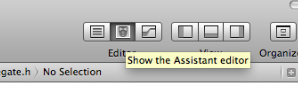
并将ctrl-从UIImageView拖到文件的顶部,以生成一个名为imageView的IBOutlet。可以通过以下方式之一调用(调用)您的方法:
- 如果要在某人单击按钮时淡出图像,请将ctrl-从UIButton拖动到
popupImage方法以生成IBAction。 - 如果希望以编程方式淡出图像,只需在代码中的任何地方执行
[self popupImage],就可以开始淡出(例如,在viewDidLoad中)。在这种情况下,您不需要方法的IBAction部分,只需将其称为- (void)popupImage。
由于您希望从一开始就显示您的图像,所以不应该将其设置为隐藏。
Stack Overflow用户
发布于 2014-08-08 18:31:45
您正在使用故事板,所以控制-拖动UIImageView到您的界面。属性不一定是强的--应该是:@property (weak, nonatomic) IBOutlet UIImageView *imageView。
如果你不知道如何控制-拖动,这个视频可能会有所帮助:4I。快进到2:05。
页面原文内容由Stack Overflow提供。腾讯云小微IT领域专用引擎提供翻译支持
原文链接:
https://stackoverflow.com/questions/25209678
复制相关文章
相似问题
腾讯云开发者

Copyright © 2013 - 2026 Tencent Cloud. All Rights Reserved. 腾讯云 版权所有
深圳市腾讯计算机系统有限公司 ICP备案/许可证号:粤B2-20090059  粤公网安备44030502008569号
腾讯云计算(北京)有限责任公司 京ICP证150476号 | 京ICP备11018762号