
如何在JavaFX中对三角形的前后面进行相同的渲染
我开始使用JavaFX可视化三维非结构化网格,我面临一个渲染问题。
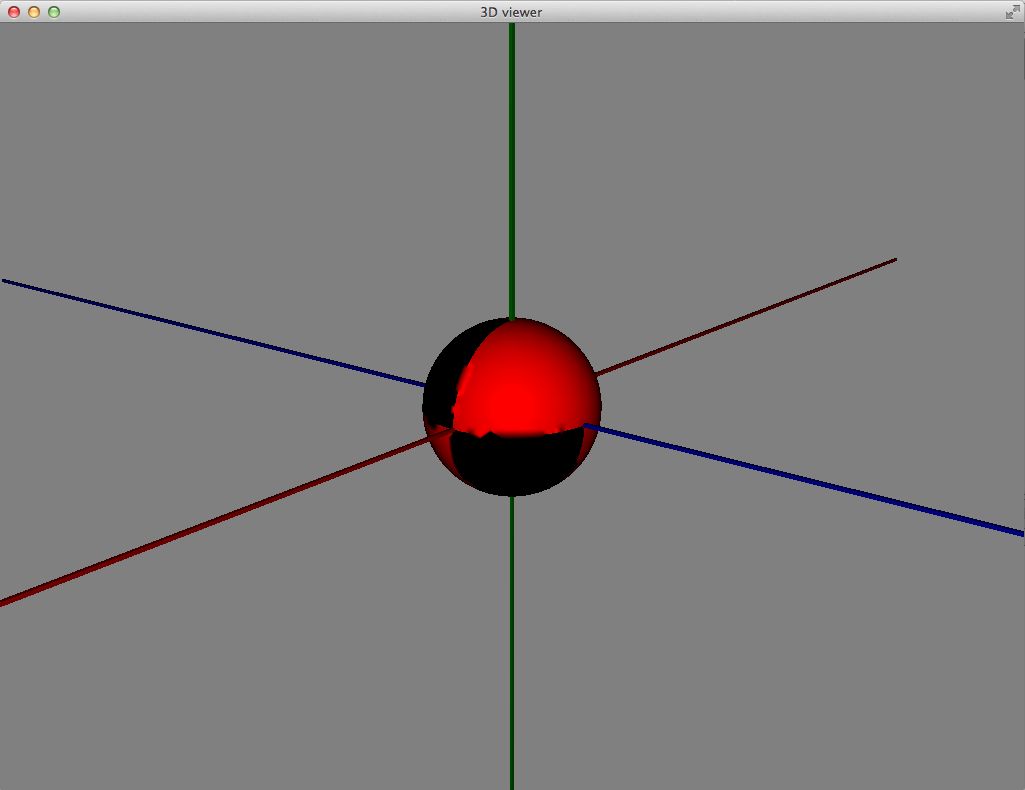
如1所示,JavaFX只呈现三角形的正面,除非使用CullFace.NONE选项。但是后面的脸是黑色的。
由于3D网格是由外部工具(如Gmsh http://geuz.org/gmsh/)生成的,所以我没有脸方向的控制。使用网格的科学软件也不需要定向网格。
因此,我不想重新定位后的网格,只是渲染正面和背面的三角形相同。这在JavaFX 8中是可能的吗?多么?
谢谢你的回答。
值得注意的是:我也在Oracle论坛2上发布了一个类似的问题,但它们似乎非常空洞。如果您中的一些人知道JavaFX社区在哪里是活跃的,那么链接将是有用的。如果我有有用的答案要分享,我当然会更新这两个线程。
亲切的问候
回答 1
Stack Overflow用户
发布于 2014-10-16 03:43:49
解决方案1
你可以通过绘制两组不同人脸方向的网格来解决这个问题。请参阅下面的结果和代码。然而,这使数据量和处理时间翻了一番。
PS:还有一个问题值得一提。目前尚不清楚的是,在当前版本的JavaFX (@2014年8月)中,你是否可以将网格边缘的颜色与人脸不同。这将是必要的,如果你需要使一个平面瓷砖可见单个瓷砖。解决方案是再添加两组网格对象。但这是所需资源的四倍。
另外,我们想要剔除一些不必要的边缘。在下图中,只需要突出显示地板边缘,而不是对角线。
解决方案2
用三维网格对象替换每个网格面,例如,不是有一个矩形的表面,而是创建一个平板。因此,一个打开的盒子对象将由五个板子组成,盒子的内部和外部将具有相同的颜色。与第一个解决方案一样,该解决方案仍然是一个黑客,仍然会产生处理开销。
数字
实际JavaFX渲染与所需渲染的比较(在Matlab中生成):
tower.jpg
部分解决办法:
boxes.png
码
import javafx.scene.Group;
import javafx.scene.paint.Color;
import javafx.scene.paint.PhongMaterial;
import javafx.scene.shape.CullFace;
import javafx.scene.shape.DrawMode;
import javafx.scene.shape.MeshView;
import javafx.scene.shape.TriangleMesh;

/**
// * Draw polygonal 3D box.
// *
// * INPUT
// * - footprint: 2D polygon coordinates;
// *   closed path (i.e. first and last coordinates are identical); ex:
// *   float[] footprint = {
// *       10, -1,
// *       -1, -1,
// *       -1, 5,
// *       10, 5,
// *       10, -1
// *   };
// * - zLevel: z-coordinate of actual floor level: int k; float zLevel = k * HEIGHT - HEIGHT;
// * - HEIGHT: height of the box: private static final float HEIGHT = (float) 50;
// *
// * NOTE: we have to use the mesh method since the straightforward way
// * to construct a rectangle - "rectangle" method - produces blurry edges.
// *
// */
public class DrawPolygonalBox {

// Draw polygonal 3D box.
public static Group draw(float[] footprint, float zLevel, float HEIGHT) {

    Group box = new Group();
    int y = 0;

    // for each footprint coordinate make a rectangle
    int n = footprint.length - 2;

    // one side of the box
    for (int k = 0; k < n; k = k + 2) {

        float[] points = {
            footprint[k], y + zLevel, footprint[k + 1],
            footprint[k + 2], y + zLevel, footprint[k + 3],
            footprint[k + 2], y + zLevel + HEIGHT, footprint[k + 3],
            footprint[k], y + zLevel + HEIGHT, footprint[k + 1]
        };
        float[] texCoords = {
            1, 1,
            1, 0,
            0, 1,
            0, 0
        };
        int[] faces = {
            0, 0, 2, 2, 1, 1,
            0, 0, 3, 3, 2, 2
        };
        int[] faces2 = {
            0, 0, 1, 1, 2, 2,
            0, 0, 2, 2, 3, 3
        };

        TriangleMesh mesh1 = new TriangleMesh();
        mesh1.getPoints().setAll(points);
        mesh1.getTexCoords().setAll(texCoords);
        mesh1.getFaces().setAll(faces);

        TriangleMesh mesh2 = new TriangleMesh();
        mesh2.getPoints().setAll(points);
        mesh2.getTexCoords().setAll(texCoords);
        mesh2.getFaces().setAll(faces2);

        final MeshView rectangle1 = new MeshView(mesh1);
        rectangle1.setMaterial(new PhongMaterial(Color.web("#FF0000",0.25)));
        rectangle1.setCullFace(CullFace.BACK);

        final MeshView rectangle2 = new MeshView(mesh2);
        rectangle2.setMaterial(new PhongMaterial(Color.web("#FF0000",0.25)));
        rectangle2.setCullFace(CullFace.BACK);

        final MeshView wire1 = new MeshView(mesh1);
        wire1.setMaterial(new PhongMaterial(Color.web("#000000",0.5)));
        wire1.setCullFace(CullFace.BACK);
        wire1.setDrawMode(DrawMode.LINE);

        final MeshView wire2 = new MeshView(mesh2);
        wire2.setMaterial(new PhongMaterial(Color.web("#000000",0.5)));
        wire2.setCullFace(CullFace.BACK);
        wire2.setDrawMode(DrawMode.LINE);

        // add to group
        box.getChildren().addAll(rectangle1, wire1, rectangle2, wire2);
    }

    return box;
}
}
https://stackoverflow.com/questions/25190409
复制相似问题
腾讯云开发者

Copyright © 2013 - 2026 Tencent Cloud. All Rights Reserved. 腾讯云 版权所有
深圳市腾讯计算机系统有限公司 ICP备案/许可证号:粤B2-20090059  粤公网安备44030502008569号
腾讯云计算(北京)有限责任公司 京ICP证150476号 | 京ICP备11018762号