
无法与表视图标题中的控件交互
无法与表视图标题中的控件交互
提问于 2014-08-06 21:07:23
我决定在我的应用程序中使用一个表格标题视图来保存一个搜索栏和一个UISegmentedControl。以下是视图控制器的viewDidLoad:
- (void)viewDidLoad
{
    [super viewDidLoad];

    self.searchBar = [[UISearchBar alloc] initWithFrame:CGRectMake(0, 65, 320, 44)];
    [self.searchBar sizeToFit];
    [self.searchBar setUserInteractionEnabled:YES];
    [self setSearchController:[[UISearchDisplayController alloc] initWithSearchBar:self.searchBar contentsController:self]];

    self.mainSegment = [[UISegmentedControl alloc] initWithItems:@[@"YouTube", @"iTunes"]];
    [self.mainSegment setFrame:CGRectMake(8, 109, 305, 29)];
    [self.mainSegment setSelectedIndex:0];
    [self.mainSegment addTarget:self action:@selector(searchTypeChanged:) forControlEvents:UIControlEventValueChanged];
    [self.mainSegment setUserInteractionEnabled:YES];

    UIView* headerView = [[UIView alloc] initWithFrame:CGRectMake(0, 0, 320, 65)];
    [headerView setBackgroundColor:[UIColor clearColor]];
    [headerView addSubview:self.searchBar];
    [headerView addSubview:self.mainSegment];
    [headerView bringSubviewToFront:self.searchBar];
    [headerView bringSubviewToFront:self.mainSegment];
    [headerView setUserInteractionEnabled:YES];

    self.tableView.tableHeaderView = headerView;
    self.tableView.userInteractionEnabled = YES;
}
这产生了很好的效果:
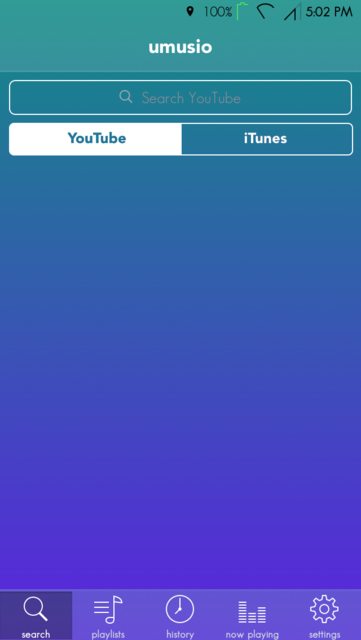
但是,我不能与搜索栏或分段控件交互。如上面所示,我尝试将userInteractionEnabled设置为YES,但问题仍然存在。有什么想法吗?
回答 2
Stack Overflow用户
回答已采纳
发布于 2014-08-06 22:01:00
标题视图的高度为65点。您正在将搜索栏插入Y=65,因此超出了标头rect的范围。将你的搜索栏移动到Y=0,并将你的分段控件移到它下面,它就能正常工作了。
祝你今天愉快:)
Stack Overflow用户
发布于 2014-08-06 21:12:43
USe委托方法来设置headerview.Create并在此方法中返回头视图。
-(UIView *)tableView:(UITableView *)tableView viewForHeaderInSection:(NSInteger)section不要忘记设置表格的标题高度。
- (CGFloat)tableView:(UITableView *)tableView heightForHeaderInSection:(NSInteger)section 以及头文件中的<UITableviewDatasource>,以指示该类实际上拥有该表的数据源方法。
页面原文内容由Stack Overflow提供。腾讯云小微IT领域专用引擎提供翻译支持
原文链接:
https://stackoverflow.com/questions/25170218
复制相关文章
相似问题
腾讯云开发者

Copyright © 2013 - 2026 Tencent Cloud. All Rights Reserved. 腾讯云 版权所有
深圳市腾讯计算机系统有限公司 ICP备案/许可证号:粤B2-20090059  粤公网安备44030502008569号
腾讯云计算(北京)有限责任公司 京ICP证150476号 | 京ICP备11018762号