
容器上缩放的iOS应用程序图像
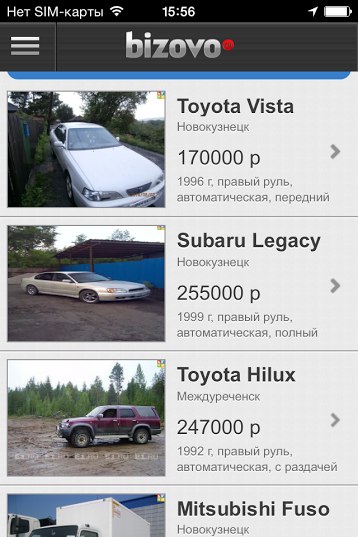
如何在我的IOS应用程序中按高度和宽度在容器中从站点加载照片?在我的应用程序中,有些照片被拉伸(第二张从一开始),如何修复它?
回答 3
Stack Overflow用户
发布于 2014-08-04 09:40:05
不要在图像上使用width:100%和height:100%,而是尝试使用max-width:100%和max-height:100%。这样,您的图像将保持其比率,但可能留下空白。
为了避免空白,您可以使用background-image:url('url_of_image')和background-size:cover在CSS中显示图像。这样,图像将填充div,保持他们的比例,但可能更大的大小。
Stack Overflow用户
发布于 2014-08-04 09:37:50
使用CSS的一种技术是将图像指定为元素的背景,然后相应地缩放:
.imgContainer{
  background-image:url(myImage.jpg); /* <--- add the image as the background */
  background-size:cover; /* <--- scale the image maintaining proportions */
  background-position:center center; /* <--- center the image */
}背景大小CSS属性指定背景图像的大小。为了保持图像的固有比率,图像的大小可以被完全限制,或者只是部分地被限制。 封面:此关键字指定背景图像应尽可能小,同时确保其大小都大于或等于背景定位区域的相应尺寸。
..and background-position
Stack Overflow用户
发布于 2014-08-04 10:07:37
我认为你的问题是图像的实际大小,那可能不是实际的正方形或矩形。在这种情况下,您可能需要使用以下2种方法:
    1) yourImageView.contentMode = UIViewContentModeScaleAspectFit;
//That keeps an entire image in frame but cut borders

    2) yourImageView.contentMode = UIViewContentModeScaleAspectFill;
//That fills whole frame with image but cut off sides
为了在框架中适当调整图像大小,我建议使用类别:
- (UIImage*)resizedImageWithBounds:(CGSize)bounds;

- (UIImage*)resizedImageWithBounds:(CGSize)bounds{

// Based on code by Trevor Harmon
    CGFloat horizontalRatio = bounds.width/self.size.width;
    CGFloat verticalRatio = bounds.height/self.size.height;
    CGFloat ratio = MIN(horizontalRatio,verticalRatio);
    CGSize newSize = CGSizeMake(self.size.width*ratio, self.size.height*ratio);

    UIGraphicsBeginImageContextWithOptions(newSize, YES, 0);

    if (newSize.width >66){
        newSize.width = 66;
    }

    if (newSize.height > 66){
        newSize.height = 66;
    }
    [self drawInRect:CGRectMake(0, 0, newSize.width, newSize.height)];


    UIImage *newImage = UIGraphicsGetImageFromCurrentImageContext();
    UIGraphicsEndImageContext();
    return newImage;

}
在此代码中,66表示图像的宽度/高度。
希望能帮上忙。
https://stackoverflow.com/questions/25115671
复制相似问题
腾讯云开发者

Copyright © 2013 - 2026 Tencent Cloud. All Rights Reserved. 腾讯云 版权所有
深圳市腾讯计算机系统有限公司 ICP备案/许可证号:粤B2-20090059  粤公网安备44030502008569号
腾讯云计算(北京)有限责任公司 京ICP证150476号 | 京ICP备11018762号