
用两种不同的颜色设置WordPress页面的标题
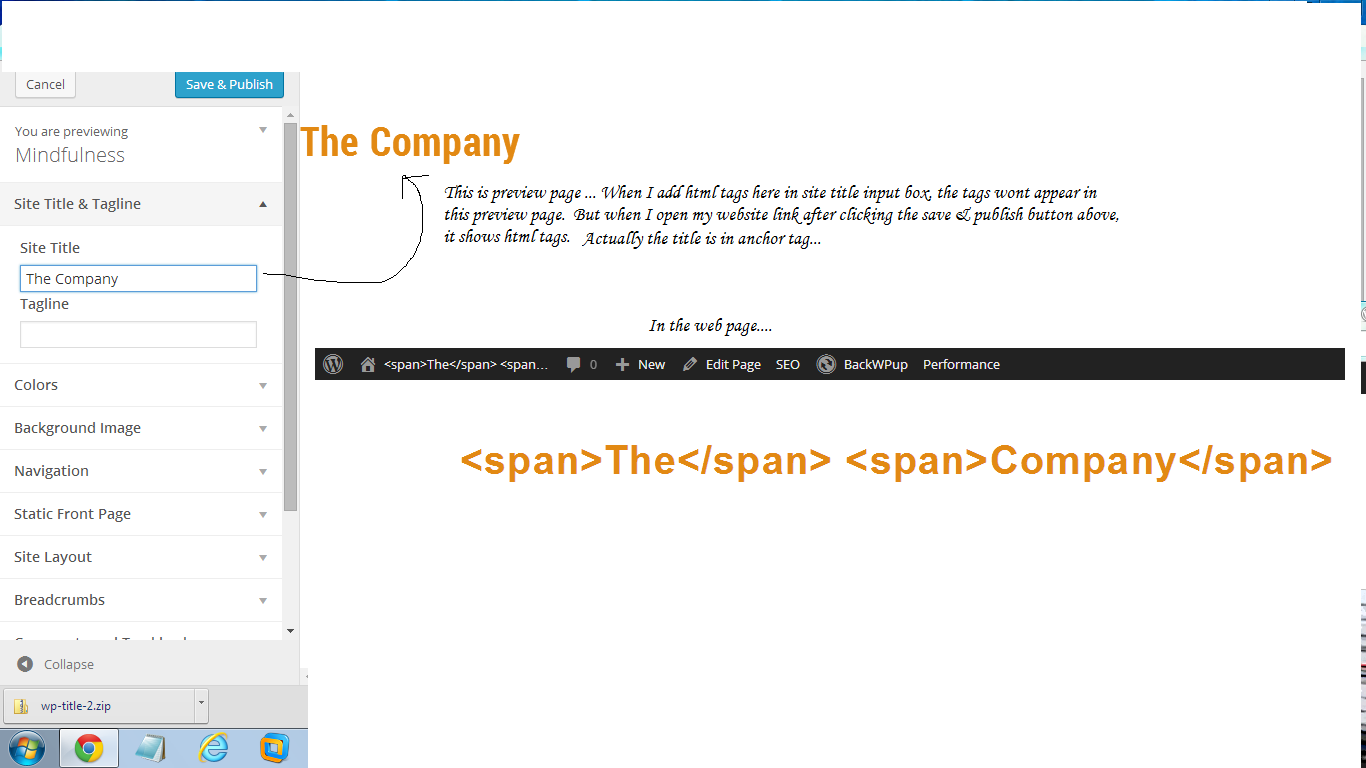
在我的WordPress标题是两个词(例如“公司”)。现在,默认的颜色是蓝色。但是我希望上面的例子中的" the“部分是灰色的。我在站点标题输入框中使用了字体标记并将其设置为<font color="grey">The</font> Company。在预览页中,它显示正确,但当我访问我的页面时,它显示为
<font color="grey">The</font> Company
包括标签。如何修改?我在WordPress中使用正念主题(类似的类型),如果有人对此页的第二种选择投了一个光。
简略描述的图像:
回答 2
Stack Overflow用户
发布于 2014-08-02 14:31:40
“十二二主题”博客标题中的具体词语如何定位?
您可以尝试以下方法,它适用于二十十二个主题:
/**
 * Wrap the first word of the blog title with the <span>...</span> tag.
 * Assumes the Twenty Twelve theme.
 *
 * @see http://stackoverflow.com/a/25096093/2078474
 */

add_filter( 'body_class',
    function( $class )
    {
        add_filter( 'bloginfo', 'so_25094932_modify_first_word', 10, 2 );
        return $class;
    }
);

function so_25094932_modify_first_word( $output, $show )
{
    static $counter = 0;

    // Target the "name" part:
    if( 'name' === $show )
    {
        // Target the second instance:
        if( 2 === ++$counter )
        {
            remove_filter( current_filter(), __FUNCTION__ );

            // Modify the first word of the blog title:
            $title = explode( ' ', $output );
            if( count( $title ) > 0 )
            {
                $title[0] = sprintf( '<span>%s</span>', $title[0] );
            }
            $output = join( ' ', $title );
        }
    }
    return $output;
}在这里,我们使用bloginfo过滤器只针对博客名的第二个实例,从<body>标记中计数。
然后,我们可以使用CSS来锁定span标记:
h1.site-title span{
    color: red;
}
示例:
这是一张截图:
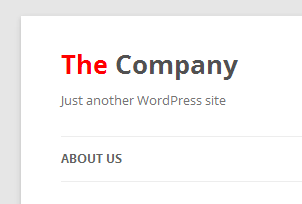
应该可以将我们的代码片段调整为其他主题。
我希望这能帮到你。
Stack Overflow用户
发布于 2014-08-02 12:33:27
要做到这一点,您必须更改控制您的设计\主题的style.css。
编辑来自wordpress:的CSS
登录到WordPress,不确定您正在运行哪个版本,但是您应该有一个名为主题或设计的部分。从那里选择主题编辑器。将会有一个可以编辑的所有文件的列表,CSS样式表应该被命名为style.css。
您将必须有写访问,以编辑它从内部WP管理。
,否则您将不得不通过FTP在您的网站上找到该文件,下载到您的计算机,编辑它,然后将它上传回您的网站。
编辑CSS以您想要的方式:
<span id="the">The</span>
<span id="company">Company</span>
<style>

#the{color: #0033CC;} //refers to blue.
#company{color:#CCCCCC;} //refers to grey.

</style>
还有一个小提琴可以让你测试它:
JSFIDDLE演示
GoodLuck!
https://stackoverflow.com/questions/25094932
复制相似问题
腾讯云开发者

Copyright © 2013 - 2026 Tencent Cloud. All Rights Reserved. 腾讯云 版权所有
深圳市腾讯计算机系统有限公司 ICP备案/许可证号:粤B2-20090059  粤公网安备44030502008569号
腾讯云计算(北京)有限责任公司 京ICP证150476号 | 京ICP备11018762号