
安卓应用OnClick崩溃
安卓应用OnClick崩溃
提问于 2014-07-31 21:14:24
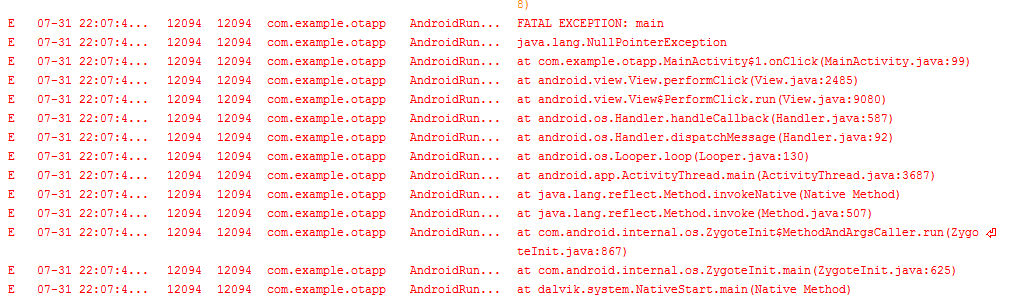
所以我有一个简单的应用程序,只有一个带有几个按钮的菜单,当一个按钮被点击时,你会被带到一个新的页面。该页面有一个按钮,当单击该按钮时,会一直更改其背景图像,直到图像用完(存储在字符串中的图像名称列表),然后将您带回主菜单。我可以这样做两次,然后在第三次尝试,如果我点击菜单上的一个按钮,应用程序崩溃。这不是发生在模拟器,只有当我运行它在我的手机。我不知道为什么会这样
package com.example.otapp;

import com.example.otapp.R.raw;

import android.content.Intent;
import android.os.Bundle;
import android.support.v7.app.ActionBarActivity;
import android.util.DisplayMetrics;
import android.view.Display;
import android.view.Menu;
import android.view.MenuItem;
import android.view.View;
import android.view.View.OnClickListener;
import android.widget.LinearLayout;
import android.widget.LinearLayout.LayoutParams;
import android.media.MediaPlayer;

public class MainActivity extends ActionBarActivity {

    public static String DPExtension;//Holds the letters dp
    public String list;
    public static int Screen_Height;//holds screen height
    public static int Screen_Width;//holds screen width
    public Intent intent;
    public MediaPlayer audio;

    public final static String EXTRA_MESSAGE = "com.example.otapp.MESSAGE";

    @Override
    protected void onCreate(Bundle savedInstanceState) {

        super.onCreate(savedInstanceState);
        setContentView(R.layout.activity_main);

        //this code block is for getting the screen proportions
        Display getdisplay = getWindowManager().getDefaultDisplay();
        DisplayMetrics dispMetrics = new DisplayMetrics();
        getdisplay.getMetrics(dispMetrics);

        float densitydp  = getResources().getDisplayMetrics().density;

        float ScreenHeightdp = dispMetrics.heightPixels / densitydp;
        float ScreenWidthdp  = dispMetrics.widthPixels / densitydp;

        //Below dimension value holders do not use pixel density
        float ScreenHeightCheck = dispMetrics.heightPixels;
        float ScreenWidthCheck = dispMetrics.heightPixels;

        DPExtension = "dp";

        Screen_Height = (int) ScreenHeightCheck;

        Screen_Width = (int) ScreenWidthCheck;

        //The printlns are so I can discern the outputs in LogCat
        //System.out.println("Screen Height:" + Screen_Height);
        //System.out.println("Screen Width:" + Screen_Width);

        View Button1 = findViewById(R.id.Button01);
        LinearLayout.LayoutParams params = (LayoutParams) Button1.getLayoutParams();
        params.height = Screen_Height/3;
        Button1.setLayoutParams(params);

        View Button2 = findViewById(R.id.Button02);
        Button2.setLayoutParams(params);

        View Button3 = findViewById(R.id.Button03);
        Button3.setLayoutParams(params);

        View Button4 = findViewById(R.id.Button04);
        Button4.setLayoutParams(params);

        Button1.setOnClickListener(onClickListener);
        Button2.setOnClickListener(onClickListener);
        Button3.setOnClickListener(onClickListener);
        Button4.setOnClickListener(onClickListener);

        Button1.setBackgroundResource(getResources().getIdentifier("gettingup", "drawable", getPackageName()));

        intent = new Intent(this, DisplayMessageActivity.class);
        intent.setFlags(Intent.FLAG_ACTIVITY_CLEAR_TOP);

        audio = MediaPlayer.create(MainActivity.this, raw.buttonsound);
    }

    @Override
    public boolean onCreateOptionsMenu(Menu menu) {

        getMenuInflater().inflate(R.menu.main, menu);
        return true;
    }

    private OnClickListener onClickListener = new OnClickListener() {

        @Override
        public void onClick(View v) {

            // play sound
            audio.start();

            // do different things for each different button
            switch(v.getId()) {
                case R.id.Button01:

                    list = "Get Up";

                    intent.putExtra(EXTRA_MESSAGE, list);

                    startActivity(intent);

                    break;
                case R.id.Button02:

                    list = "Get Dressed";

                    intent.putExtra(EXTRA_MESSAGE, list);

                    startActivity(intent);

                    break;
                case R.id.Button03:

                    list = "Get Dressed";

                    intent.putExtra(EXTRA_MESSAGE, list);

                    startActivity(intent);

                    break;
                case R.id.Button04:

                    list = "Get Dressed";

                    intent.putExtra(EXTRA_MESSAGE, list);

                    startActivity(intent);

                    break;
            }
        }
    };

    @Override
    public boolean onOptionsItemSelected(MenuItem item) {
        int id = item.getItemId();
        if (id == R.id.action_settings) {
            return true;
        }
        return super.onOptionsItemSelected(item);
    }
}

<ScrollView xmlns:android="http://schemas.android.com/apk/res/android"
    android:layout_width="match_parent" android:layout_height="match_parent" android:background="#1E90FF">

    <LinearLayout
            android:layout_width="match_parent"
            android:layout_height="wrap_content"
            android:orientation="vertical">

        <Button
            android:id="@+id/Button01"
            android:layout_width="match_parent"
            android:layout_height="125dp"
            android:text="@string/button_send"/>

        <Button
            android:id="@+id/Button03"
            android:layout_width="match_parent"
            android:layout_height="125dp"
            android:text="@string/button2_send" />

        <Button
            android:id="@+id/Button04"
            android:layout_width="match_parent"
            android:layout_height="125dp"
            android:text="@string/button3_send" />

        <Button
            android:id="@+id/Button02"
            android:layout_width="match_parent"
            android:layout_height="125dp"
            android:text="@string/button4_send" />

    </LinearLayout>

</ScrollView>回答 2
Stack Overflow用户
回答已采纳
发布于 2014-08-01 03:10:22
如果上面的源格式化正确,那么抛出NullPointerException的第99行是:
audio.start();这意味着音频为空。在第83行中宣布:
audio = MediaPlayer.create(MainActivity.this, raw.buttonsound);最有可能的情况是,MediaPlayer.create无法定位raw.buttonsound。我将在这一行进行调试,并验证MediaPlayer是否未能创建音频。
Stack Overflow用户
发布于 2014-08-01 03:04:37
尝试将onClickListener对象的定义移到onCreate方法中。可以将其声明为成员变量,但应创建对象并将其赋值给onCreate()中的字段。
页面原文内容由Stack Overflow提供。腾讯云小微IT领域专用引擎提供翻译支持
原文链接:
https://stackoverflow.com/questions/25069037
复制相关文章
相似问题
腾讯云开发者

Copyright © 2013 - 2026 Tencent Cloud. All Rights Reserved. 腾讯云 版权所有
深圳市腾讯计算机系统有限公司 ICP备案/许可证号:粤B2-20090059  粤公网安备44030502008569号
腾讯云计算(北京)有限责任公司 京ICP证150476号 | 京ICP备11018762号