
自动调整大小的ScrollPane
自动调整大小的ScrollPane
提问于 2014-07-30 12:44:29
我想调整ScrollPane的大小以适应父组件。我测试了这段代码:
import javafx.application.Application;
import static javafx.application.Application.launch;
import javafx.scene.Scene;
import javafx.scene.control.ScrollPane;
import javafx.scene.control.ScrollPane.ScrollBarPolicy;
import javafx.scene.layout.BorderPane;
import javafx.scene.layout.VBox;
import javafx.stage.Stage;


public class MainApp extends Application {

    @Override
    public void start(Stage stage) throws Exception {

        BorderPane bp = new BorderPane();
        bp.setPrefSize(600, 600);
        bp.setMaxSize(600, 600);
        bp.setStyle("-fx-background-color: #2f4f4f;");

        VBox vb = new VBox(bp);

        ScrollPane scrollPane = new ScrollPane(vb);
        scrollPane.setFitToHeight(true);
        scrollPane.setFitToWidth(true);

        scrollPane.setHbarPolicy(ScrollBarPolicy.AS_NEEDED);
        scrollPane.setVbarPolicy(ScrollBarPolicy.AS_NEEDED);

        Scene scene = new Scene(scrollPane);

        stage.setScene(scene);
        stage.show();
    }

    public static void main(String[] args) {
        launch(args);
    }
}
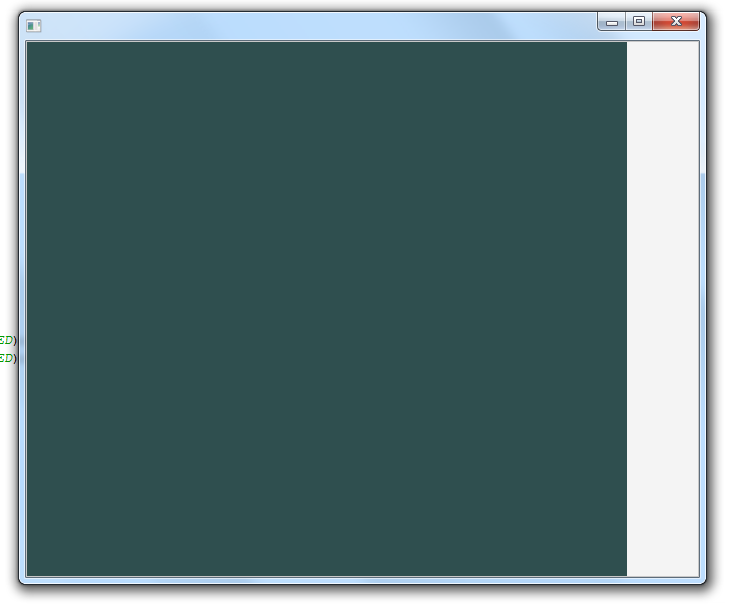
但正如你所见,我没有看到树滚动条。我的代码有什么问题吗?
回答 1
Stack Overflow用户
回答已采纳
发布于 2014-07-30 14:29:54
滚动条不会出现,因为
- 您的策略设置为
ScrollBarPolicy.AS_NEEDED - 滚动条的宽度和高度将自动调整为其容器的宽度和高度,在本例中,容器是可调整大小的Vbox。
要解决这个问题,您可以删除setFitToHeight和setFitToWidth,并将它们保留为false。
请注意,ScrollBarPolicy也可以设置为ALWAYS,而不是AS_NEEDED,即使在扩展窗口时,AS_NEEDED也会保留滚动条。
有关使用ScrollPane的更多信息,请参阅此处
ScrollPane API: setFitToHeight
    public class MainApp extends Application {

        @Override
        public void start(Stage stage) throws Exception {

            BorderPane bp = new BorderPane();
            bp.setPrefSize(600, 600);
            bp.setMaxSize(600, 600);
            bp.setStyle("-fx-background-color: #2f4f4f;");

            VBox vb = new VBox(bp);

            ScrollPane scrollPane = new ScrollPane(vb);
            //scrollPane.setFitToHeight(true);
            //scrollPane.setFitToWidth(true);

            scrollPane.setHbarPolicy(ScrollBarPolicy.ALWAYS);
            scrollPane.setVbarPolicy(ScrollBarPolicy.ALWAYS);

            Scene scene = new Scene(scrollPane);

            stage.setScene(scene);
            stage.show();
        }

        public static void main(String[] args) {
            launch(args);
        }
}页面原文内容由Stack Overflow提供。腾讯云小微IT领域专用引擎提供翻译支持
原文链接:
https://stackoverflow.com/questions/25037196
复制相关文章
相似问题
腾讯云开发者

Copyright © 2013 - 2026 Tencent Cloud. All Rights Reserved. 腾讯云 版权所有
深圳市腾讯计算机系统有限公司 ICP备案/许可证号:粤B2-20090059  粤公网安备44030502008569号
腾讯云计算(北京)有限责任公司 京ICP证150476号 | 京ICP备11018762号