
未找到LibUsbDotNet打开设备->设备
我有AVR微控制器的usbasp程序员。这个程序员使用libusb库。我成功地将它连接到pc上,系统检测到了新的设备,并成功地为该设备安装了驱动程序。它工作得很好,因为我可以用它编程AVR芯片。所以硬件部分是100%可以的。
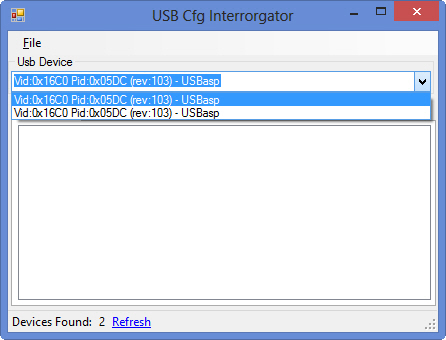
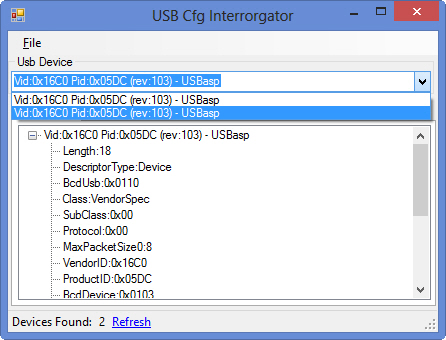
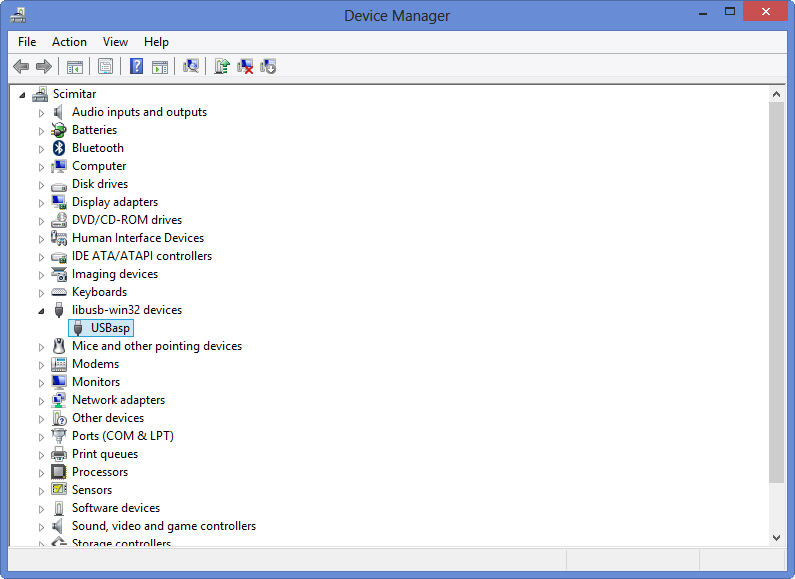
现在软件部分:使用简单的迭代在我的libusb 32设备上使用LibUsbDotNet,我找到了两个设备。它们都被命名为相同(并且具有相同的VID和PID),所以我认为这是一个复合设备。第二种方法有一些数据。下面的截图很好地显示了这一点。
以及代码(只是从示例中粘贴的副本)
using System;
using System.Collections.Generic;
using System.Linq;
using System.Text;
using System.Threading.Tasks;
using LibUsbDotNet;
using LibUsbDotNet.Info;
using LibUsbDotNet.Main;


namespace USB_Test_CLI_CS {
    class Program {

        public static readonly int VendorID = 0x16C0;
        public static readonly int ProductID = 0x05DC;

        public static void Main(string[] args) {
            UsbDevice usbDevice = null;

            UsbRegDeviceList allDevices = UsbDevice.AllDevices;

            Console.WriteLine("Found {0} devices", allDevices.Count);

            foreach (UsbRegistry usbRegistry in allDevices) {
                Console.WriteLine("Got device: {0}\r\n", usbRegistry.FullName);

                if (usbRegistry.Open(out usbDevice)) {
                    Console.WriteLine("Device Information\r\n------------------");

                    Console.WriteLine("{0}", usbDevice.Info.ToString());

                    Console.WriteLine("VID & PID: {0} {1}", usbDevice.Info.Descriptor.VendorID, usbDevice.Info.Descriptor.ProductID);

                    Console.WriteLine("\r\nDevice configuration\r\n--------------------");
                    foreach (UsbConfigInfo usbConfigInfo in usbDevice.Configs) {
                        Console.WriteLine("{0}", usbConfigInfo.ToString());

                        Console.WriteLine("\r\nDevice interface list\r\n---------------------");
                        IReadOnlyCollection<UsbInterfaceInfo> interfaceList = usbConfigInfo.InterfaceInfoList;
                        foreach (UsbInterfaceInfo usbInterfaceInfo in interfaceList) {
                            Console.WriteLine("{0}", usbInterfaceInfo.ToString());

                            Console.WriteLine("\r\nDevice endpoint list\r\n--------------------");
                            IReadOnlyCollection<UsbEndpointInfo> endpointList = usbInterfaceInfo.EndpointInfoList;
                            foreach (UsbEndpointInfo usbEndpointInfo in endpointList) {
                                Console.WriteLine("{0}", usbEndpointInfo.ToString());
                            }
                        }
                    }
                    usbDevice.Close();
                }
                Console.WriteLine("\r\n----- Device information finished -----\r\n");
            }


            Console.WriteLine("Trying to find our device: {0} {1}", VendorID, ProductID);
            UsbDeviceFinder usbDeviceFinder = new UsbDeviceFinder(VendorID, ProductID);

            // This does not work !!! WHY ?
            usbDevice = UsbDevice.OpenUsbDevice(usbDeviceFinder);

            if (usbDevice != null) {
                Console.WriteLine("OK");
            } else {
                Console.WriteLine("FAIL");
            }

            UsbDevice.Exit();

            Console.Write("Press anything to close");
            Console.ReadKey();
        }

    }
}
这是这个程序的输出
Found 2 devices
Got device: Van Ooijen Technische Informatica - USBasp


----- Device information finished -----

Got device: Van Ooijen Technische Informatica - USBasp

Device Information
------------------
Length:18
DescriptorType:Device
BcdUsb:0x0110
Class:VendorSpec
SubClass:0x00
Protocol:0x00
MaxPacketSize0:8
VendorID:0x16C0
ProductID:0x05DC
BcdDevice:0x0103
ManufacturerStringIndex:1
ProductStringIndex:2
SerialStringIndex:0
ConfigurationCount:1
ManufacturerString:www.fischl.de
ProductString:USBasp
SerialString:

VID & PID: 5824 1500

Device configuration
--------------------
Length:9
DescriptorType:Configuration
TotalLength:18
InterfaceCount:1
ConfigID:1
StringIndex:0
Attributes:0x80
MaxPower:25
ConfigString:


Device interface list
---------------------
Length:9
DescriptorType:Interface
InterfaceID:0
AlternateID:0
EndpointCount:0
Class:PerInterface
SubClass:0x00
Protocol:0x00
StringIndex:0
InterfaceString:


Device endpoint list
--------------------

----- Device information finished -----

Trying to find our device: 5824 1500
FAIL
Press anything to close
我想要得到的是这个简单的代码来检测这个设备的存在(因为所有设备上的简单迭代都会找到它,而其他工具"USB询问器“也会找到它)。以前有人问过这个问题,但没有提出建设性的答复。
我也可以使用libusb 32 c++库并为它创建一些C#包装器,但是如果不需要它,并且我可以使用LibUsbDotNet库,我想使用它而不是自己创建包装器。
回答 2
Stack Overflow用户
发布于 2014-07-27 06:45:07
我想要的是这个简单的代码来检测这个存在的设备
你几乎已经有了。只有一个是usbRegistry.Open()实际工作的。不应该有其他设备-检查您是否使用了最新的libusb-win32版本(此时是1.2.6.0)。
UsbDeviceFinder似乎对这个幻影设备有问题。
Stack Overflow用户
发布于 2015-09-20 20:35:29
您可以尝试筛选向导来安装设备筛选器。
https://stackoverflow.com/questions/24971301
复制相似问题
腾讯云开发者

Copyright © 2013 - 2026 Tencent Cloud. All Rights Reserved. 腾讯云 版权所有
深圳市腾讯计算机系统有限公司 ICP备案/许可证号:粤B2-20090059  粤公网安备44030502008569号
腾讯云计算(北京)有限责任公司 京ICP证150476号 | 京ICP备11018762号