
如何读取csv文件并在java半透明的swing窗口中显示其内容?
我需要使用java读取csv文件的内容,并将其显示在swing窗口中,我能够打印csv内容,但无法看到swing窗口。我还想把内容印在半透明的窗口里。我的代码是:
import java.awt.*;
import javax.swing.*;
import static java.awt.GraphicsDevice.WindowTranslucency.*;
import java.io.BufferedReader;
import java.io.FileNotFoundException;
import java.io.FileReader;
import java.io.IOException;
public class Swing extends JFrame {
private JButton aButton = new JButton("I am a Button \n");
public Swing() {
    setUndecorated(true);
    setBackground(new Color(0, 0, 0, 0));
    setSize(new Dimension(600, 500));
    setLocationRelativeTo(null);
    setDefaultCloseOperation(JFrame.EXIT_ON_CLOSE);
    JPanel panel = new JPanel() {
    @Override
    protected void paintComponent(Graphics g) {
    super.paintComponent(g);
    if (g instanceof Graphics2D) {
    final int R = 250;
    final int G = 210;
    final int B = 220;
    Paint p = new GradientPaint(0.0f, 0.0f, new Color(R, G, B, 0),
                            0.0f, getHeight(), new Color(R, G, B, 255), true);
    Graphics2D g2d = (Graphics2D) g;
    g2d.setPaint(p);
    g2d.fillRect(0, 0, getWidth(), getHeight());
    Font font = new Font("Serif", Font.PLAIN, 45);
    g2d.setFont(font);
    g2d.setColor(Color.red);
    g2d.drawString("Abcde",40,120);
    g2d.drawString(line,150,200);
    }
    }
    };
    setContentPane(panel);
    setLayout(new GridBagLayout());
    add(aButton);
    pack();
    }

    public void runn() {
    String csvFile = "D:\\Html1.csv";
    BufferedReader br = null;
    String line = "";
    String abc = "";
    try {
    br = new BufferedReader(new FileReader(csvFile));
    while (br.ready()) {
      line = br.readLine();
      System.out.println(line);
      abc = line + "--";
      }

    } catch (Exception e) {
    e.printStackTrace();
    }
    System.out.println("Done");
    }
    public static void main(String[] args) {
        GraphicsEnvironment ge
                = GraphicsEnvironment.getLocalGraphicsEnvironment();
        GraphicsDevice gd = ge.getDefaultScreenDevice();
        boolean isPerPixelTranslucencySupported
                = gd.isWindowTranslucencySupported(PERPIXEL_TRANSLUCENT);
        if (!isPerPixelTranslucencySupported) {
            System.out.println("Per-pixel translucency is not supported");
            System.exit(0);
        }
        SwingUtilities.invokeLater(new Runnable() {
        @Override
        public void run() {
        Swing gtw = new Swing();
        gtw.runn();
        gtw.setVisible(true);
       }
    });
    }
}回答 2
Stack Overflow用户
发布于 2014-07-23 06:06:40
有一些基本的缺陷..。
让我们从main方法开始。
System.out.println("DStarting");
SwingIt swObj = new SwingIt();
swObj.runn();
毫无意义,因为你会完全忽略它.
SwingUtilities.invokeLater(new Runnable() {
@Override
public void run() {
    SwingIt gtw = new SwingIt();
    gtw.setVisible(true);
}显示在屏幕上的窗口不是您创建并调用runn的窗口,这意味着它基本上是不可见的(没有大小或位置).
与其使用swingText初始化窗口,不如使用它的构造函数,但是说到swingText.
创建一个名为JTextField的jj,然后简单地扔掉它.
JTextField  jj=new JTextField();
jj.setText(txt);
add(new JTextField("Text"));
这意味着您提供的文本永远不会显示在screen...you上,似乎很难理解对象/变量引用.
无论如何,您应该丢弃swingText方法并用类构造函数替换它,例如.
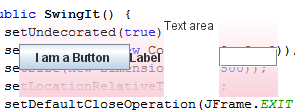
private JButton aButton = new JButton("I am a Button \n");
private JLabel label = new JLabel("Label \n");
private JTextArea ta = new JTextArea("Text area", 5, 5);
private JTextField jj = new JTextField(5);

public SwingIt() {
    setUndecorated(true);
    setBackground(new Color(0, 0, 0, 0));
    setSize(new Dimension(600, 500));
    setLocationRelativeTo(null);
    setDefaultCloseOperation(JFrame.EXIT_ON_CLOSE);
    JPanel panel = new JPanel() {
        @Override
        protected void paintComponent(Graphics g) {
            super.paintComponent(g);
            System.out.println("bbb");
            if (g instanceof Graphics2D) {
                final int R = 250;
                final int G = 210;
                final int B = 220;
                Paint p = new GradientPaint(0.0f, 0.0f, new Color(R, G, B, 0),
                        0.0f, getHeight(), new Color(R, G, B, 255), true);
                Graphics2D g2d = (Graphics2D) g;
                g2d.setPaint(p);
                g2d.fillRect(0, 0, getWidth(), getHeight());
            }
        }
    };
    setContentPane(panel);
    setLayout(new GridBagLayout());
    add(aButton);
    add(label);
    add(ta);
    add(jj);
    pack();
}这意味着您需要一些方法来设置jj字段的文本,为此,只需创建一个setText方法,例如.
public void setText(String text) {
    jj.setText(text);
}从你的runn方法调用它..。
public void runn() {
    String csvFile = "D:\\Html1.csv";
    BufferedReader br = null;
    String line = "";
    String abc = "";
    try {
        br = new BufferedReader(new FileReader(csvFile));
        while (br.ready()) {
            line = br.readLine();
            System.out.println(line);
            abc = line + "--";
        }
        setText(abc);
    } catch (Exception e) {
        e.printStackTrace();
    }

    System.out.println("Done");
}返回到main method...get,消除了第一个Swing对象的创建,只使用第二个Swing对象,确保在它上调用runn .
public static void main(String[] args) {
    GraphicsEnvironment ge
            = GraphicsEnvironment.getLocalGraphicsEnvironment();
    GraphicsDevice gd = ge.getDefaultScreenDevice();
    boolean isPerPixelTranslucencySupported
            = gd.isWindowTranslucencySupported(PERPIXEL_TRANSLUCENT);

    if (!isPerPixelTranslucencySupported) {
        System.out.println("Per-pixel translucency is not supported");
        System.exit(0);
    }

    SwingUtilities.invokeLater(new Runnable() {
        @Override
        public void run() {
            SwingIt gtw = new SwingIt();
            gwt.runn();
            gtw.setVisible(true);
        }
    });
}
正如已经指出的,在执行任何自定义绘图之前,您应该在您的super.paintComponent中调用paintComponent。(至少)Java1.4中,传递给Graphics方法的paintComponent对象肯定是Graphics2D的一个实例,因此if (g instanceof Graphics2D) {是没有意义的
有关更多细节,请查看表演定制绘画。
您还应该看看在容器中布局组件,以了解组件实际上是如何在Swing中布局的。
由于CSV文件的性质,最好在JTable中表示,请查看如何使用表以获得更多细节.
您可能想看看类似OpenCSV的东西,以便读取您的CSV文件,而不是试图在已经非常复杂的问题上重新发明轮子.
Stack Overflow用户
发布于 2014-07-23 05:47:45
我注意到了你代码中的一些要点。
- 您忘记在重写的
super.paintComponent()方法中调用paintComponent()。 - 在添加组件时,您使用的是
GridBagLayout,而不是GridBagConstraints。 - 您正在创建类
Swing的两次对象。
参见关于如何使用GridBagLayout的Swing教程
https://stackoverflow.com/questions/24902673
复制相似问题
腾讯云开发者

Copyright © 2013 - 2026 Tencent Cloud. All Rights Reserved. 腾讯云 版权所有
深圳市腾讯计算机系统有限公司 ICP备案/许可证号:粤B2-20090059  粤公网安备44030502008569号
腾讯云计算(北京)有限责任公司 京ICP证150476号 | 京ICP备11018762号