
如何使用grunt-ngdocs创建api文档
如何使用grunt-ngdocs创建api文档
提问于 2014-07-22 16:38:17
我正在尝试通过grunt-ngdocs创建API文档。创建了部分,但是index.html没有正确的链接到它。
我在我的gruntfile.js:
module.exports = function (grunt) {

grunt.initConfig({
    pkg: grunt.file.readJSON('package.json'),
    karma: {
        unit: {
            configFile: 'karma.conf.js'
        }
    },
    uglify: {
        options: {
            // the banner is inserted at the top of the output
            banner: '/*! <%= pkg.name %> <%= grunt.template.today("dd-mm-yyyy") %> */\n'
        },
        dist: {
            files: {
                'web/js/app.min.js': ['web/js/app.js']
            }
        }
    },
    ngdocs: {
        options: {
            dest: 'docs',
            scripts: ['web/js/app.js'],
            title: 'My Documentation'
        },
        api: {
            src: ['web/**/*.js'],
            title: 'API Documentation'
        }
    },
    clean:['docs','testResult']


});

grunt.loadNpmTasks('grunt-karma');
grunt.loadNpmTasks('grunt-ngdocs');
grunt.loadNpmTasks('grunt-contrib-uglify');
grunt.loadNpmTasks('grunt-contrib-clean');
grunt.registerTask('default', ['clean','uglify', 'ngdocs', 'karma']);
};
我的js文件是这样的
 /**
  * @ngdoc overview
  * @ngdoc directive
  * @name myApp.maincontroller:controller
  * @description
  *
  * # myApp
  * The factoryName is my favorite service in the world.
  *
  */


 var myApp = angular.module('myApp',[]);


 myApp.controller("MainController", function($scope) {
    $scope.model = {
        myValue: "Run you fools!"
    };
   });


 /**
          * @ngdoc function
          * @name mySuperFunction
          * @returns {int} The int representing a Firebase resource
          */

 function mySuperFunction() {
    var i = 5;
    var j = 5;
    i += j;
    return i;
 }
但当我跑
grunt 在命令行中,结果是
 C:\Users\Lino Simões\Documents\bitbucket\test>grunt -d --force
 Running "clean:0" (clean) task
 [D] Task source: C:\Users\Lino Simões\Documents\bitbucket\test\node_modules\grun
 t-contrib-clean\tasks\clean.js
 Cleaning docs...OK

 Running "clean:1" (clean) task
 [D] Task source: C:\Users\Lino Simões\Documents\bitbucket\test\node_modules\grun
 t-contrib-clean\tasks\clean.js
 Cleaning testResult...OK

 Running "uglify:dist" (uglify) task
 [D] Task source: C:\Users\Lino Simões\Documents\bitbucket\test\node_modules\grun
 t-contrib-uglify\tasks\uglify.js
 File web/js/app.min.js created: 796 B → 210 B

 Running "ngdocs:api" (ngdocs) task
 [D] Task source: C:\Users\Lino Simões\Documents\bitbucket\test\node_modules\grun
 t-ngdocs\tasks\grunt-ngdocs.js
 Generating Documentation...
 DONE. Generated 2 pages in 256ms.

 Running "karma:unit" (karma) task
 [D] Task source: C:\Users\Lino Simões\Documents\bitbucket\test\node_modules\grun
 t-karma\tasks\grunt-karma.js
 INFO [karma]: Karma v0.12.17 server started at http://localhost:9876/
 INFO [launcher]: Starting browser PhantomJS
 INFO [PhantomJS 1.9.7 (Windows 7)]: Connected on socket dFX-dKGVINA6PBjB5Gu9 wit
 h id 91061839
 PhantomJS 1.9.7 (Windows 7): Executed 8 of 8 SUCCESS (0.008 secs / 0.004 secs)

 Done, without errors.
因此,这会生成2个文件,但是当我转到docs下的index.html时,我会看到以下内容:
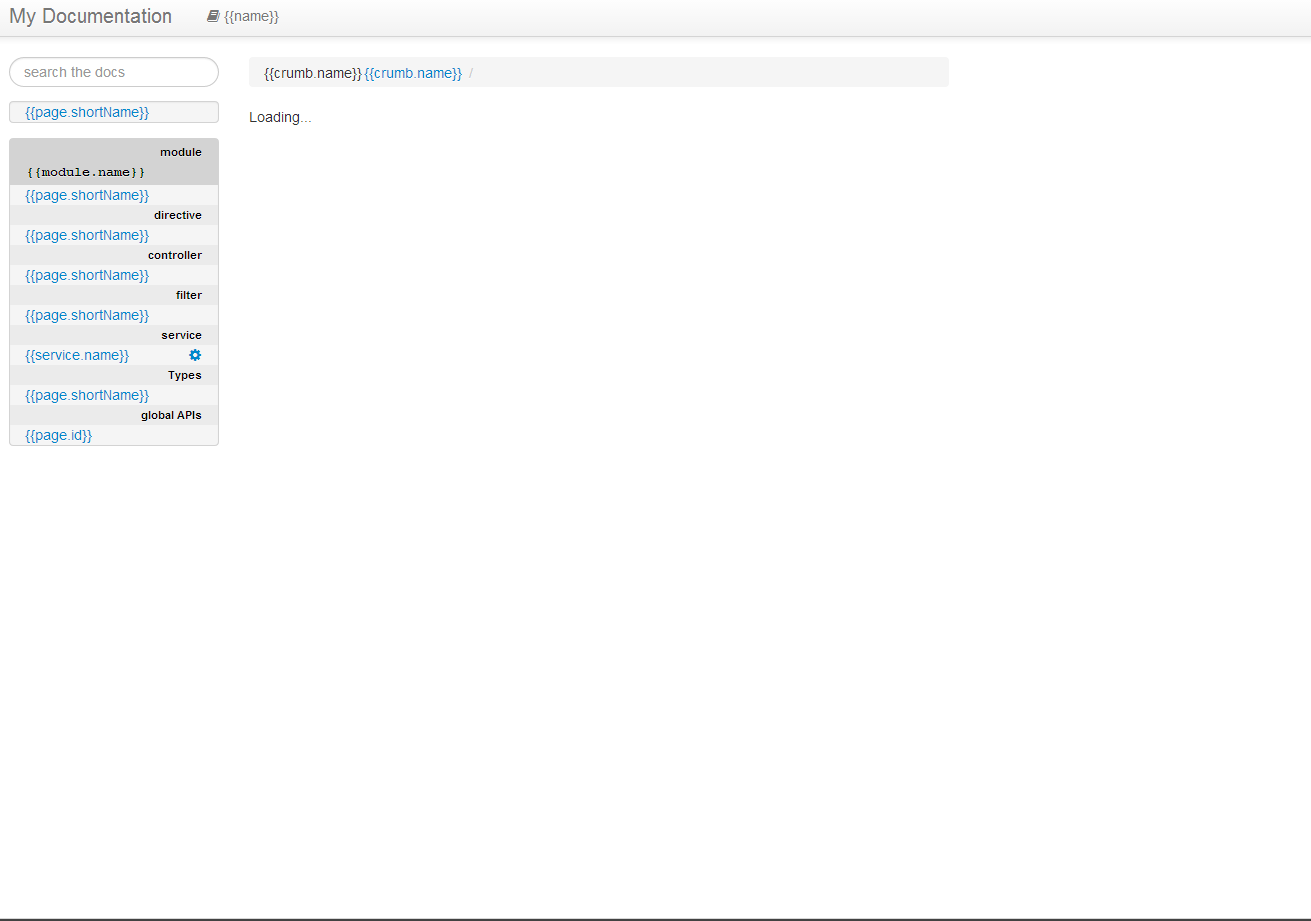
但是在我的docs/ partials /api/我中有ngdocs创建的部分。
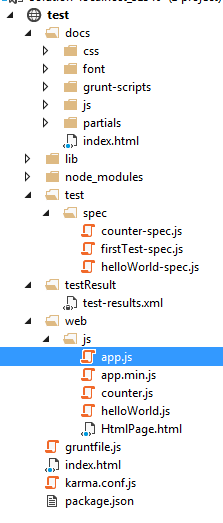
我的项目树是这样的:
回答 2
Stack Overflow用户
回答已采纳
发布于 2014-07-24 09:09:58
您的web/js/app.js中有、angular.js、和angular.js吗?检查一下。并添加到“选项”html5Mode: false中
Stack Overflow用户
发布于 2017-04-13 08:00:02
对于ng1.6为我工作:
ngdocs: {
  all: ['app/**/*.js']
}
您将看到角1.2的旧版本。
cat docs/js/angular.min.js  | grep v1
 AngularJS v1.2.16
但它不会影响你的源文件。
此外,不要忘记为生成的文件夹文档运行服务器:
例如使用python
pushd ./dist; python -m SimpleHTTPServer 9000; popd #v 2.*
pushd ./dist; python -m http.server 9000; popd #v 3.*不幸的是,将angular.js和角动画.me添加到脚本选项中,不适用于我
页面原文内容由Stack Overflow提供。腾讯云小微IT领域专用引擎提供翻译支持
原文链接:
https://stackoverflow.com/questions/24893036
复制相关文章
相似问题
腾讯云开发者

Copyright © 2013 - 2026 Tencent Cloud. All Rights Reserved. 腾讯云 版权所有
深圳市腾讯计算机系统有限公司 ICP备案/许可证号:粤B2-20090059  粤公网安备44030502008569号
腾讯云计算(北京)有限责任公司 京ICP证150476号 | 京ICP备11018762号