
PLayer在Piccolo2d中的扩展
PLayer在Piccolo2d中的扩展
提问于 2014-07-21 19:45:39
我有下一个问题。在我的项目中,当从层中添加或删除节点时,我需要将消息委托给第三方库。为了实现这一点,我以下一种方式扩展了PLayer:
public class DelegateLayer extends PLayer {
    private Delegate delegate = null;
    private boolean delegationNeeded = false;
    public DelegateLayer() {
        super();
    }
    @Override
    public void removeChildren(final Collection children) {
        for (Object child : children) {
            removeChild((PNode)child);
        }
    }
    @Override
    public void addChildren(final Collection children) {
        for (Object child : children) {
            addChild((PNode) child);
        }
    }

    @Override
    public void addChild(final PNode child) {
        if (delegationNeeded) {
            Preconditions.checkNotNull(delegate, "DelegateLayer: Delegate is not initialized");
            delegate.delegateNodeAdded((CloudNode)child);
        }
        super.addChild(child);
    }

    @Override
    public PNode removeChild(final PNode child) {
        if (delegationNeeded) {
            Preconditions.checkNotNull(delegate, "DelegateLayer: Delegate is not initialized");
            delegate.delegateNodeRemoved((CloudNode)child);
        }
        return super.removeChild(child);
    }

    public void setDelegationNeeded(boolean needed) {
        this.delegationNeeded = needed;
    }

    public void setDelegate(ClusterUpdateDelegate delegate) {
        this.delegate = delegate;
    }
}
我还将这个节点层添加到画布的摄像机中:
DelegateLayer nodeLayer = new DelegateLayer();
camera.addLayer(0, nodeLayer);但是,在我将节点放置到层并应用转换(在点上对节点进行中心化)之后,什么都不会发生。但是一旦我告诉PLayer,我开始使用camera.getLayer(0),一切都很好。
有谁能解释一下是怎么回事吗?
回答 1
Stack Overflow用户
回答已采纳
发布于 2014-07-21 23:08:06
您可能缺少一个将新创建的层添加到PRoot中的调用。下面是在Piccolo2D模式中描述的运行时结构的快照:
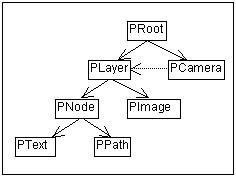
在这个简短的演示中,当您注释掉canvas.getCamera().getRoot().addChild(layer);时,动画就停止工作了:
import java.awt.Color;
import java.awt.Dimension;
import java.awt.geom.Point2D;
import javax.swing.JFrame;
import javax.swing.SwingUtilities;

import edu.umd.cs.piccolo.PCanvas;
import edu.umd.cs.piccolo.PLayer;
import edu.umd.cs.piccolo.PNode;
import edu.umd.cs.piccolo.event.PBasicInputEventHandler;
import edu.umd.cs.piccolo.event.PInputEvent;
import edu.umd.cs.piccolo.nodes.PPath;
import edu.umd.cs.piccolo.util.PBounds;

public class Test {
    public static void main(String[] args) {
        SwingUtilities.invokeLater(new Runnable() {
            public void run() {
                JFrame frame = new JFrame("Test");
                frame.setDefaultCloseOperation(JFrame.EXIT_ON_CLOSE);
                frame.setLocationByPlatform(true);

                final PCanvas canvas = new PCanvas() {
                    @Override
                    public Dimension getPreferredSize() {
                        return new Dimension(600, 400);
                    }
                };

                PLayer layer = new PLayer() {
                    @Override
                    public void addChild(final PNode child) {
                        System.out.println("notify: addChild");
                        super.addChild(child);
                    }
                };

                canvas.getCamera().addLayer(0, layer);
                canvas.getCamera().getRoot().addChild(layer);

                final PPath node = PPath.createRectangle(0, 0, 100, 100);
                node.setPaint(Color.RED);
                canvas.getLayer().addChild(node);

                canvas.addInputEventListener(new PBasicInputEventHandler() {
                    @Override
                    public void mouseClicked(PInputEvent event) {
                        Point2D p = event.getCamera().localToView(
                                event.getCanvasPosition());
                        PBounds bounds = node.getBounds();
                        final double dx = p.getX() - bounds.getCenterX();
                        final double dy = p.getY() - bounds.getCenterY();
                        node.animateToBounds(node.getBounds().x + dx, bounds.y
                                + dy, bounds.width, bounds.height, 300);
                    }
                });

                frame.add(canvas);
                frame.pack();
                frame.setVisible(true);
            }
        });
    }
}另外,您还可以监听PNode.PROPERTY_CHILDREN属性,而无需添加自定义层:
canvas.getLayer().addPropertyChangeListener(PNode.PROPERTY_CHILDREN, new PropertyChangeListener() {
    @Override
    public void propertyChange(PropertyChangeEvent e) {
        System.out.println("notify");
    }
});
但是,在这种方法中,您没有添加/删除哪个子节点的信息。
页面原文内容由Stack Overflow提供。腾讯云小微IT领域专用引擎提供翻译支持
原文链接:
https://stackoverflow.com/questions/24873417
复制相关文章
相似问题
腾讯云开发者

Copyright © 2013 - 2026 Tencent Cloud. All Rights Reserved. 腾讯云 版权所有
深圳市腾讯计算机系统有限公司 ICP备案/许可证号:粤B2-20090059  粤公网安备44030502008569号
腾讯云计算(北京)有限责任公司 京ICP证150476号 | 京ICP备11018762号