
R中的圆形叠加条形图
我遇到了这个非常棒且相对简单的包在这里看到的,它可以以极形式就像这样创建漂亮的规范化堆叠条形图。我希望创建一个类似的情节,但这不是规范化的,而是可以有原始值作为输入。

在他的博客上,他指出有人对他的代码做了一个不规范的版本,可以生成这样的情节:
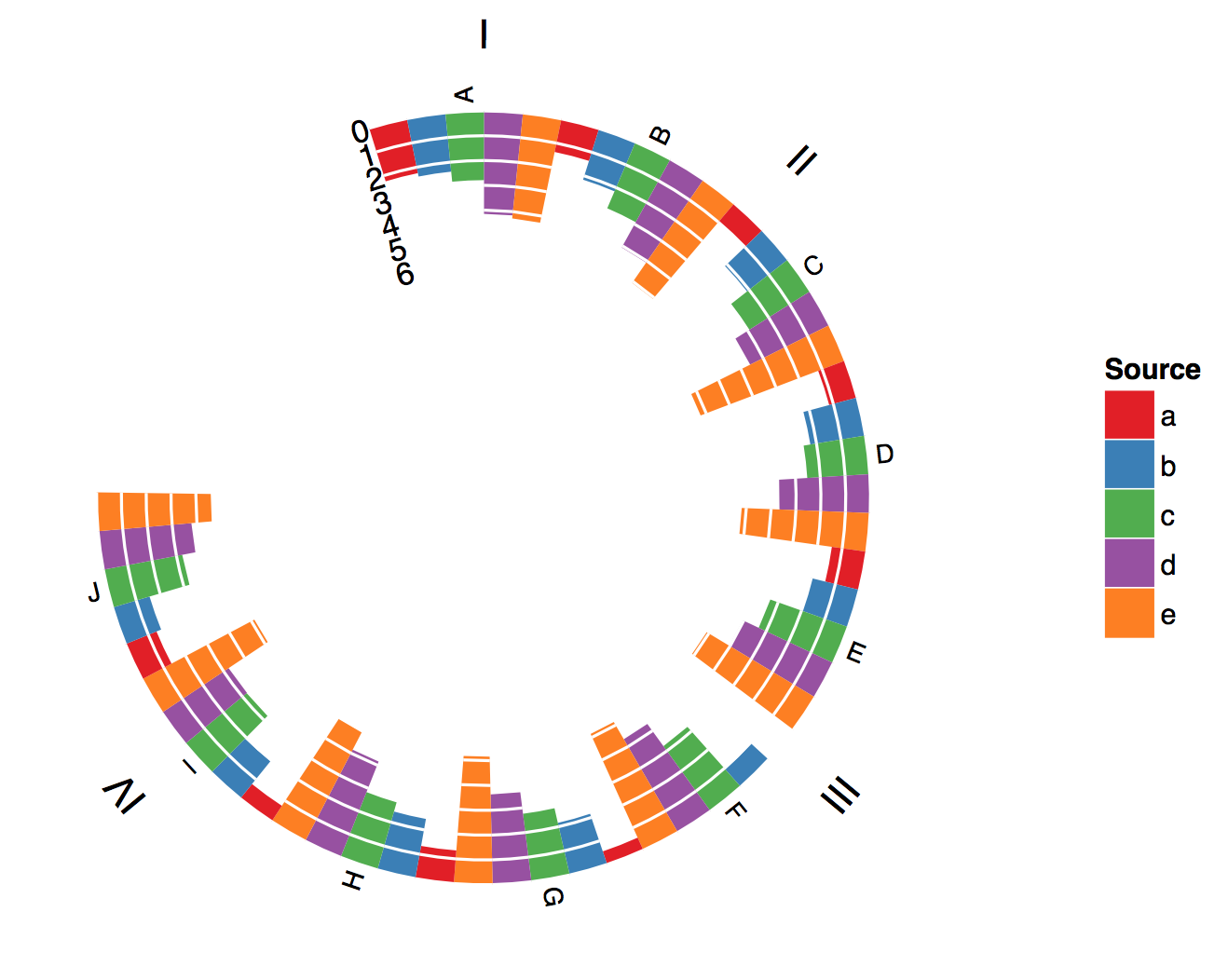
这几乎正是我所需要的,但我不知道如何堆叠条形图来生成这样的图形(对质量表示遗憾):
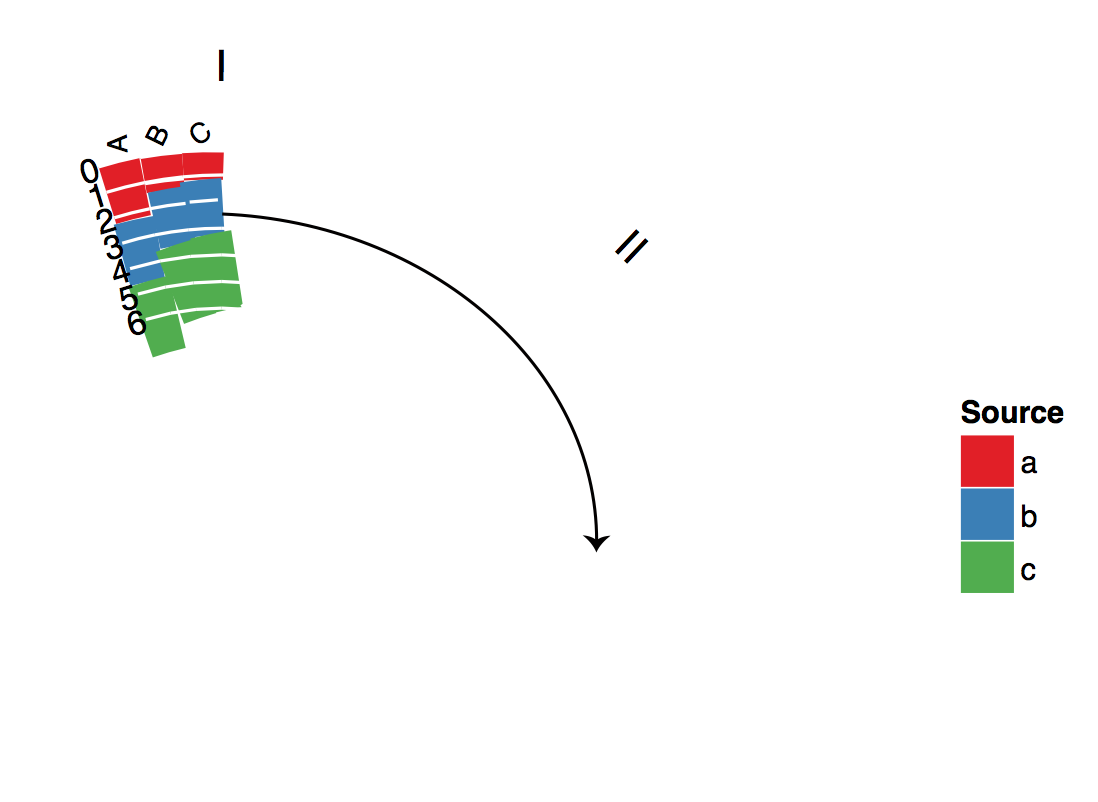
下面是一些玩具数据,它们是我将要使用的真实数据的子集,遵循他的输入格式:
family  item    score   value
Group 1 Disease 1   Genetics    1
Group 1 Disease 1   EMR 8
Group 1 Disease 1   Pubmed  10
Group 1 Disease 2   Genetics    1
Group 1 Disease 2   EMR 21
Group 1 Disease 2   Pubmed  4
Group 1 Disease 3   Genetics    0
Group 1 Disease 3   EMR 2
Group 1 Disease 3   Pubmed  0
Group 2 Disease 4   Genetics    4
Group 2 Disease 4   EMR 72
Group 2 Disease 4   Pubmed  16
Group 3 Disease 5   Genetics    2
Group 3 Disease 5   EMR 19
Group 3 Disease 5   Pubmed  7
Group 3 Disease 6   Genetics    2
Group 3 Disease 6   EMR 12
Group 3 Disease 6   Pubmed  6
Group 4 Disease 7   Genetics    0
Group 4 Disease 7   EMR 11
Group 4 Disease 7 Pubmed 4他公开提供的软件包代码的直接链接可以找到这里。
非常感谢,本
编辑:这是我试过的-
我进入了代码并替换了:
# histograms
p<-ggplot(df)+geom_rect(
        aes(
            xmin=xmin,
            xmax=xmax,
            ymin=ymin,
            ymax=ymax,
            fill=score)
        )
通过以下方式:
# histograms
p<-ggplot(df)+
        geom_bar(stat="identity", position="stack", aes(x=item, y=value,fill=score))
我这么做是因为据我所能理解,使用geom_rect生成堆叠条形图没有一种简单的方法,当我用polarBarChart脚本的上下文尝试上面的代码时,它会绘制堆叠的条形图,但是从中心开始生成,而不是从输出开始。此外,当我在polarBarChart脚本中使用这段代码时,我会得到以下错误:
“Error: Discrete value supplied to continuous scale” 没有输出
回答 1
Stack Overflow用户
发布于 2014-07-25 21:18:25
为了完成这项工作,您必须使用geom_rect()。只是不可能修改geom_bar()来做您需要的事情,因为极性geom_bar()会创建一个玫瑰图。因此,为了向内而不是向外绘制数据,geom_rect()是唯一的选项(我知道对于ggplot2)。
我将首先突出显示我所做的更改,显示情节,最后我将包括修改后的整个函数。
我对计算xmin、xmax、ymin和ymax的代码块进行了如下修改:
xmin是:
xmin <- (indexScore - 1) * (binSize + spaceBar) + (indexItem - 1) * (spaceItem + M * (binSize + spaceBar)) + (indexFamily - 1) * (spaceFamily - spaceItem)
xmin现在是:
xmin <- (binSize + spaceBar) + (indexItem - 1) * (spaceItem + (binSize + spaceBar)) + (indexFamily - 1) * (spaceFamily - spaceItem)
我去掉了(indexScore-1) *和M *,因为这是每一个分数相邻的条子的位置。在每个项目中,我们希望它们位于相同的x位置。
伊明是:
ymin <- affine(1)
伊明现在是:
df<-df[with(df, order(family,item,value)), ] df<-ddply(df,.(item),mutate,ymin=c(1,ymax[1:(length(ymax)-1)]))
我们希望每个条目中的每一个条形图都从它前面的条形图的ymax开始。为了实现这一点,我首先对数据帧进行了排序,以便在每个项中,值的顺序从最低到最高。然后,对于每一项,我将ymin设置为1作为最低值,然后将所有其他值设置为上一栏的ymax。
我也做了一些苦行的改变。在“家庭标签”一节中,我将y=1.2更改为y=1.7,因为您的项目标签很长,因此家庭标签就在它们上面。我还添加了hjust=0.5来对它们和vjust=0进行居中,这样它们就不那么接近商品标签了。因此,这一行:
p<-p+ylim(0,outerRadius+0.2)
现在是:
p<-p+ylim(0,outerRadius+0.7)
所以标签适合于地块区域。
最后,这一行:
familyLabelsDF<-aggregate(xmin~family,data=df,FUN=function(s) mean(s+binSize))
现在是:
familyLabelsDF<-aggregate(xmin~family,data=df,FUN=function(s) mean(s+binSize/2))
这使得家庭标签在每一组中居中。
如下所示:
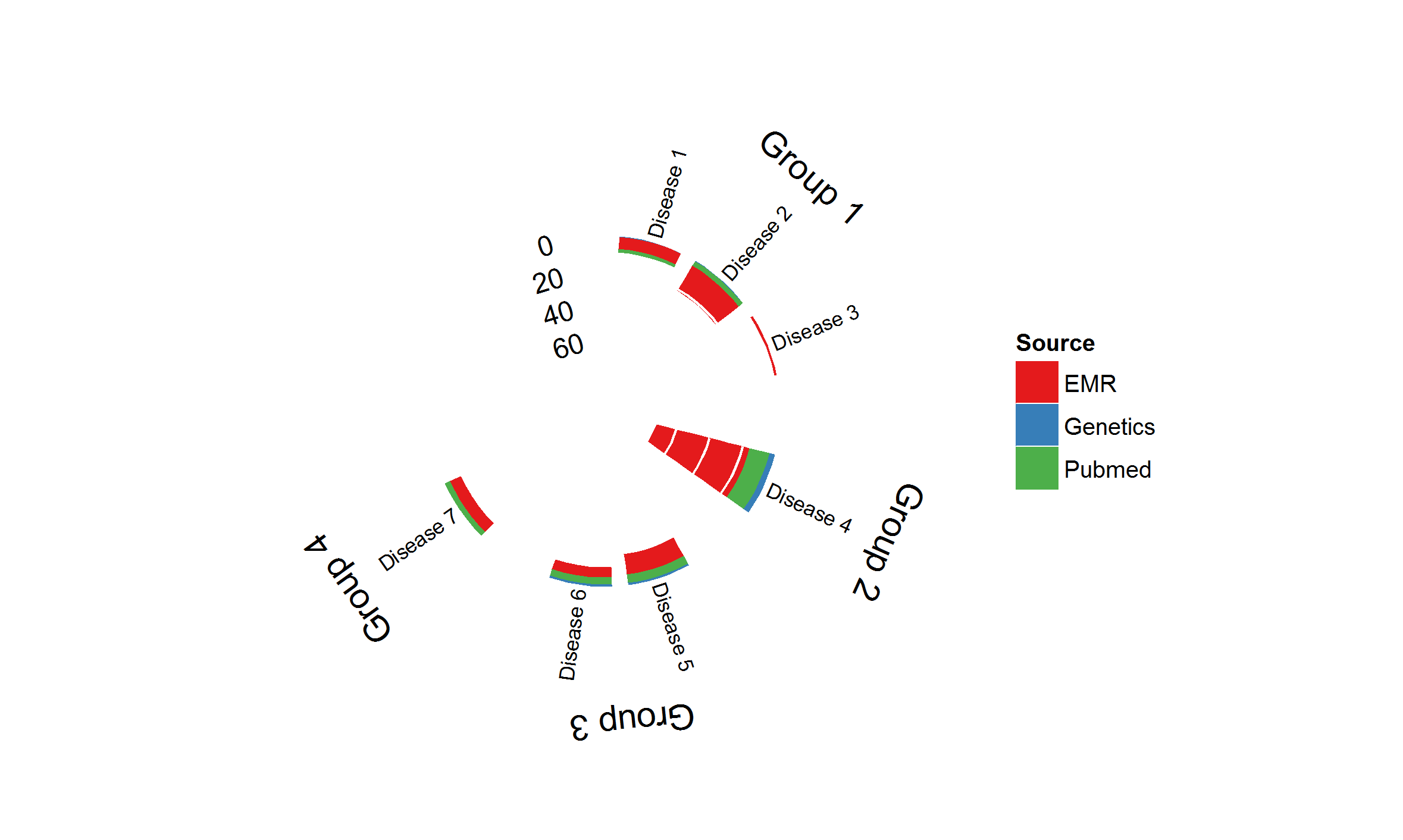
下面是整个函数(最新版本参见GitHub):
## =============================================================================
## Polar BarChart
## Original Polar Histogram by Christophe Ladroue
## Source: http://chrisladroue.com/2012/02/polar-histogram-pretty-and-useful/
## Modified from original by Christos Hatzis 3.22.2012 (CH)
## Modified from modified by Christie Haskell 7.25.2014 (CHR)
## =============================================================================
polarBarChart <-
  function(
    df,
    binSize=1,
    spaceBar=0.05,
    spaceItem=0.2,
    spaceFamily=1.2,
    innerRadius=0.3,
    outerRadius=1,
    nguides=3,
    guides=pretty(range(c(0, df$value)), n=nguides, min.n=2),
    alphaStart=-0.3,
    circleProportion=0.8,
    direction="inwards",
    familyLabels=TRUE,
    itemSize=3,
    legLabels=NULL,
    legTitle="Source"){

    require(ggplot2)
    require(plyr)

    # ordering
    df<-arrange(df,family,item,score)

    # family and item indices
    df$indexFamily <- as.integer(factor(df$family))
    df$indexItem <- with(df, as.integer(factor(item, levels=item[!duplicated(item)])))
    df$indexScore <- as.integer(factor(df$score))

    df<-arrange(df,family,item,score)

    # define the bins

    vMax <- max(df$value)

    guides <- guides[guides < vMax]
    df$value <- df$value/vMax

    # linear projection
    affine<-switch(direction,
                   'inwards'= function(y) (outerRadius-innerRadius)*y+innerRadius,
                   'outwards'=function(y) (outerRadius-innerRadius)*(1-y)+innerRadius,
                   stop(paste("Unknown direction")))

    df<-within(df, {
      xmin <- (binSize + spaceBar) +
        (indexItem - 1) * (spaceItem + (binSize + spaceBar)) +
        (indexFamily - 1) * (spaceFamily - spaceItem)
      xmax <- xmin + binSize
      ymax <- affine(1 - value)
    }
    )

    df<-df[with(df, order(family,item,value)), ]
    df<-ddply(df,.(item),mutate,ymin=c(1,ymax[1:(length(ymax)-1)]))

    # build the guides
    guidesDF<-data.frame(
      xmin=rep(df$xmin,length(guides)),
      y=rep(guides/vMax,1,each=nrow(df)))

    guidesDF<-within(guidesDF,{
      xend<-xmin+binSize+spaceBar
      y<-affine(1-y)
    })


    # Building the ggplot object

    totalLength<-tail(df$xmin+binSize+spaceBar+spaceFamily,1)/circleProportion-0

    # histograms
    p<-ggplot(df)+geom_rect(
      aes(
        xmin=xmin,
        xmax=xmax,
        ymin=ymin,
        ymax=ymax,
        fill=score)
    )

    # guides
    p<-p+geom_segment(
      aes(
        x=xmin,
        xend=xend,
        y=y,
        yend=y),
      colour="white",
      data=guidesDF)

    # label for guides
    guideLabels<-data.frame(
      x=0,
      y=affine(1-guides/vMax),
      label=guides
    )

    p<-p+geom_text(
      aes(x=x,y=y,label=label),
      data=guideLabels,
      angle=-alphaStart*180/pi,
      hjust=1,
      size=4)

    # item labels
    readableAngle<-function(x){
      angle<-x*(-360/totalLength)-alphaStart*180/pi+90
      angle+ifelse(sign(cos(angle*pi/180))+sign(sin(angle*pi/180))==-2,180,0)
    }
    readableJustification<-function(x){
      angle<-x*(-360/totalLength)-alphaStart*180/pi+90
      ifelse(sign(cos(angle*pi/180))+sign(sin(angle*pi/180))==-2,1,0)
    }

    dfItemLabels<-ddply(df,.(item),summarize,xmin=xmin[1])
    dfItemLabels<-within(dfItemLabels,{
      x <- xmin +  (binSize + spaceBar)/2
      angle <- readableAngle(xmin +  (binSize + spaceBar)/2)
      hjust <- readableJustification(xmin +  (binSize + spaceBar)/2)
    })

    p<-p+geom_text(
      aes(
        x=x,
        label=item,
        angle=angle,
        hjust=hjust),
      y=1.02,
      size=itemSize,
      vjust=0.5,
      data=dfItemLabels)

    # family labels
    if(familyLabels){
      #     familyLabelsDF<-ddply(df,.(family),summarise,x=mean(xmin+binSize),angle=mean(xmin+binSize)*(-360/totalLength)-alphaStart*180/pi)
      familyLabelsDF<-aggregate(xmin~family,data=df,FUN=function(s) mean(s+binSize/2))
      familyLabelsDF<-within(familyLabelsDF,{
        x<-xmin
        angle<-xmin*(-360/totalLength)-alphaStart*180/pi
      })

      p<-p+geom_text(
        aes(
          x=x,
          label=family,
          angle=angle),
        data=familyLabelsDF,
        hjust=0.5,
        vjust=0,
        y=1.7)
    }

    # empty background and remove guide lines, ticks and labels
    p<-p+opts(
      panel.background=theme_blank(),
      axis.title.x=theme_blank(),
      axis.title.y=theme_blank(),
      panel.grid.major=theme_blank(),
      panel.grid.minor=theme_blank(),
      axis.text.x=theme_blank(),
      axis.text.y=theme_blank(),
      axis.ticks=theme_blank()
    )

    # x and y limits
    p<-p+xlim(0,tail(df$xmin+binSize+spaceFamily,1)/circleProportion)
    p<-p+ylim(0,outerRadius+0.7)

    # project to polar coordinates
    p<-p+coord_polar(start=alphaStart)

    # nice colour scale
    if(is.null(legLabels)) legLabels <- levels(df$score)
    names(legLabels) <- levels(df$score)
    p<-p+scale_fill_brewer(name=legTitle, palette='Set1',type='qual', labels=legLabels)

    p
}https://stackoverflow.com/questions/24872193
复制相似问题
腾讯云开发者

Copyright © 2013 - 2026 Tencent Cloud. All Rights Reserved. 腾讯云 版权所有
深圳市腾讯计算机系统有限公司 ICP备案/许可证号:粤B2-20090059  粤公网安备44030502008569号
腾讯云计算(北京)有限责任公司 京ICP证150476号 | 京ICP备11018762号