
如何使用DrawingContext (WPF)模糊绘图?
如何使用DrawingContext (WPF)模糊绘图?
提问于 2014-07-18 12:32:18
MSDN说,人们可以应用模糊位图效应来做DrawingContext使用PushEffect方法绘制的东西。但是,PushEffect和*BitmapEffect都被标记为过时了。
如何将模糊处理应用于DrawingContext绘制的内容?
回答 1
Stack Overflow用户
发布于 2014-07-18 12:55:28
这就是你要的
在UserControl的构造函数中,将Effect属性设置为BlurEffect的实例,这将模糊整个呈现。
    public UserControl()
    {
        InitializeComponent();
        Effect = new BlurEffect() { Radius = 10 };
    }
选择性模糊
我试图利用RenderTargetBitmap类来实现选择性模糊。
我为简化使用创建了一个扩展方法
Extension class
public static class DrawingContextExtension
{
    public static void RenderBlurred(this DrawingContext dc, int width, int height, Rect targetRect, double blurRadius, Action<DrawingContext> action)
    {
        Rect elementRect = new Rect(0, 0, width, height);
        BlurredElement element = new BlurredElement(action)
        {
            Width = width,
            Height = height,
            Effect = new BlurEffect() { Radius = blurRadius }
        };
        element.Arrange(elementRect);
        RenderTargetBitmap rtb = new RenderTargetBitmap(width, height, 96, 96, PixelFormats.Default);
        rtb.Render(element);
        dc.DrawImage(rtb, targetRect);
    }

    class BlurredElement : FrameworkElement
    {
        Action<DrawingContext> action;
        public BlurredElement(Action<DrawingContext> action)
        {
            this.action = action;
        }
        protected override void OnRender(DrawingContext drawingContext)
        {
            base.OnRender(drawingContext);
            action(drawingContext);
        }
    }
}
示例代码
    protected override void OnRender(DrawingContext drawingContext)
    {
        base.OnRender(drawingContext);
        int boxSize = 20;

        Pen pen = new Pen(new SolidColorBrush(Colors.Black), 1);
        for (int i = 0; i < 10; i++)
        {
            for (int j = 0; j < 10; j++)
            {
                Rect targetRect = new Rect(i * boxSize, j * boxSize, boxSize, boxSize);
                if (j % 2 == 0)
                {
                    Rect elementRect = new Rect(0, 0, boxSize, boxSize);
                    double blurRadius = 5;
                    drawingContext.RenderBlurred(boxSize, boxSize, targetRect, blurRadius, dc => dc.DrawRectangle(new SolidColorBrush(Colors.Transparent), pen, elementRect));
                }
                else
                {
                    drawingContext.DrawRectangle(new SolidColorBrush(Colors.Transparent), pen, targetRect);
                }
            }
        }
    }
结果
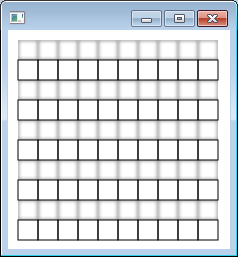
在上面的例子中,每一行奇数行中的矩形都是模糊的。
页面原文内容由Stack Overflow提供。腾讯云小微IT领域专用引擎提供翻译支持
原文链接:
https://stackoverflow.com/questions/24825132
复制相关文章
相似问题
腾讯云开发者

Copyright © 2013 - 2026 Tencent Cloud. All Rights Reserved. 腾讯云 版权所有
深圳市腾讯计算机系统有限公司 ICP备案/许可证号:粤B2-20090059  粤公网安备44030502008569号
腾讯云计算(北京)有限责任公司 京ICP证150476号 | 京ICP备11018762号