
圆形包装文本需要稍作调整
你可能说不出那么多,但出于某种原因,由于我的algorithm...If中的一个缺陷,有些字符被抵消了,有人可以找出是什么原因造成的,我真的很感激,任何批评都是受欢迎的,因为我在java还是很新的。
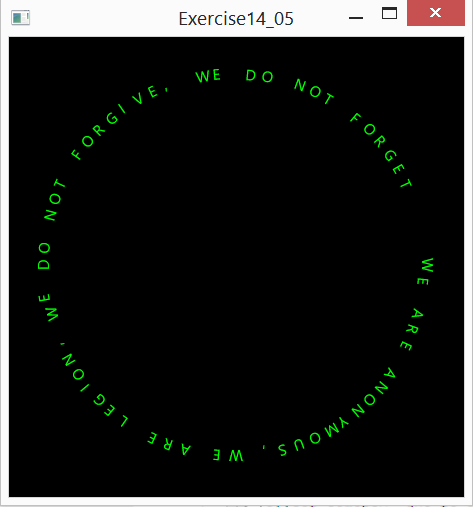
编辑:如果你看上面的图片,左边和右边的E是偏移的。
编辑:我认为这可能是在我计算文本的大小与圆圈的大小之间。
编辑:好的,当我输入600表示宽度和高度时,一切似乎都已经到位了,但是当它从250开始变小时,字符就开始变得更加偏移和重叠。
主修班:
import javafx.application.Application;
import javafx.geometry.Insets;
import javafx.geometry.Pos;
import javafx.scene.Scene;
import javafx.scene.layout.GridPane;
import javafx.stage.Stage;

/**
 * Created by John on 7/11/2014.
 */
public class Prog14_05 extends Application {
    @Override
    public void start(Stage primaryStage) {
        // Create Pane
        circularText phrase = new circularText("WE ARE ANONYMOUS, " +
                "WE ARE LEGION, WE DO NOT FORGIVE, WE DO NOT FORGET ",
                480, 480);

        // Place clock and label in border pane
        GridPane pane = new GridPane();
        pane.setPadding(new Insets(phrase.getTextSize() * 2));
        pane.setAlignment(Pos.CENTER);
        pane.setStyle("-fx-background-color: black");
        pane.getChildren().add(phrase);

        // Create a scene and place it in the stage
        Scene scene = new Scene(pane);
        primaryStage.setTitle("Exercise14_05");
        primaryStage.setScene(scene);
        primaryStage.show();
    }
}
circularText类:
import javafx.scene.layout.Pane;
import javafx.scene.paint.Color;
import javafx.scene.shape.Circle;
import javafx.scene.text.Font;
import javafx.scene.text.Text;

/**
 * Created by John on 7/11/2014.
 */
public class circularText extends Pane {
    double textSize = 30;
    String string = "";
    String fontName = "";
    Font font;
    // Pane's width and height
    private double w = 250, h = 250;

    /** Create Constructor */
    public circularText (String phrase, double w, double h) {
        this.w = w;
        this.h = h;
        this.string = phrase;
        textSize = (this.w / this.string.length()) * 2;
        Font font = new Font("Times Roman", textSize);

        paintText(this.string, this.font);
    }

    /** Set new font */
    public void setFont(String name) {
        Font font = new Font(name, textSize);
        this.font = font;
        this.fontName = name;
        paintText(this.string, this.font);
    }

    /** Return textSize */
    public double getTextSize() {
        return this.textSize;
    }

    /** Set textSize */
    public void setTextSize(double textSize) {
        this.textSize = textSize;
        Font font = new Font(fontName, textSize);
        this.font = font;
        paintText(this.string, this.font);
    }

    /** Return pane's width */
    public double getW() {
        return w;
    }

    /** Set pane's width */
    public void setW(double w) {
        this.w = w;
        textSize = (this.w / this.string.length()) * 2;
        paintText(this.string, this.font);
    }

    /** Return pane's height */
    public double getH() {
        return h;
    }

    /** Set pane's height */
    public void setH(double h) {
        this.h = h;
        textSize = (this.w / this.string.length()) * 2;
        paintText(this.string, this.font);
    }

    /** Paint the Letters */
    protected void paintText(String phrase, Font font) {
        // Initialize parameters
        double radius = Math.min(w, h) * 0.8 * 0.5;
        double centerX = w / 2;
        double centerY = h / 2;
        double size = radius / 4 - this.getTextSize();

        // Draw circle
        Circle circle = new Circle(centerX - size - textSize, centerY - size,
            radius);
        circle.setFill(null);
        circle.setStroke(null);
        getChildren().clear();
        getChildren().add(circle);

        // Place text in a circular pattern
        int i = 0;
        double degree = 360 / phrase.length();
        for (double degrees = 0; i < phrase.length(); i++, degrees += degree) {
            double pointX = circle.getCenterX() + circle.getRadius() *
                Math.cos(Math.toRadians(degrees));
            double pointY = circle.getCenterY() + circle.getRadius() *
                Math.sin(Math.toRadians(degrees));
            Text letter = new Text(pointX, pointY, phrase.charAt(i) + "");
            letter.setFont(font);
            letter.setFill(Color.LIME);
            letter.setRotate(degrees + 90);
            getChildren().add(letter);
        }

    }
}回答 3
Stack Overflow用户
发布于 2014-07-16 18:44:15
好吧,这是我到目前为止所得到的,让我知道你们的想法和可以改进的地方.
import javafx.scene.layout.Pane;
import javafx.scene.paint.Color;
import javafx.scene.paint.Paint;
import javafx.scene.text.Font;
import javafx.scene.text.Text;
import javafx.scene.text.TextAlignment;

/**
 * Created by John on 7/11/2014.
 */
public class CircularText extends Pane {
    private double circleWidth;
    private double circleHeight;
    private double textSize;
    private double textStartDegree;
    private double textRotate;
    private double gapSpacing;
    private double offSetX;
    private double offSetY;
    private Font font;
    private Paint textFill;
    private String fontName;
    final String text;

    /** Default Constructor */
    public CircularText(String text) {
        this.circleWidth = 250;
        this.circleHeight = 250;
        this.text = text;
        textSize = (this.circleWidth / this.text.length()) * 2;
        this.font = new Font("Times Roman", textSize);
        this.textFill = Color.BLACK;
        this.textStartDegree = 240;
        this.textRotate = 90;
        this.gapSpacing = 0.975;
        this.offSetX = 4;
        this.offSetY = 3;
        paintText(this.text, this.font);
    }

    /** Create Constructor */
    public CircularText (String text, double w, double h) {
        this.circleWidth = w;
        this.circleHeight = h;
        this.text = text;
        textSize = (this.circleWidth / (this.text.length()) * 2);
        this.font = new Font("Times Roman", textSize);
        this.textFill = Color.BLACK;
        this.textStartDegree = 240;
        this.textRotate = 90;
        this.gapSpacing = 0.975;
        this.offSetX = 4;
        this.offSetY = 3;
        paintText(this.text, this.font);
    }

    /** Get font color */
    public Paint getTextFill() {
        return textFill;
    }

    /** Set font color */
    public void setTextFill(Paint textFill) {
        this.textFill = textFill;
        this.font = new Font(fontName, textSize);
        paintText(this.text, this.font);
    }

    /** Get starting position for text */
    public double getTextStartDegree() {
        return textStartDegree;
    }

    /** Set starting position for text */
    public void setTextStartDegree(double textStartDegree) {
        this.textStartDegree = textStartDegree;
        this.font = new Font(fontName, textSize);
        paintText(this.text, this.font);
    }

    /** Get letter rotation */
    public double getTextRotate() {
        return textRotate;
    }

    /** Set letter rotation */
    public void setTextRotate(double textRotate) {
        this.textRotate = textRotate;
        this.font = new Font(fontName, textSize);
        paintText(this.text, this.font);
    }

    /** Get spacing between ending and beginning of phrase */
    public double getGapSpacing() {
        return gapSpacing;
    }

    /** Set spacing between ending and beginning of phrase */
    public void setGapSpacing(double gapSpacing) {
        this.gapSpacing = gapSpacing;
        this.font = new Font(fontName, textSize);
        paintText(this.text, this.font);
    }

    /** Get current font */
    public Font getFont() {
        return this.font;
    }

    /** Set new font */
    public void setFont(String name) {
        this.font = new Font(name, textSize);
        this.fontName = name;
        paintText(this.text, this.font);
    }

    /** Return textSize */
    public double getTextSize() {
        return this.textSize;
    }

    /** Set textSize */
    public void setTextSize(double textSize, double offSetX, double offSetY) {
        this.textSize = textSize;
        this.offSetX = offSetX;
        this.offSetY = offSetY;
        this.font = new Font(fontName, textSize);
        paintText(this.text, this.font);
    }

    /** Return circle's width */
    public double getCircleWidth() {
        return circleWidth;
    }

    /** Set circle's width */
    public void setCircleWidth(double w) {
        this.circleWidth = w;
        textSize = (this.circleWidth / this.text.length()) * 2;
        paintText(this.text, this.font);
    }

    /** Return circle's height */
    public double getCircleHeight() {
        return circleHeight;
    }

    /** Set circle's height */
    public void setCircleHeight(double h) {
        this.circleHeight = h;
        textSize = (this.circleWidth / this.text.length()) * 2;
        paintText(this.text, this.font);
    }

    /** Paint the Letters */
    protected void paintText(String text, Font font) {
        getChildren().clear();
        // Initialize parameters
        double radius = Math.min(circleWidth, circleHeight) * 0.8 * 0.5;
        double centerX = circleWidth / 2;
        double centerY = circleHeight / 2;

        // Place text in a circular pattern
        int i = 0;
        double degree = 360.0 / (text.length() / this.gapSpacing);
        for (double degrees = this.textStartDegree;
             i < text.length(); i++, degrees += degree) {
            double pointX = centerX + radius *
                Math.cos(Math.toRadians(degrees)) - (this.textSize) *
                this.offSetX;
            double pointY = centerY + radius *
                Math.sin(Math.toRadians(degrees)) - (this.textSize) *
                this.offSetY;
            Text letter = new Text(pointX, pointY,
                String.valueOf(text.charAt(i)));
            letter.setFont(font);
            letter.setFill(this.textFill);
            letter.setRotate(degrees + this.textRotate);
            letter.setTextAlignment(TextAlignment.CENTER);
            getChildren().add(letter);
        }

    }
}
经过测试这与快递新字体,它似乎是完美的。我还测试了其他字体和所有仍然正确的渲染。我的代码中的漏洞似乎与我为排除故障而创建的循环对象相关,并且出于某种原因决定在我的算法中使用。删除这个循环对象并修复代码中的小缺陷并添加灵活性之后,所有操作都非常完美:)
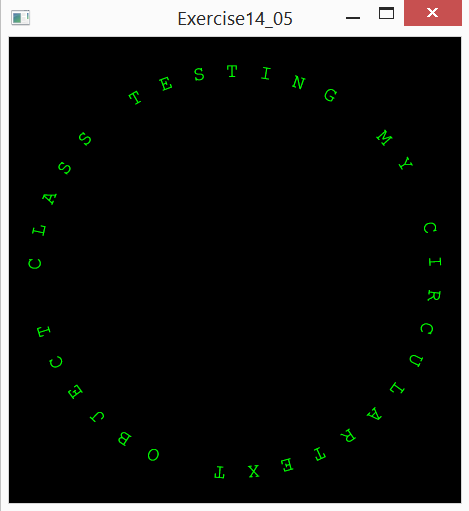
import javafx.application.Application;
import javafx.geometry.Insets;
import javafx.geometry.Pos;
import javafx.scene.Scene;
import javafx.scene.layout.GridPane;
import javafx.scene.paint.Color;
import javafx.stage.Stage;

/**
 * Created by John on 7/11/2014.
 */
public class Prog14_05 extends Application {
    @Override
    public void start(Stage primaryStage) {
        // Create Pane
        CircularText phrase = new CircularText("TESTING MY CIRCULAR" +
                "TEXT OBJECT CLASS",
                500, 500);
        phrase.setFont("Courier New");
        phrase.setTextFill(Color.LIME);
        phrase.setTextSize(20);

        // Place clock and label in border pane
        GridPane pane = new GridPane();
        pane.setPadding(new Insets(phrase.getTextSize()));
        pane.setAlignment(Pos.CENTER);
        pane.setStyle("-fx-background-color: black");
        pane.getChildren().add(phrase);

        // Create a scene and place it in the stage
        Scene scene = new Scene(pane);
        primaryStage.setTitle("Exercise14_05");
        primaryStage.setScene(scene);
        primaryStage.show();
    }
}
测试我的代码,如果你发现任何错误,请告诉我,谢谢大家的帮助
Stack Overflow用户
发布于 2014-07-14 00:55:52
我的三角不太好所以我帮不了你。我认为"W“可能被抵消,而不是"E”。我知道在其他版本的摇摆"W“曾引起绘画问题,但我不记得细节。因此,我可能建议尝试不同的字符,看看你是否仍然有相同的问题,在这两个位置。
这是我很久以前在网上发现的另一个圆形绘画的例子。我试过你的短信,“我们”被重叠了。我把"W“改为"R”,它似乎工作得很好,所以也许这验证了我的上述说法?
import javax.swing.JFrame;
import javax.swing.JPanel;
import javax.swing.Timer;
import java.awt.Font;
import java.awt.Color;
import java.awt.Graphics;
import java.awt.Graphics2D;
import java.awt.GradientPaint;
import java.awt.RenderingHints;
import java.awt.event.ActionListener;
import java.awt.event.ActionEvent;
import java.awt.geom.AffineTransform;
//import com.sun.awt.AWTUtilities;

public class SplashPortalPanel6 extends JPanel
{
    private static final long serialVersionUID = 1L;
//    private static final char[] MESSAGE = "  SplashPortal.net".toCharArray();
    private static final char[] MESSAGE = "  WE ARE ANONYMOUS, WE ARE LEGION, WE DO NOT FORGIVE, WE DO NOT FORGET ".toCharArray();
//    private static final char[] MESSAGE = "  RE ARE ANONYMOUS, RE ARE LEGION, RE DO NOT FORGIVE, RE DO NOT FORGET ".toCharArray();

    private static final double R90 = Math.toRadians(90);
    private static final double R_90 = Math.toRadians(-90);

    private AffineTransform cumalativeRotation = new AffineTransform();
    private double rotation = Math.toRadians(360.0 / MESSAGE.length);

    private Font font = new Font("Impact",Font.ITALIC,40);

    private final Timer timer = new Timer(1000/76, new ActionListener() {
        public void actionPerformed(ActionEvent e) {
            repaint();//just repaint
        }
    });

    public SplashPortalPanel6() {
      setPreferredSize(new java.awt.Dimension(600, 600));
      setOpaque(false);
    }

    //This method is called when the panel is connected to a native
    //screen resource.  It's an indication we can now start painting.
    public void addNotify() {
        super.addNotify();
        timer.start();
    }
    public void removeNotify() {
        super.removeNotify();
        timer.stop();
    }

    private static final GradientPaint gradient = new GradientPaint(0F, 0F, Color.BLUE, 5F, 10F, Color.CYAN, true);

    private static final int x = 0, y = 0, w = 100, h = 100;

    public void paintComponent(Graphics g) {
        Graphics2D g2 = (Graphics2D) g;
        g2.setRenderingHint(RenderingHints.KEY_ANTIALIASING, RenderingHints.VALUE_ANTIALIAS_ON);
        g2.setRenderingHint(RenderingHints.KEY_TEXT_ANTIALIASING, RenderingHints.VALUE_TEXT_ANTIALIAS_ON);
        g2.setFont(font);
        g2.translate( getWidth()/2, getHeight()/2 );
        cumalativeRotation.rotate(rotation/50);
        g2.transform( cumalativeRotation );

        for(int i = 0; i < MESSAGE.length; i++) {
            // fill the rectangle
            g2.translate(250, 0);
            g2.rotate(R90);
            g2.setColor(Color.BLACK);
//            g2.fillRect(x,y,w,h);
            // draw the border
            g2.setColor(Color.WHITE);
//            g2.drawRect(x,y,w,h);
            // draw the character
            g2.setPaint(gradient);
            g2.drawChars(MESSAGE,i, 1, x+30, y+50);
            g2.rotate(R_90);
            g2.translate(-250, 0);
            g2.rotate(rotation);
        }
    }

    public static void createAndShowSplashScreen() {
        JFrame frame = new JFrame();
        frame.setDefaultCloseOperation(JFrame.EXIT_ON_CLOSE);
        frame.setUndecorated(true);
        frame.setContentPane(new SplashPortalPanel6());
        frame.pack();
        frame.setLocationRelativeTo(null);
//        AWTUtilities.setWindowOpaque(frame, false);
        //frame.setAlwaysOnTop(true);
        frame.setVisible(true);
    }

    public static void main(String[] args) {
        java.awt.EventQueue.invokeLater(new Runnable() {
            public void run() {
                createAndShowSplashScreen();
            }
        });
    }
}
注意,如果取消对"fillRect“和"drawRect”语句的注释,您将看到代码的原始实现。当然,您需要使用较短的第一个消息字符串来查看效果。
Stack Overflow用户
发布于 2014-07-14 01:11:16
添加
    letter.setTextAlignment(TextAlignment.CENTER);
    letter.setWrappingWidth(100);
不确定JavaFX文本呈现是怎么回事。
这个数字似乎是正确的。为了清晰地编写代码,有些建议添加显式类型,以确保不将双倍和浮动与int混合。所以而不是
双centerY =h/ 2;
做
双centerY =h/ 2.0d;
(也拿出额外的“这个”杂乱无章,许多方法没有像"setH“那样被使用,而使类名大写为CircularText)
https://stackoverflow.com/questions/24727889
复制相似问题
腾讯云开发者

Copyright © 2013 - 2026 Tencent Cloud. All Rights Reserved. 腾讯云 版权所有
深圳市腾讯计算机系统有限公司 ICP备案/许可证号:粤B2-20090059  粤公网安备44030502008569号
腾讯云计算(北京)有限责任公司 京ICP证150476号 | 京ICP备11018762号