
如何避免MultiPageEditor与StructuredTextEditor一起显示所有页面的大纲视图?
我正在为eclipse开发一个多页的XML编辑器,并在第一页使用StructuredTextEditor。我想知道,如果选择文本编辑器,是否可以让大纲视图显示内容。虽然所选内容是其他页面之一,但大纲视图不应该显示任何内容。
我将文本编辑器添加到多页编辑器,如下所示:
private StructuredTextEditor textEditor;

@Override
protected void addPages()
{
    textEditor = new StructuredTextEditor();
    addPage(textEditor, getEditorInput());

    // add other pages
}我还在plugin.xml中声明了一个内容类型
<extension point="org.eclipse.core.contenttype.contentTypes">
     <content-type
         id="artFile"
         name="%content-type.name"
         base-type="org.eclipse.core.runtime.xml"
         file-names="app_registration_template.vm"
         file-extensions="vm">
         <describer class="org.eclipse.core.runtime.content.XMLContentDescriber"/>
     </content-type>
</extension>
现在如何控制大纲视图?
回答 1
Stack Overflow用户
发布于 2015-04-15 20:19:26
我也有过类似的问题。
正如@greg-449在问题的评论中提到的,“content视图代码对多页编辑器一无所知,每个编辑器只支持一个内容大纲”。
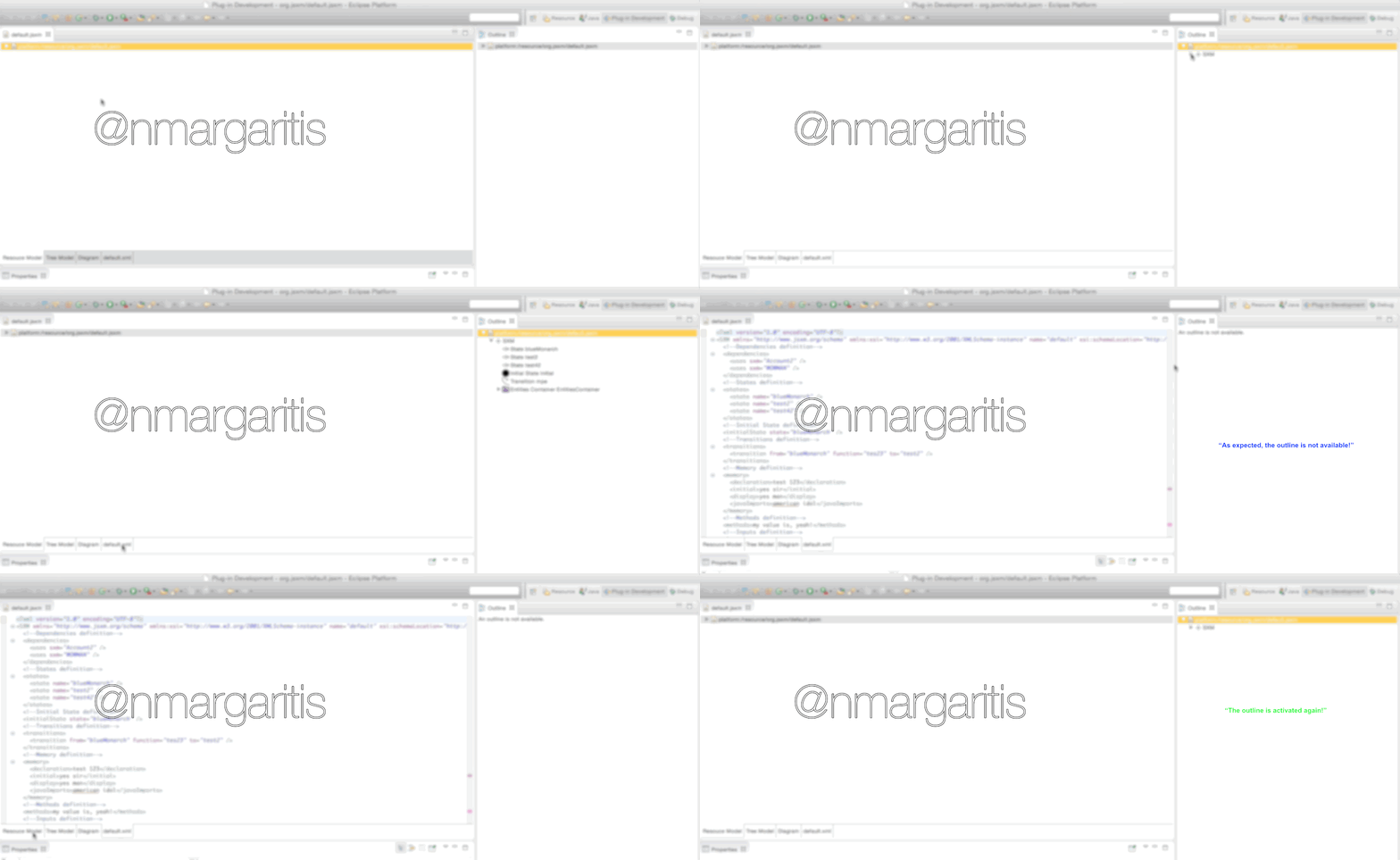
这是真的,实际上给了我一个如何处理这个问题的想法。我想出的解决方案与刷新outline视图有关(通过编程方式关闭并再次打开它),同时在选项卡中导航。
因此,首先,我在一个多页编辑器中应用了该解决方案,该编辑器结合了EMF/GMF选项卡以及用于显示XML的StructuredTextEditor。
你应该拥有的
您的多页编辑器应该覆盖/添加以下方法。请注意,这不是即插即用的情况,搜索如何创建自定义大纲页面或如何基于editorInput调用默认大纲页。我之所以加上这句话是为了理解。
(注意showOutlineView方法)它返回false,因为我们想禁用其他视图。但是,如果您愿意,可以为每个编辑器提供不同的大纲。为此,您需要始终在showOutlineView中返回true,并以不同的方式初始化getContentOutlinePage()方法中的大纲页面。可能是根据请求的编辑器对页面进行不同的实现。
/**
 * This is how the framework determines which interfaces we implement.
*/
@SuppressWarnings("rawtypes")
@Override
public Object getAdapter(Class key) {
    if (key.equals(IContentOutlinePage.class)) {
        return showOutlineView() ? getContentOutlinePage() : null;
    } else {
        return super.getAdapter(key);
    }
}

/**
 * This accesses a cached version of the content outliner.
 */
public IContentOutlinePage getContentOutlinePage() {
    if (contentOutlinePage == null) {
        //your outlinepage from your editor
        //or create a custom page(s)
    }
    return contentOutlinePage;
}

/**
 * Returns whether the outline view should be presented to the user.
 */
protected boolean showOutlineView() {
    //e.g if StructuredTextEditor xmlEditor;
    //like this we force the editor getAdapter contentOutline part
    //to return false, and therefore the contentoutline will get a value of
    //null that results in "an outline in not available" in the outline view
    if(getActiveEditor() != xmlEditor)) {
        return false;
    }
    return true;
}
如何应用解决方案
为了应用该解决方案,您需要修改pageChange方法,并引入一个方法,该方法以编程方式刷新大纲视图并适当调用它。
public void refreshOutlineView() {
    //get the activePage
    IWorkbenchPage wp =  PlatformUI.getWorkbench().getActiveWorkbenchWindow().getActivePage();
    //Find desired view by its visual ID
    IViewPart myView=wp.findView("org.eclipse.ui.views.ContentOutline");

    //Hide the view :
    wp.hideView(myView);
    try {
      //show the view again
      PlatformUI.getWorkbench().getActiveWorkbenchWindow().getActivePage().showView("org.eclipse.ui.views.ContentOutline");
    } catch (PartInitException e) {
        // TODO Auto-generated catch block
        e.printStackTrace();
    }
}

@Override
protected void pageChange(int pageIndex) {
    refreshOutlineView();
    ....
    ....
    ....
}
解决方案是怎么做的?
编辑器的大纲视图是初始化的,而编辑器是初始化的(例如,当您用编辑器打开文件时)。在此之后,它将被检索,并且它不会因为缓存而改变。现在,这个解决方法是以编程方式关闭outline视图(以便强制初始化调用)。当进行此调用时,我们可以初始化并显示我们偏好的大纲视图。
右击新选项卡中的gif - open以查看它。
https://stackoverflow.com/questions/24694269
复制相似问题
腾讯云开发者

Copyright © 2013 - 2026 Tencent Cloud. All Rights Reserved. 腾讯云 版权所有
深圳市腾讯计算机系统有限公司 ICP备案/许可证号:粤B2-20090059  粤公网安备44030502008569号
腾讯云计算(北京)有限责任公司 京ICP证150476号 | 京ICP备11018762号