
没有找到'WindowsFormsHost‘
在我的wpf应用程序中,我试图使用windows窗体控件.但是我得到了一个错误,即没有找到类型'WindowsFormsHost‘的错误。确认您没有丢失程序集引用,并且所有引用的程序集都已生成。有人能帮我完成这件事吗..。以下是我的代码
       c#:code

     public Window2()
    {
        InitializeComponent();
        System.Windows.Forms.PictureBox PictureBox1 = new System.Windows.Forms.PictureBox();
        windowsFormsHost1.Child = PictureBox1;
        PictureBox1.Paint += new System.Windows.Forms.PaintEventHandler(PictureBox1_Paint);


    }
   xaml:code


<WindowsFormsHost Height="175" HorizontalAlignment="Left" Margin="10,10,0,0" Name="windowsFormsHost1" VerticalAlignment="Top" Width="255" />回答 1
Stack Overflow用户
发布于 2014-07-11 08:12:30
通常,当我们看到一个错误时,上面写着:
找不到
SomeClass类型。验证您没有丢失程序集引用,并且所有引用的程序集都已生成。
可能有几个问题。这意味着我们没有将相关dll的引用添加到我们的项目中,或者我们没有正确导入命名空间。
为了找到我们需要添加引用的dll,我们通常转到MSDN,使用搜索项“SomeClass类”搜索.在您的例子中,“WindowsFormsHost类”。为WindowsFormsHost类执行此操作,我们将看到以下内容:
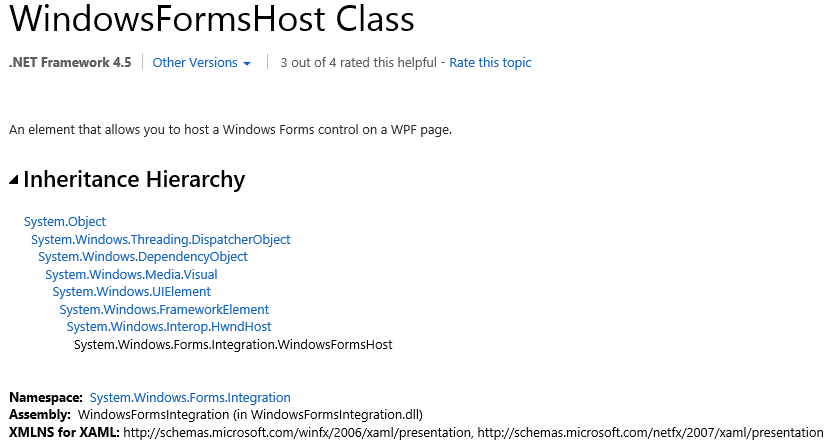
请注意以下一行:
程序集: WindowsFormsIntegration (以WindowsFormsIntegration.dll表示)
在Visual中的Add Reference对话框中,我们可以看到WindowsFormsIntegration的dll条目
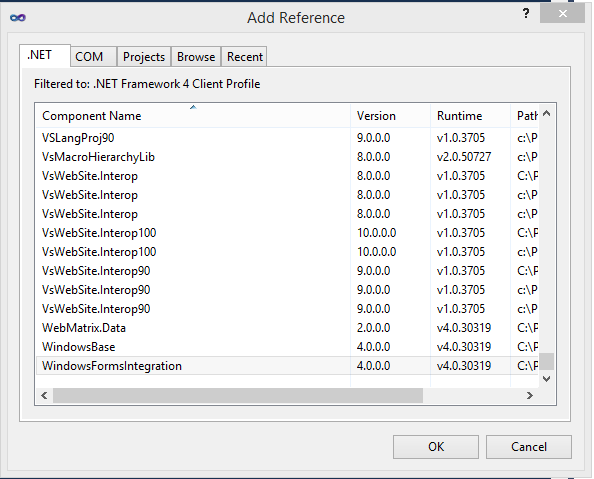
这就是我们要导入哪个dll的方法。现在,我们只需要确保正确导入名称空间,无论是在C#中:
using System.Windows.Forms.Integration;在XAML中,在使用WindowsFormsIntegration控件之前,不需要为WindowsFormsHost dll添加XAML。
<WindowsFormsHost>
    <!-- Some WinForms Control -->
</WindowsFormsHost>有关更多信息,请参见MSDN上的WindowsFormsHost类页面。
https://stackoverflow.com/questions/24692490
复制相似问题
腾讯云开发者

Copyright © 2013 - 2026 Tencent Cloud. All Rights Reserved. 腾讯云 版权所有
深圳市腾讯计算机系统有限公司 ICP备案/许可证号:粤B2-20090059  粤公网安备44030502008569号
腾讯云计算(北京)有限责任公司 京ICP证150476号 | 京ICP备11018762号