
我在Nutiteq下的ViewLabel不能正常工作
我可以在ViewLabel中用Nutiteq填充视图,但不能在这个布局的文本视图中设置正确的文本。
我的代码如下
    //Setting Popup Label if we click the area
    LayoutInflater inflater = (LayoutInflater) this.getSystemService(Context.LAYOUT_INFLATER_SERVICE);
    View labelView = inflater.inflate(R.layout.popup_field, null);

    //In order to get a dynamic "redimensionable" Ballon aka ViewLabel
    labelView.measure(MeasureSpec.makeMeasureSpec(0, MeasureSpec.UNSPECIFIED),
                      MeasureSpec.makeMeasureSpec(0, MeasureSpec.UNSPECIFIED));
    labelView.layout(0, 0, labelView.getMeasuredWidth(), labelView.getMeasuredHeight());

    //labelView.measure(400, 400);
    //labelView.layout(100, 100, 400, 400);

    Log.info("drawField:: Nach Label fieldLabel = new ViewLabel... ");

    LinearLayout lLayout = (LinearLayout)labelView.findViewById(R.id.layout1);
    lLayout.setBackgroundColor(Color.RED);
    TextView farmNameTV  = (TextView)labelView.findViewById(R.id.farmName);
    TextView areaTV      = (TextView)labelView.findViewById(R.id.area);
    TextView statusTV    = (TextView)labelView.findViewById(R.id.status);

    farmNameTV.setTextColor(Color.BLACK);
    farmNameTV.setText("Farm CacoCaCoca");


    areaTV.setTextColor(Color.BLACK);
    String areaString = "12.34"
    areaTV.setText("Area "+areaString);

    statusTV.setTextColor(Color.BLACK);
    String statusString = "Status:::qwertzuiopasdfghjklyxcvbnm";
    statusTV.setText(statusString);
*你能看到红色的是我膨胀的视图。
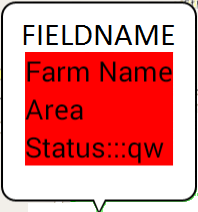
R.layout.popup_field看起来像这样
<?xml version="1.0" encoding="utf-8"?>
<LinearLayout xmlns:android="http://schemas.android.com/apk/res/android"
android:id="@+id/layout1"
android:layout_width="match_parent"
android:layout_height="match_parent"
android:orientation="vertical" >

<TextView
    android:id="@+id/farmName"
    android:layout_width="match_parent"
    android:layout_height="wrap_content"
    android:text="@string/farmName"/>

<TextView
    android:id="@+id/area"
    android:layout_width="match_parent"
    android:layout_height="wrap_content"
    android:text="@string/area"/>

<TextView
    android:id="@+id/status"
    android:layout_width="match_parent"
    android:layout_height="wrap_content"
    android:text="@string/status"/>
字符串在哪里
<?xml version="1.0" encoding="utf-8"?>
<resources>
<string name="app_name">Nutiteq3D</string>
<string name="area">Area</string>
<string name="status">Status</string>
<string name="farmName">Farm Name</string>
</resources>
已经有人完成这个任务了吗?有人能帮我找出我的错误吗?
使用google的MapView很容易,但是我用Nutiteq和纯活动来开发它,所以,没有片段,为了膨胀,我们通常需要一个ViewGroup,而G-Api下的ViewGroup是MapView,因此从ViewGroup继承而来,但是在Nutiteq中,MapView不是这样的,Nutiteq的MapView继承了android.view,我不能转换,我可以在inflate调用中指定为ViewGroup null,如你所见。
所以,各位,我非常感谢你们的帮助。
亲切的问候
回答 1
Stack Overflow用户
发布于 2014-07-11 09:30:58
解决了!它与ViewLabel无关,但与普通的Android.View有关,在声明了可调整大小的View之后,我希望将文本分配给TextView,因此它不能正常工作。
因此,解决方案是编写labelView.measure(MeasureSpec.makeMeasureSpec(0,MeasureSpec.UNSPECIFIED)、MeasureSpec.makeMeasureSpec(0,MeasureSpec.UNSPECIFIED)、labelView.layout(0、0、labelView.getMeasuredWidth()、labelView.getMeasuredHeight()以上的所有内容;
https://stackoverflow.com/questions/24681927
复制相似问题
腾讯云开发者

Copyright © 2013 - 2026 Tencent Cloud. All Rights Reserved. 腾讯云 版权所有
深圳市腾讯计算机系统有限公司 ICP备案/许可证号:粤B2-20090059  粤公网安备44030502008569号
腾讯云计算(北京)有限责任公司 京ICP证150476号 | 京ICP备11018762号