
错误:当以PowerPoint将形状粘贴为PNG格式时,“指定的数据类型不可用”
我需要编写一个宏来将PPT演示文稿中的所有分组图(形状、箭头和文本)转换为PNG。(我正在使用一些eLearning软件转换PPT,而图最终会损坏;我需要它们成为PNG,因为增强的元文件也会带来问题)。
我一直在使用宏中的一些稍微修改的代码,该宏将图片(增强的元文件)转换为PNG。我所做的就是将msoPicture更改为msoGroup:
Sub ConvertAllPicsToPNG()
    Dim oSl As Slide
    Dim oSh As Shape

    For Each oSl In ActivePresentation.Slides
        For Each oSh In oSl.Shapes
            ' modify the following depending on what you want to
            ' convert
            Select Case oSh.Type
                Case msoGroup
                    ConvertPicToPNG oSh
                Case Else

            End Select
        Next
    Next

End Sub

Sub ConvertPicToPNG(ByRef oSh As Shape)
    Dim oNewSh As Shape
    Dim oSl As Slide

    Set oSl = oSh.Parent
    oSh.Copy
    Set oNewSh = oSl.Shapes.PasteSpecial(ppPastePNG)(1)

    With oNewSh
        .Left = oSh.Left
        .Top = oSh.Top
        Do
            .ZOrder (msoSendBackward)
        Loop Until .ZOrderPosition = .ZOrderPosition
    End With

    oSh.Delete

End Sub
我得到行上的错误“形状(未知成员)”。
Set oNewSh = oSl.Shapes.PasteSpecial(ppPastePNG)(1)我怀疑VBA的对象引用模型()存在问题,正如研究告诉我的GroupItems和GroupShapes一样,但我无法理解。
回答 1
Stack Overflow用户
发布于 2014-07-10 16:52:21
我在PPT 2010中得到了这个错误:“形状(未知成员):无效请求。剪贴板是空的,或者包含可能不会粘贴在这里的数据。”
我们都注意到,当您缩小或使用选择窗格时,会出现“125号形状”:
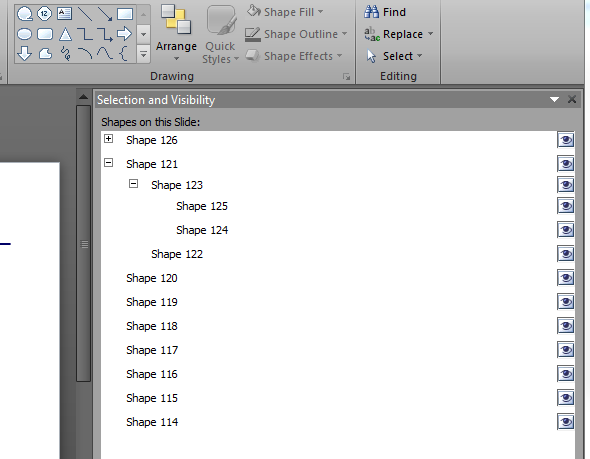
经过大量的尝试和错误(我认为嵌套可能是个问题,并试图成功地不嵌套它们,但错误仍然发生),我注意到它们每一个都有一个0的高度。如果我把它改变成任何积极的价值,成功!
下面是一个补丁--调用一个新函数以确保形状的高度大于0:
    For Each oSh In oSl.Shapes
        ' modify the following depending on what you want to
        ' convert
        Select Case oSh.Type
            Case msoGroup
                'Ensure each grouped shape has h/w of at least "1"
                FixShape oSh
                ConvertPicToPNG oSh
            Case Else
以下是功能:
Function FixShape(ByRef oSh As Shape)

Dim s As Shape
'## Iterate the GroupItems collection and ensure minimum height/width
'   for converion to png/jpg/etc.
For Each s In oSh.GroupItems
    If s.Height = 0 Then s.Height = 1
    If s.Width = 0 Then s.Width = 1
    'Recursive
    If s.Type = msoGroup Then
        Set s = FixShape(s)
    End If
Next

Set FixShape = oSh

End Function
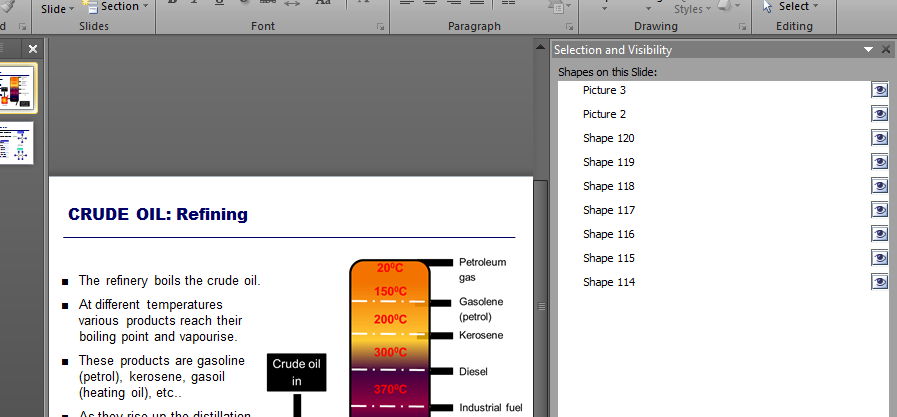
下面是将形状转换为PNG的最终输出:
错误的根本原因
您似乎无法以PNG格式粘贴高度/宽度为0的形状(尽管您可以将它们粘贴为形状)。这似乎是有意的限制,但不幸的是,错误信息是模棱两可的。
此错误的解决方案
在尝试粘贴为图像格式(PNG、JPG等)之前,确保形状的最小尺寸为1x1。
当您能够通过删除违规的形状来解决问题时,这将有助于您不必搜索那些窗格外形状,或者在将来再次尝试对此进行故障排除。
https://stackoverflow.com/questions/24675562
复制相似问题
腾讯云开发者

Copyright © 2013 - 2026 Tencent Cloud. All Rights Reserved. 腾讯云 版权所有
深圳市腾讯计算机系统有限公司 ICP备案/许可证号:粤B2-20090059  粤公网安备44030502008569号
腾讯云计算(北京)有限责任公司 京ICP证150476号 | 京ICP备11018762号