
无法在JSeparator中垂直对齐水平BorderLayout
无法在JSeparator中垂直对齐水平BorderLayout
提问于 2014-07-07 01:10:45
使用BorderLayout,我放置了两个不同的JButtons,一个在左边(西),一个在右边(东方),另一个在中间的水平JSeparator。我想要做的是y-对齐分隔符到中间,而不是现在的顶部。我已经尝试在分隔符上使用以下方法
setAlignmentY(CENTER_ALIGNMENT);但它绝对没有效果。我遗漏了什么?如果不可能,那么在不使用外部库的情况下,还有其他方法可以做到吗?
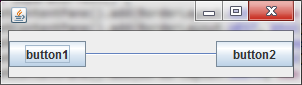
我得到的是:
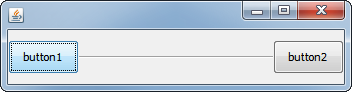
这就是我想要达到的目标:
这是我正在使用的示例代码(为清晰起见,添加了顶部和底部的JPanels):
import java.awt.BorderLayout;
import javax.swing.*;

public class SeparatorTest extends JFrame{

    JButton btn1 = new JButton("button1");
    JSeparator sep = new JSeparator(SwingConstants.HORIZONTAL);
    JButton btn2 = new JButton("button2");

    public SeparatorTest() {
        getContentPane().add(BorderLayout.NORTH, new JPanel());
        getContentPane().add(BorderLayout.WEST, btn1);
        getContentPane().add(BorderLayout.CENTER, sep);
        getContentPane().add(BorderLayout.EAST, btn2);
        getContentPane().add(BorderLayout.SOUTH, new JPanel());

        setSize(300, 85);
    }

    public static void main(String[] args){
        new SeparatorTest().setVisible(true);
    }
}
编辑1:我不介意布局,只要它看起来一样,我在这里使用BorderLayout,因为它很简单.
回答 1
Stack Overflow用户
回答已采纳
发布于 2014-07-07 01:32:16
这与JSeparator UI委托如何决定如何绘制组件有关,基于测试,组件似乎总是希望从y位置0开始绘制分隔符。
相反,您可能需要将JSeparator封装在另一个面板中,该面板可以使用满足您需要的不同的布局管理器,例如GridBagLayout (当然,您可以先使用GridBagLayout,但我的目标是尽可能地进行最小的更改;)
import java.awt.BorderLayout;
import java.awt.EventQueue;
import java.awt.GridBagConstraints;
import java.awt.GridBagLayout;
import javax.swing.JButton;
import javax.swing.JFrame;
import javax.swing.JPanel;
import javax.swing.JSeparator;
import javax.swing.SwingConstants;
import javax.swing.UIManager;
import javax.swing.UnsupportedLookAndFeelException;

public class SeparatorTest extends JFrame {

    JButton btn1 = new JButton("button1");
    JSeparator sep = new JSeparator(SwingConstants.HORIZONTAL);
    JButton btn2 = new JButton("button2");

    public SeparatorTest() {

        JPanel pane = new JPanel(new GridBagLayout());
        GridBagConstraints gbc = new GridBagConstraints();
        gbc.gridwidth = GridBagConstraints.REMAINDER;
        gbc.weightx = 1;
        gbc.fill = GridBagConstraints.HORIZONTAL;
        pane.add(sep, gbc);

        getContentPane().add(BorderLayout.NORTH, new JPanel());
        getContentPane().add(BorderLayout.WEST, btn1);
        getContentPane().add(BorderLayout.CENTER, pane);
        getContentPane().add(BorderLayout.EAST, btn2);
        getContentPane().add(BorderLayout.SOUTH, new JPanel());

        setSize(300, 85);
    }

    public static void main(String[] args) {
        EventQueue.invokeLater(new Runnable() {
            @Override
            public void run() {
                try {
                    UIManager.setLookAndFeel(UIManager.getSystemLookAndFeelClassName());
                } catch (ClassNotFoundException | InstantiationException | IllegalAccessException | UnsupportedLookAndFeelException ex) {
                }

                SeparatorTest frame = new SeparatorTest();
                frame.setDefaultCloseOperation(JFrame.EXIT_ON_CLOSE);
                frame.pack();
                frame.setLocationRelativeTo(null);
                frame.setVisible(true);
            }
        });
    }
}页面原文内容由Stack Overflow提供。腾讯云小微IT领域专用引擎提供翻译支持
原文链接:
https://stackoverflow.com/questions/24601831
复制相关文章
相似问题
腾讯云开发者

Copyright © 2013 - 2026 Tencent Cloud. All Rights Reserved. 腾讯云 版权所有
深圳市腾讯计算机系统有限公司 ICP备案/许可证号:粤B2-20090059  粤公网安备44030502008569号
腾讯云计算(北京)有限责任公司 京ICP证150476号 | 京ICP备11018762号