
如何在mayavi (显示)中绘制彩色图像
是否可以使用mayavi绘制三色通道的图像?根据mayavi的文档,mayavi.mlab.imshow只能处理形状(n )的图像。
回答 2
Stack Overflow用户
发布于 2014-06-28 21:40:09
方法
我不得不使用mayavi的定制的colormaps,参见colormap.html。
我制作了一个彩色地图,它由原始(Nxmx3)图像中的所有像素作为行组成。我还包括一个alpha通道,这样就可以正确地显示透明的png。接下来,我使用灰度图像作为查找表,将像素值作为存储在彩色地图中的原始像素的索引。我创建了一个以查找表作为输入图像的imshow对象,并用我的自定义颜色映射替换了imshow对象的颜色映射。
代码
下面是一些为感兴趣的人编写的带有测试用例的工作代码。除了pl.imread(.)的测试用例外,任何地方都可以用Numpy (Pylab包装Numpy)代替Pylab。在Python2.7上进行测试,在Windows7上使用Mayavi4.3.0进行测试。(不幸的是,我必须首先修复Windows https://github.com/enthought/mayavi/pull/96/files上的以下Mayavi。)
import pylab as pl
from mayavi import mlab

def mlab_imshowColor(im, alpha=255, **kwargs):
    """
    Plot a color image with mayavi.mlab.imshow.
    im is a ndarray with dim (n, m, 3) and scale (0->255]
    alpha is a single number or a ndarray with dim (n*m) and scale (0->255]
    **kwargs is passed onto mayavi.mlab.imshow(..., **kwargs)
    """
    try:
        alpha[0]
    except:
        alpha = pl.ones(im.shape[0] * im.shape[1]) * alpha
    if len(alpha.shape) != 1:
        alpha = alpha.flatten()

    # The lut is a Nx4 array, with the columns representing RGBA
    # (red, green, blue, alpha) coded with integers going from 0 to 255,
    # we create it by stacking all the pixles (r,g,b,alpha) as rows.
    myLut = pl.c_[im.reshape(-1, 3), alpha]
    myLutLookupArray = pl.arange(im.shape[0] * im.shape[1]).reshape(im.shape[0], im.shape[1])

    #We can display an color image by using mlab.imshow, a lut color list and a lut lookup table.
    theImshow = mlab.imshow(myLutLookupArray, colormap='binary', **kwargs) #temporary colormap
    theImshow.module_manager.scalar_lut_manager.lut.table = myLut
    mlab.draw()

    return theImshow

def test_mlab_imshowColor():
    """
    Test if mlab_imshowColor displays correctly by plotting the wikipedia png example image
    """

    #load a png with a scale 0->1 and four color channels (an extra alpha channel for transparency).
    from urllib import urlopen
    url = 'http://upload.wikimedia.org/wikipedia/commons/4/47/PNG_transparency_demonstration_1.png'
    im = pl.imread(urlopen(url), format='png')
    im *= 255

    mlab_imshowColor(im[:, :, :3], im[:, :, -1])

    mlab.points3d([-200, 300, -200, 300],
                  [-200, 300, 200, -300],
                  [300, 300, 300, 300])
    mlab.show()

if __name__ == "__main__":
    test_mlab_imshowColor()
结果
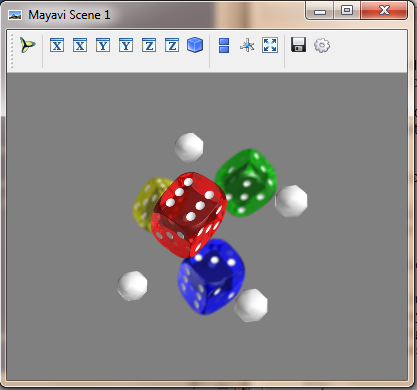
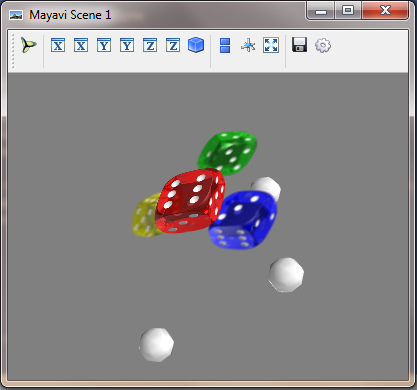
Stack Overflow用户
发布于 2017-07-15 20:44:13
不过,load_lut_from_file似乎不像imshow预期的那样工作。直接在演员中设置颜色是唯一对我有效的方法。
import pylab as pl
import numpy as np

from mayavi import mlab
from urllib import urlopen
from tvtk.api import tvtk

def test_mlab_imshowColor():
    """
    Test if mlab_imshowColor displays correctly by plotting the wikipedia png example image
    """
    #load a png with a scale 0->1 and four color channels (an extra alpha channel for transparency).
    url = 'http://upload.wikimedia.org/wikipedia/commons/4/47/PNG_transparency_demonstration_1.png'
    im = pl.imread(urlopen(url), format='png') * 255

    colors = tvtk.UnsignedCharArray()
    colors.from_array(im.transpose((1,0,2)).reshape(-1, 4))
    m_image = mlab.imshow(np.ones(im.shape[:2]))
    m_image.actor.input.point_data.scalars = colors

    mlab.points3d([-200, 300, -200, 300],
                  [-200, 300, 200, -300],
                  [300, 300, 300, 300])

    mlab.draw()
    mlab.show()

if __name__ == "__main__":
test_mlab_imshowColor()https://stackoverflow.com/questions/24471210
复制相似问题
腾讯云开发者

Copyright © 2013 - 2026 Tencent Cloud. All Rights Reserved. 腾讯云 版权所有
深圳市腾讯计算机系统有限公司 ICP备案/许可证号:粤B2-20090059  粤公网安备44030502008569号
腾讯云计算(北京)有限责任公司 京ICP证150476号 | 京ICP备11018762号