
如何使用Excel搜索街道地址并将值返回Excel?
我在Excel中有一份5万多个名额的清单。拱形国家公园,康奈尔玻璃博物馆)。当我在谷歌上输入“康奈尔玻璃博物馆”时,它会返回一个地址"1 Museum Way,Corning,NY 14830“。我需要完整的街道地址街#、街道名称和邮政编码。不过,我的状态是NY (在Excel中)。有没有人知道如何在谷歌上搜索地址(输入康奈尔玻璃博物馆),然后将街道地址返回Excel(纽约康宁博物馆1号,纽约14830)?我知道VBA能够做到这一点,我不想手动做50,000次,而且我是VBA的新手。如果有人知道我会非常感激的!提前谢谢你。
回答 3
Stack Overflow用户
发布于 2014-06-27 21:42:58
以下是解决问题所需的信息
这里是一篇文章,展示了如何使用VBA和XML与Google交互(通过google )。
这里是谷歌的Place,这就是你要找的东西(请求/接收谷歌的信息)。
答案
我创造了一个工作测试。您必须创建google密钥,您可以使用这里来实现这一点。获得API密钥后,将其放入代码并运行它。
请注意,Google确实限制了每天使用API密钥的频率。一个免费的用户似乎每天收到1000个对"place“API的”请求“。令人烦恼的是,有些电话似乎比其他电话更值得“请求”。我的代码对google的"place“API进行了2次调用,但google将它们计算为11个请求。这是因为调用"place/textsearch“值10 "requests”。我的另一个调用是places/details值1,这意味着使用此方法,您每天只能输入90个条目/免费api密钥。
这里是谷歌的place/search文档
这里是谷歌的place/details文档
最后,这是这个主题的一个很棒的帖子,我的代码是基于它的。
测试输出:
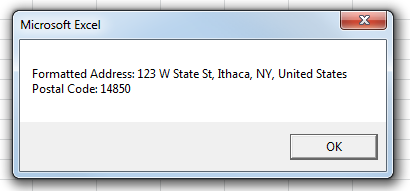
代码:
Sub myTest()
    Dim xhrRequest As XMLHTTP60
    Dim domDoc As DOMDocument60
    Dim domDoc2 As DOMDocument60
    Dim placeID As String
    Dim query As String
    Dim nodes As IXMLDOMNodeList
    Dim node As IXMLDOMNode

    'you have to replace spaces with +
    query = "Cornell+Museum+of+Glass"

    'You must acquire a google api key and enter it here
    Dim googleKey As String
    googleKey = "imaginary api key" 'your api key here

    'Send a "GET" request for place/textsearch
    Set xhrRequest = New XMLHTTP60

    xhrRequest.Open "GET", "https://maps.googleapis.com/maps/api/place/textsearch/xml?" & _
        "query=Cornell+Museum+of+Glass&key=" & googleKey, False
    xhrRequest.send

    'Save the response into a document
    Set domDoc = New DOMDocument60
    domDoc.LoadXML xhrRequest.responseText

    'Find the first node that is called "place_id" and is the child of the "result" node
    placeID = domDoc.SelectSingleNode("//result/place_id").Text

    'recycling objects (could just use new ones)
    Set domDoc = Nothing
    Set xhrRequest = Nothing

    'Send a "GET" request for place/details
    Set xhrRequest = New XMLHTTP60
    xhrRequest.Open "GET", "https://maps.googleapis.com/maps/api/place/details/xml?placeid=" & placeID & _
    "&key=" & googleKey, False
    xhrRequest.send

    'Save the response into a document
    Set domDoc = New DOMDocument60
    domDoc.LoadXML xhrRequest.responseText

    Dim output As String
    Dim s As String

    'hacky way to get postal code, you might want to rewrite this after learning more
    Set nodes = domDoc.SelectNodes("//result/address_component/type")
    For Each node In nodes
        s = node.Text
        If s = "postal_code" Then
            'this is bad, you should search for "long_name", what i did here was assume that "long_name was the first child"
            output = vbNewLine & "Postal Code: " & node.ParentNode.FirstChild.Text
        End If
    Next node

    'output
    MsgBox "Formatted Address: " & domDoc.SelectSingleNode("//result/formatted_address").Text & output
End Sub
'####
编辑:现在使用place而不是Geocoding
Stack Overflow用户
发布于 2017-04-12 19:48:57
我犯了一个类似于上面的海报的错误,我想在某个地方发布修复,因为我现在使用的是这个代码的修改版本,一旦它生效,我也会发布。所发生的是,我传递的名字,谷歌没有结果。如果您可能在一艘类似的船上,下面一行是一个积极的检查,如果您得到了一些东西回来:( negitive不是= "ZERO_RESULTS")
if domDoc.selectSingleNode("//status").Text = "OK"Stack Overflow用户
发布于 2016-11-30 04:08:27
您必须获得一个API密钥,然后代码就可以正常工作了。转到下面的链接,点击按钮,上面写着“获取一个键”。
https://developers.google.com/maps/documentation/javascript/tutorial
https://stackoverflow.com/questions/24460488
复制相似问题
腾讯云开发者

Copyright © 2013 - 2026 Tencent Cloud. All Rights Reserved. 腾讯云 版权所有
深圳市腾讯计算机系统有限公司 ICP备案/许可证号:粤B2-20090059  粤公网安备44030502008569号
腾讯云计算(北京)有限责任公司 京ICP证150476号 | 京ICP备11018762号