
Maven阴影复制WEB-INF
Maven阴影复制WEB-INF
提问于 2014-06-26 22:38:51
使用maven-shade-plugin,我试图创建一个项目文件结构,如下所示:
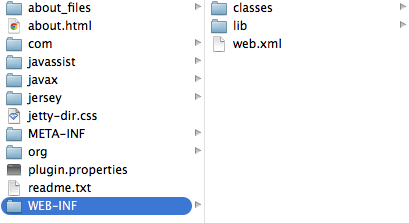
问题是下面的pom配置没有创建WEB目录。
<plugin>
            <groupId>org.apache.maven.plugins</groupId>
            <artifactId>maven-shade-plugin</artifactId>
            <version>2.3</version>
            <executions>
                <execution>
                    <phase>package</phase>
                    <goals>
                        <goal>shade</goal>
                    </goals>
                    <configuration>
                        <filters>
                            <filter>
                                <artifact>*:*</artifact>
                                <excludes>
                                    <exclude>META-INF/*.SF</exclude>
                                    <exclude>META-INF/*.DSA</exclude>
                                    <exclude>META-INF/*.RSA</exclude>
                                </excludes>
                            </filter>
                        </filters>
                        <createDependencyReducedPom>true</createDependencyReducedPom>
                        <transformers>
                            <transformer implementation="org.apache.maven.plugins.shade.resource.ManifestResourceTransformer">
                                <mainClass>com.my.package.Main</mainClass>
                            </transformer>
                        </transformers>
                    </configuration>
                </execution>
            </executions>
        </plugin>
基本上,我需要将我的web.xml文件、类和lib文件复制到项目根目录中的一个名为WEB的目录中。
更新:对不起,我把我的pom中错误的插件复制到了原来的问题中!
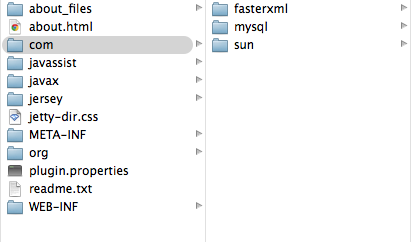
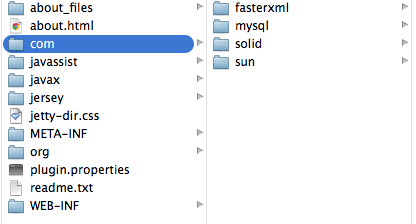
更新:如果我从pom声明中添加打包:<packaging>war</packaging>,WEB文件结构按照OQ完成。但是,使用此声明,com目录现在不包含我的包,因此找不到主类。
它与<packaging>war</packaging>的外观
应如何看待:
回答 2
Stack Overflow用户
发布于 2014-06-26 22:42:24
maven-装配插件允许更多的灵活性,它将很容易通过使用组装插件来实现。
见
- 装配描述符示例
Stack Overflow用户
发布于 2014-06-27 07:49:40
有很多可能的答案,以达到预期的效果与maven。然而,基于我给出的更新,我发现用以下内容添加maven-antrun-plugin解决了我的问题:
<plugin>
            <artifactId>maven-antrun-plugin</artifactId>
            <executions>
                <execution>
                    <id>move-main-class</id>
                    <phase>compile</phase>
                    <configuration>
                        <tasks>
                            <copy todir="${project.build.directory}/${project.artifactId}">
                                <fileset dir="${project.build.directory}/classes/">
                                </fileset>
                            </copy>
                        </tasks>
                    </configuration>
                    <goals>
                        <goal>run</goal>
                    </goals>
                </execution>
            </executions>
</plugin>页面原文内容由Stack Overflow提供。腾讯云小微IT领域专用引擎提供翻译支持
原文链接:
https://stackoverflow.com/questions/24441349
复制相关文章
相似问题
腾讯云开发者

Copyright © 2013 - 2026 Tencent Cloud. All Rights Reserved. 腾讯云 版权所有
深圳市腾讯计算机系统有限公司 ICP备案/许可证号:粤B2-20090059  粤公网安备44030502008569号
腾讯云计算(北京)有限责任公司 京ICP证150476号 | 京ICP备11018762号