
如何生成6行2列的Java GridBagLayout
我厌倦了Java GridBagLayout。我想要创建一个面板,看起来像在下面的图片,但我无法得到它。我无法定位左边的面板,也没能让面板变得很长。设置gridWidth时宽度不会增加。我不能为此使用任何GUI构建器。我想得到一个像下面的图片一样的布局。

这是不成功的代码:
public class gui3 extends Frame{
    Panel p1,p2,p3,p4,p5,p6,p7,pmain;
    gui3(){

    setVisible(true);
    setSize(500,500);
    setTitle(" Calculator ");


        GridBagLayout gb1=new GridBagLayout();
        GridBagConstraints gbc=new GridBagConstraints();
        setLayout(gb1);

        p1=new Panel();
        p1.setBackground(Color.BLACK);
        gbc.gridx=5;
        gbc.gridy=0;
        gbc.gridwidth=3;
        //gbc.weightx =0.5;
        gbc.fill=GridBagConstraints.HORIZONTAL;
        add(p1,gbc);

        p2=new Panel();
        p2.setBackground(Color.BLUE);
        gbc.gridx=0;
        gbc.gridy=1;
        gbc.gridwidth=2;
       // gbc.weightx = 1;
        gbc.fill=GridBagConstraints.HORIZONTAL;
        add(p2,gbc);

        p3=new Panel();
        p3.setBackground(Color.GREEN);
        gbc.gridx=0;
        gbc.gridy=2;
        gbc.gridwidth=2;
      //  gbc.weightx = 1;
        gbc.fill=GridBagConstraints.HORIZONTAL;
        add(p3,gbc);

        p4=new Panel();
        p4.setBackground(Color.cyan);
        gbc.gridx=0;
        gbc.gridy=3;
        gbc.gridwidth=2;
      //  gbc.weightx = 1;
        gbc.fill=GridBagConstraints.HORIZONTAL;
        add(p4,gbc);

        p5=new Panel();
        p5.setBackground(Color.RED);
        gbc.gridx=0;
        gbc.gridy=4;
        gbc.gridwidth=2;
     //   gbc.weightx = 1;
        gbc.fill=GridBagConstraints.HORIZONTAL;
        add(p5,gbc);

        p6=new Panel();
        p6.setBackground(Color.pink);
        gbc.gridx=0;
        gbc.gridy=5;
        gbc.gridwidth=2;
       // gbc.weightx = 1;
       // gbc.fill=GridBagConstraints.HORIZONTAL;
        add(p6,gbc);

        p7=new Panel();
        p7.setBackground(Color.yellow);
        gbc.gridx=6;
        gbc.gridy=0;
        gbc.gridheight=6;
     //   gbc.weightx = 1;
        gbc.fill=GridBagConstraints.HORIZONTAL;
        add(p7,gbc);


    }

}回答 2
Stack Overflow用户
发布于 2014-06-26 10:15:12
你的意思是像..。
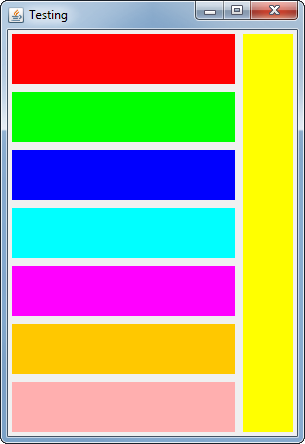
因此,基本上,您可以使用GridBagConstraints#gridheight (或gridwidth)来设置组件跨越的网格单元格数。
import java.awt.Color;
import java.awt.Dimension;
import java.awt.EventQueue;
import java.awt.Graphics;
import java.awt.Graphics2D;
import java.awt.GridBagConstraints;
import java.awt.GridBagLayout;
import java.awt.Insets;
import javax.swing.JFrame;
import javax.swing.JPanel;
import javax.swing.UIManager;
import javax.swing.UnsupportedLookAndFeelException;

public class TestLayout {

    public static void main(String[] args) {
        new TestLayout();
    }

    public TestLayout() {
        EventQueue.invokeLater(new Runnable() {
            @Override
            public void run() {
                try {
                    UIManager.setLookAndFeel(UIManager.getSystemLookAndFeelClassName());
                } catch (ClassNotFoundException | InstantiationException | IllegalAccessException | UnsupportedLookAndFeelException ex) {
                    ex.printStackTrace();
                }

                JFrame frame = new JFrame("Testing");
                frame.setDefaultCloseOperation(JFrame.EXIT_ON_CLOSE);
                frame.setLayout(new GridBagLayout());

                GridBagConstraints gbc = new GridBagConstraints();
                gbc.insets = new Insets(4, 4, 4, 4);
                gbc.gridx = 0;
                gbc.weightx = 1;
                gbc.gridy = 0;
                gbc.fill = GridBagConstraints.HORIZONTAL;
                frame.add(createPane(Color.RED), gbc);
                gbc.gridy++;
                frame.add(createPane(Color.GREEN), gbc);
                gbc.gridy++;
                frame.add(createPane(Color.BLUE), gbc);
                gbc.gridy++;
                frame.add(createPane(Color.CYAN), gbc);
                gbc.gridy++;
                frame.add(createPane(Color.MAGENTA), gbc);
                gbc.gridy++;
                frame.add(createPane(Color.ORANGE), gbc);
                gbc.gridy++;
                frame.add(createPane(Color.PINK), gbc);

                gbc.gridx++;
                gbc.weightx = 0;
                gbc.gridy = 0;
                gbc.weighty = 1;
                gbc.gridheight = GridBagConstraints.REMAINDER;
                gbc.fill = GridBagConstraints.VERTICAL;
                frame.add(createPane(Color.YELLOW), gbc);

                frame.pack();
                frame.setLocationRelativeTo(null);
                frame.setVisible(true);
            }
        });
    }

    public JPanel createPane(Color color) {
        JPanel pane = new JPanel(){

            @Override
            public Dimension getPreferredSize() {
                return new Dimension(50, 50);
            }

        };
        pane.setBackground(color);
        return pane;
    }

}有关更多细节,请查看如何使用GridBagLayout
Stack Overflow用户
发布于 2014-07-09 21:17:05
从MadProgrammer的解决方案中突然改变的大小可以很容易地通过两种方式来解决:
public JPanel createPane(Color color) {
    JPanel pane = new JPanel(){

        @Override
        public Dimension getPreferredSize() {
            return new Dimension(50, 50);
        }

        @Override
        public Dimension getMinimumSize() {
            return new Dimension(50, 50);
        }

    };
    pane.setBackground(color);
    return pane;
}
我们还提供了一个mimimum大小,它等于首选的大小。这样,面板不会收缩,但当容器太小而无法显示时,面板就会从窗口被切割。
最优的解决方案可能是将weighty设置为1,面板将逐渐缩小。
gbc.weightx = 1;
gbc.weighty = 1;
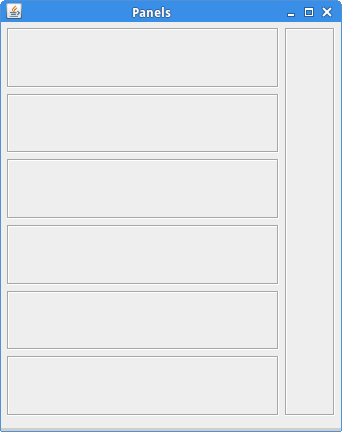
gbc.gridy = 0;最后,我还用MigLayout创建了一个解决方案。如果可能,尝试使用MigLayout而不是GridBagLayout创建布局。
package com.zetcode;

import java.awt.Dimension;
import java.awt.EventQueue;
import javax.swing.BorderFactory;
import javax.swing.JFrame;
import javax.swing.JPanel;
import net.miginfocom.swing.MigLayout;


public class MigLayoutPanels extends JFrame {

    public MigLayoutPanels() {

        initUI();

        setTitle("Panels");
        setDefaultCloseOperation(JFrame.EXIT_ON_CLOSE);
        setLocationRelativeTo(null);
    }

    private void initUI() {

        setLayout(new MigLayout("wrap"));

        add(createPanel(), "w 200, push, grow");
        add(createPanel(), "push, grow");
        add(createPanel(), "push, grow");
        add(createPanel(), "push, grow");
        add(createPanel(), "push, grow");
        add(createPanel(), "push, grow");

        add(createPanel(), "cell 1 0 1 6, growy");


        pack();
    }

   public JPanel createPanel() {
        JPanel pnl = new JPanel(){

            @Override
            public Dimension getPreferredSize() {
                return new Dimension(50, 50);
            }

        };

        pnl.setBorder(BorderFactory.createEtchedBorder());
        return pnl;
    }

    public static void main(String[] args) {

        EventQueue.invokeLater(new Runnable() {
            @Override
            public void run() {
                MigLayoutPanels ex = new MigLayoutPanels();
                ex.setVisible(true);
            }
        });
    }
}GridBagLayout是一个强大的管理器,可以用来创建大多数布局。许多程序员发现很难使用。MigLayout更容易理解,更强大,更少冗长。
https://stackoverflow.com/questions/24427092
复制相似问题
腾讯云开发者

Copyright © 2013 - 2026 Tencent Cloud. All Rights Reserved. 腾讯云 版权所有
深圳市腾讯计算机系统有限公司 ICP备案/许可证号:粤B2-20090059  粤公网安备44030502008569号
腾讯云计算(北京)有限责任公司 京ICP证150476号 | 京ICP备11018762号