
C# SerialPort DSR/DTR和CTS/RTS握手
C# SerialPort DSR/DTR和CTS/RTS握手
提问于 2014-06-26 02:47:34
我正在尝试使用C#/.NET的SerialPort类与设备通信。
这里描述了与设备交互的文档。
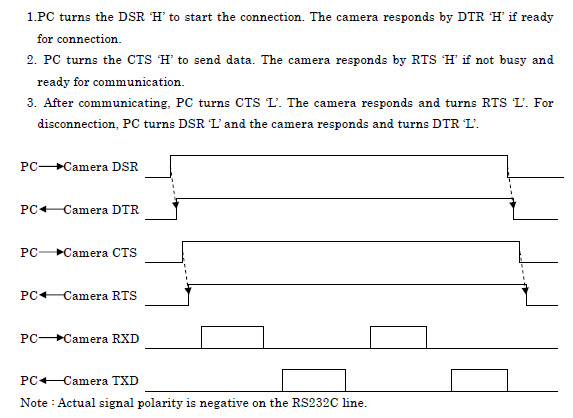
我正在使用一个与TX/RX和所有握手引脚交换(验证)的零调制解调器电缆。
我希望下面的C#代码能够工作,但我不会从我试图与之交互的相机中得到任何响应(低到高)。不过,我相信问题在于代码。这台相机与其他“个人电脑”一起工作。为什么我永远不会在我的代码中获得DsrHolding (空调制解调器电缆,所以从相机高DTR )成为真?
static void Main(string[] args)
{
    var serialPort = new SerialPort("COM5");

    // start the DSR/DTR handshake
    // we are using a null modem cable, so DTR/DSR is switched
    serialPort.DtrEnable = true;
    while (!serialPort.DsrHolding)
    {
        // probally should timeout instead of infinite wait
        Thread.Sleep(10);
        Console.WriteLine("Waiting for the DTR line to go high.");
    }


    // start the RTS/CTS handshake
    // we are using a null modem cable, so RTS/CTS is switched
    serialPort.RtsEnable = true;
    while (!serialPort.CtsHolding)
    {
        // probally should timeout instead of infinite wait
        Thread.Sleep(10);
        Console.WriteLine("Waiting for the RTS line to go high.");
    }

    // read/write
    //serialPort.Write("Some command");
    //var response = serialPort.ReadChar();
    //while (response != stopBit)
    //    response = serialPort.ReadChar();

    // close the connection because we have written/read our data

    // start the DSR/DTR handshake
    // we are using a null modem cable, so DTR/DSR is switched
    serialPort.DtrEnable = false;
    while (serialPort.DsrHolding)
    {
        // probally should timeout instead of infinite wait
        Thread.Sleep(10);
        Console.WriteLine("Waiting for the DTR line to go low.");
    }


    // start the RTS/CTS handshake
    // we are using a null modem cable, so RTS/CTS is switched
    serialPort.RtsEnable = false;
    while (serialPort.CtsHolding)
    {
        // probally should timeout instead of infinite wait
        Thread.Sleep(10);
        Console.WriteLine("Waiting for the RTS line to go low.");
    }
}回答 2
Stack Overflow用户
回答已采纳
发布于 2014-06-26 19:02:33
你试过用直通电缆吗?相机可能已经处理了需要交叉的引脚。
Stack Overflow用户
发布于 2016-11-14 13:48:38
代码中缺少serialPort.Open();。
页面原文内容由Stack Overflow提供。腾讯云小微IT领域专用引擎提供翻译支持
原文链接:
https://stackoverflow.com/questions/24421631
复制相关文章
相似问题
腾讯云开发者

Copyright © 2013 - 2026 Tencent Cloud. All Rights Reserved. 腾讯云 版权所有
深圳市腾讯计算机系统有限公司 ICP备案/许可证号:粤B2-20090059  粤公网安备44030502008569号
腾讯云计算(北京)有限责任公司 京ICP证150476号 | 京ICP备11018762号