
加载SDK时出错--与枚举有关的内容
队员们,
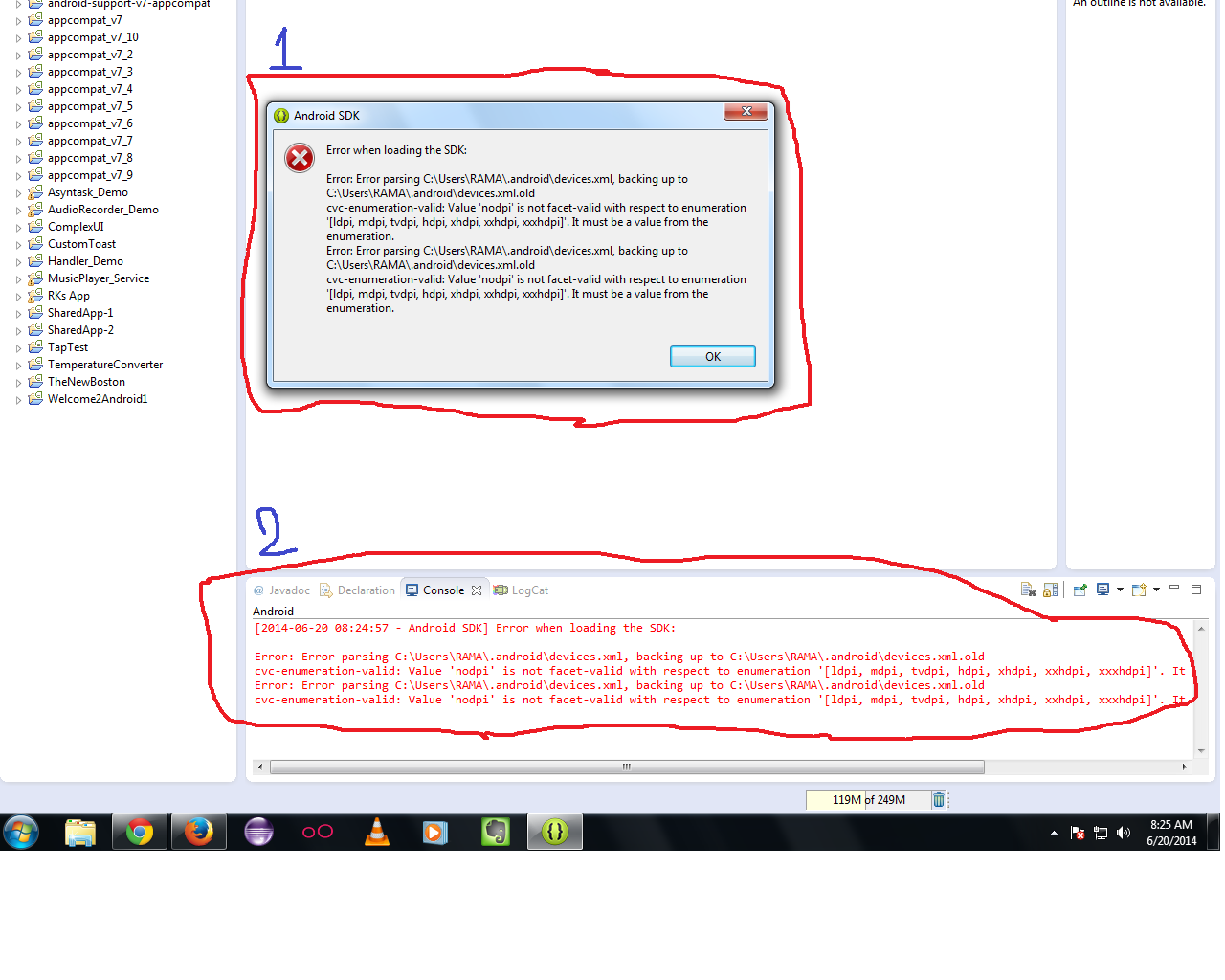
几个月以来,我一直在使用Eclipse以及GenyMotion,没有任何问题,但从“是的一天”开始,每当我重新启动Eclipse时,我都会看到这条用于AVDs的错误消息。我的配置是Win7 -64位
我已经尝试删除现有的AVDs,再次重新创建它们,并且多次重新启动Eclipse,但是它显示的是相同的错误消息。
尽管到目前为止,我还没有注意到AVDs在运行我的应用程序时,甚至在我的实际设备上有什么功能问题,但是我想要确保了解出了什么问题,以及如何克服这个错误信息。
我正在附加一个屏幕截图供您参考,以及下面的'devices.xml'文件从位置C:\Users\RAMA\.android/devices.xml'。我试图在其他地方找到解决方案,但没有完全找到解决方案的实质。
 <?xml version="1.0" encoding="UTF-8"?>
       -<d:devices xmlns:xsi="http://www.w3.org/2001/XMLSchema-instance" xmlns:d="http://schemas.android.com/sdk/devices/1">
       -<d:device>
        <d:name>NexusSS_AVD19</d:name>
        <d:manufacturer>User</d:manufacturer>
        <d:meta/>
        -<d:hardware>
        -<d:screen>
        <d:screen-size>normal</d:screen-size>
        <d:diagonal-length>40.00</d:diagonal-length>
        <d:pixel-density>nodpi</d:pixel-density>
        <d:screen-ratio>long</d:screen-ratio>
        -<d:dimensions>
        <d:x-dimension>480</d:x-dimension>
        <d:y-dimension>800</d:y-dimension>
        </d:dimensions>
        <d:xdpi>23.32</d:xdpi>
        <d:ydpi>23.32</d:ydpi>
    -<d:touch>
        <d:multitouch>jazz-hands</d:multitouch>
        <d:mechanism>finger</d:mechanism>
        <d:screen-type>capacitive</d:screen-type>
    </d:touch>
    </d:screen>
        <d:networking> Bluetooth Wifi NFC</d:networking>
        <d:sensors> Accelerometer Barometer Compass GPS Gyroscope LightSensor ProximitySensor</d:sensors>
        <d:mic>true</d:mic>
        -<d:camera>
        <d:location>front</d:location>
        <d:autofocus>true</d:autofocus>
        <d:flash>true</d:flash>
        </d:camera>
        -<d:camera>
        <d:location>back</d:location>
        <d:autofocus>true</d:autofocus>
        <d:flash>true</d:flash>
        </d:camera>
        <d:keyboard>qwerty</d:keyboard>
        <d:nav>dpad</d:nav>
        <d:ram unit="MiB">768</d:ram>
        <d:buttons>soft</d:buttons>
        <d:internal-storage unit="GiB"> 4</d:internal-storage>
        <d:removable-storage unit="TiB"/>
        <d:cpu>Generic CPU</d:cpu>
        <d:gpu>Generic GPU</d:gpu>
        <d:abi> armeabi armeabi-v7a x86 mips</d:abi>
        <d:dock/>
        <d:power-type>battery</d:power-type>
        </d:hardware>
    -<d:software>
    <d:api-level>-</d:api-level>
    <d:live-wallpaper-support>true</d:live-wallpaper-support>
    <d:bluetooth-profiles/>
    <d:gl-version>2.0</d:gl-version>
    <d:gl-extensions/>
    <d:status-bar>false</d:status-bar>
    </d:software>
    -<d:state name="Portrait" default="true">
    <d:description>The device in portrait orientation</d:description>
    <d:screen-orientation>port</d:screen-orientation>
    <d:keyboard-state>keyshidden</d:keyboard-state>
    <d:nav-state>navexposed</d:nav-state>
    </d:state>
    -<d:state name="Landscape">
    <d:description>The device in landscape orientation</d:description>
    <d:screen-orientation>land</d:screen-orientation>
    <d:keyboard-state>keyshidden</d:keyboard-state>
    <d:nav-state>navexposed</d:nav-state>
    </d:state>
    -<d:state name="Portrait with keyboard">
    <d:description>The device in portrait orientation with a keyboard open</d:description>
    <d:screen-orientation>land</d:screen-orientation>
    <d:keyboard-state>keysexposed</d:keyboard-state>
    <d:nav-state>navexposed</d:nav-state>
    </d:state>
    -<d:state name="Landscape with keyboard">
    <d:description>The device in landscape orientation with a keyboard open</d:description>
    <d:screen-orientation>land</d:screen-orientation>
    <d:keyboard-state>keysexposed</d:keyboard-state>
    <d:nav-state>navexposed</d:nav-state>
    </d:state>
    </d:device>
    </d:devices>
回答 2
Stack Overflow用户
发布于 2014-06-26 05:36:56
在花费了大量的时间并在互联网上寻找解决方案之后,对我真的没有任何帮助,不幸的是,即使是这样,也没有人对这个典型的/不正常的问题或行为作出反应。
我花了几天的时间来研究这个问题,以及问题的原因,并且一直在尝试以下各种方法来解决这个问题。
- 我删除了所有的AVDs,并从头开始重新创建它们,但是没有用。
- 我多次重新启动Eclipse,甚至还重新启动了系统,但是没有用
- 最后,我在路径
'devices.xml'中查看了'C:\Users\RAMA\.android',并逐行查看是否能从中捕捉到什么东西,但没有真正意义上的东西。 - 最后,我决定
- 再次删除所有AVDs
- 从path
'C:\Users\RAMA\.android'中删除现有的'C:\Users\RAMA\.android' - 重新启动系统并重新启动ECLIPSE
- 幸运的是,这次在Eclipse引导过程中没有看到错误。
- 然后,再次创建了我的AVDs并开始使用它们。
现在,IT工作顺利,没有任何问题或错误消息。
我将继续更新,以防将来遇到任何问题,并希望将其作为答案发布,因为有人可以进入相同的情况,anytime...so,我的响应可以在某些方面帮助用户……
Stack Overflow用户
发布于 2015-05-26 12:14:39
开放sdk管理器并删除Android5.1.1(Api 22)中的所有包,除了a) android的文档(b) sdk平台(c) sdk的示例(d)ARM EABI系统图像(e)google (F) android的源代码。然后重新启动eclipse并清理项目并运行。
https://stackoverflow.com/questions/24319408
复制相似问题
腾讯云开发者

Copyright © 2013 - 2026 Tencent Cloud. All Rights Reserved. 腾讯云 版权所有
深圳市腾讯计算机系统有限公司 ICP备案/许可证号:粤B2-20090059  粤公网安备44030502008569号
腾讯云计算(北京)有限责任公司 京ICP证150476号 | 京ICP备11018762号