
StringGrid中的撤消操作
StringGrid中的撤消操作
提问于 2014-06-17 22:17:39
我的表单中有一个StringGrid,当我按下Button1时,我会在这个网格中移动一些单元格。下面是一个例子:
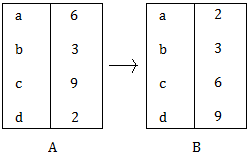
当我按Button1时,我从情景A转到情况B,但我也想做相反的事情:我的意思是,当我按另一个按钮Button2时,我想从B转到A。
我想创建类似于“撤销”按钮的东西。我怎么能这么做?我在用拉撒路。
我只需要做一个撤销。下面是移动StringGrid的单元格的过程:
procedure TForm1.SortGrid(Grid : TStringGrid; const SortCol:integer; const datatype:integer; const ascending:boolean);

var
   i : integer;
   tempgrid:tstringGrid;
   list:array of integer;
begin
  tempgrid:=TStringgrid.create(self);

  with tempgrid do
  begin
    rowcount:=grid.rowcount;
    colcount:=grid.colcount;
    fixedrows:=grid.fixedrows;
  end;

  with Grid do
  begin
    setlength(list,rowcount-fixedrows);
    for i:= fixedrows to rowcount-1 do
    begin
      list[i-fixedrows]:=i;
      tempgrid.rows[i].assign(grid.rows[i]);
    end;

    //Call the procedure and sort the stuff
    Quicksort(Grid, list,0,rowcount-fixedrows-1,sortcol,datatype, ascending);

    for i:=0 to rowcount-fixedrows-1 do
    begin
      rows[i+fixedrows].assign(tempgrid.rows[list[i]])
    end;
    row:=fixedrows;
  end;

  tempgrid.free;
  setlength(list,0);
  screen.cursor:=crdefault;

end;
当我点击Button1..。
SortGrid(StringGrid1,1,1,true);回答 1
Stack Overflow用户
回答已采纳
发布于 2014-06-17 22:40:28
可以使用Cols属性保存和还原该列的内容:
var
  MySavedData: TStringList;
begin
  ...
  MySavedData := TStringList.Create;
  // Save the contents of the column 1
  MySavedData.Assign(StringGrid1.Cols[1]);
  SortGrid(StringGrid1,1,1,true);
  // Restore the contents of the column 1
  StringGrid1.Cols[1] := MySavedData;
  ...
end;
显然,MySavedData应该在某个时候被释放。
页面原文内容由Stack Overflow提供。腾讯云小微IT领域专用引擎提供翻译支持
原文链接:
https://stackoverflow.com/questions/24274211
复制相关文章
相似问题
腾讯云开发者

Copyright © 2013 - 2026 Tencent Cloud. All Rights Reserved. 腾讯云 版权所有
深圳市腾讯计算机系统有限公司 ICP备案/许可证号:粤B2-20090059  粤公网安备44030502008569号
腾讯云计算(北京)有限责任公司 京ICP证150476号 | 京ICP备11018762号