
如何在按下按钮时预先形成动作?
如何在按下按钮时预先形成动作?
提问于 2014-06-17 07:47:36
我有一个按钮,当按钮被按到@"PRESSED"时,我需要更改标签,如果它被释放了,我需要将它更改为@"LET GO"。我找到了很多答案,但我不知道如何在Xcode 5中实现它们。
您可以在touchDownInside上启动您的操作,并在touchUpInside操作上停止它--您可以将它们连接到IB中。
或
将目标添加到控件状态( UIControlEventTouchDown和UIControlEventTouchUpInside或UIControlEventTouchUpOutside )的按钮中
甚至是
Add a dispatch source iVar to your controller...

dispatch_source_t     _timer;
Then, in your touchDown action, create the timer that fires every so many seconds. You will do your repeating work in there.

If all your work happens in UI, then set queue to be

dispatch_queue_t queue = dispatch_get_main_queue();
and then the timer will run on the main thread.

- (IBAction)touchDown:(id)sender {
    if (!_timer) {
        dispatch_queue_t queue = dispatch_get_global_queue(
            DISPATCH_QUEUE_PRIORITY_DEFAULT, 0);
        _timer = dispatch_source_create(DISPATCH_SOURCE_TYPE_TIMER, 0, 0, queue);
        // This is the number of seconds between each firing of the timer
        float timeoutInSeconds = 0.25;
        dispatch_source_set_timer(
            _timer,
            dispatch_time(DISPATCH_TIME_NOW, timeoutInSeconds * NSEC_PER_SEC),
            timeoutInSeconds * NSEC_PER_SEC,
            0.10 * NSEC_PER_SEC);
        dispatch_source_set_event_handler(_timer, ^{
            // ***** LOOK HERE *****
            // This block will execute every time the timer fires.
            // Do any non-UI related work here so as not to block the main thread
            dispatch_async(dispatch_get_main_queue(), ^{
                // Do UI work on main thread
                NSLog(@"Look, Mom, I'm doing some work");
            });
        });
    }

    dispatch_resume(_timer);
}
Now, make sure to register for both touch-up-inside and touch-up-outside

- (IBAction)touchUp:(id)sender {
    if (_timer) {
        dispatch_suspend(_timer);
    }
}
Make sure you destroy the timer

- (void)dealloc {
    if (_timer) {
        dispatch_source_cancel(_timer);
        dispatch_release(_timer);
        _timer = NULL;
    }
}
我是iOS的新手,根本不知道该怎么做!非常感谢您提前提供帮助!
回答 3
Stack Overflow用户
回答已采纳
发布于 2014-06-17 07:52:40
我会用GestureRecognzier来做这件事。以下是一些代码:
- (void)viewDidLoad
{
    [super viewDidLoad];

    UILongPressGestureRecognizer *gr = [[UILongPressGestureRecognizer alloc] initWithTarget:self action:@selector(buttonIsPressed:)];
    gr.minimumPressDuration = 0.1;
    [self.button addGestureRecognizer:gr];
}

-(IBAction)buttonIsPressed:(UILongPressGestureRecognizer*)gesture {
    if (gesture.state == UIGestureRecognizerStateBegan) {
        self.label.text = @"Button is pressed!";
    }
    else if (gesture.state == UIGestureRecognizerStateEnded) {
        self.label.text = @"Button is not pressed";
    }
}
标签和按钮需要一个IBOutlet。
Stack Overflow用户
发布于 2014-06-17 08:03:01
第一个方法可以做您想做的事情,下面是一个示例实现:
- (void)viewDidLoad
{
    [super viewDidLoad];
    // Do any additional setup after loading the view, typically from a nib.

    UIButton *myButton = [[UIButton alloc] initWithFrame:CGRectMake(self.view.bounds.size.width / 2.0 - 50.0, self.view.bounds.size.height / 2.0 - 25.0, 100.0, 50.0)];
    myButton.backgroundColor = [UIColor colorWithRed:0.2 green:0.3 blue:0.8 alpha:1.0];
    [myButton setTitle:@"PRESS ME" forState:UIControlStateNormal];
    [myButton addTarget:self action:@selector(setPressed:) forControlEvents:UIControlEventTouchDown];
    [myButton addTarget:self action:@selector(setLetGo:) forControlEvents:UIControlEventTouchUpInside];

    [self.view addSubview:myButton];
}

-(void)setPressed:(id)sender
{
    UIButton *myButton = (UIButton *)sender;

    [myButton setTitle:@"PRESSED" forState:UIControlStateNormal];
}

-(void)setLetGo:(id)sender
{
    UIButton *myButton = (UIButton *)sender;

    [myButton setTitle:@"LET GO" forState:UIControlStateNormal];
}Stack Overflow用户
发布于 2014-06-17 08:37:14
如果您是xCode新手,这可能很难理解。跟着这个,你会没事的。
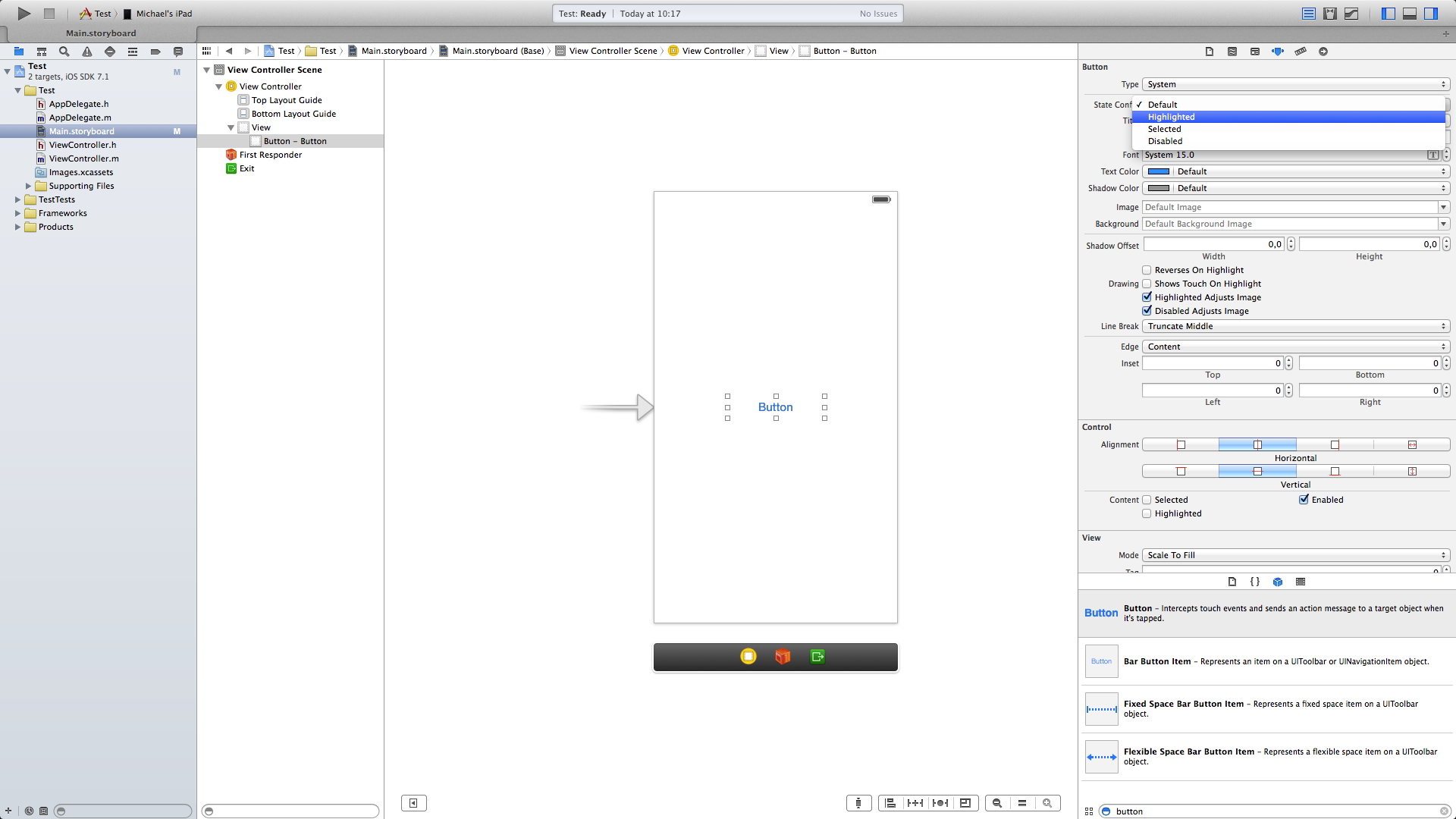
- 转到Storyboard并在视图中放置一个按钮,现在转到检查器,并将状态配置从默认更改为高亮显示
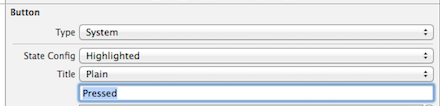
- 在占位符“突出显示的标题”中,“按下”

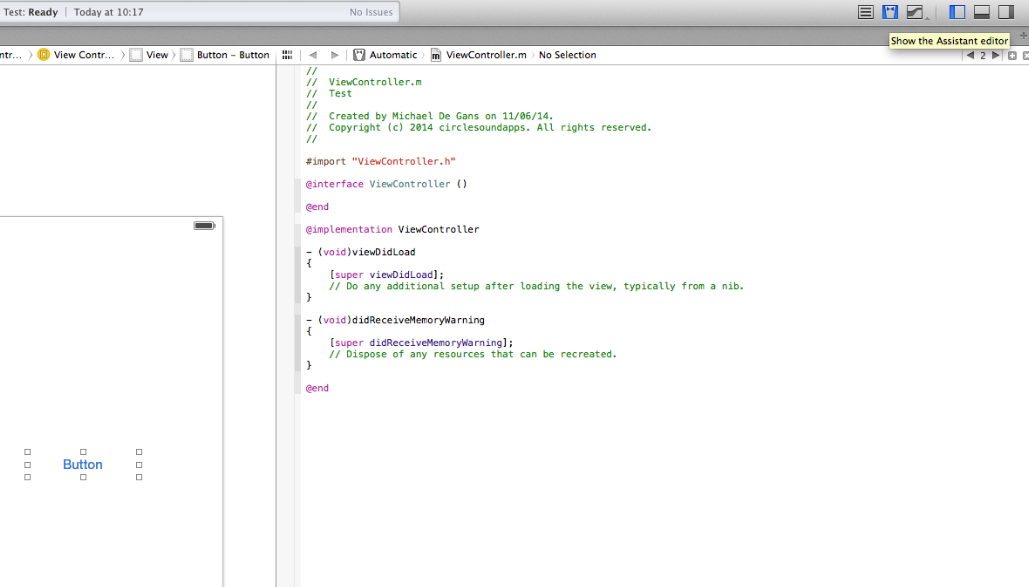
- 现在单击
Assistant Editor打开故事板旁边的.m文件
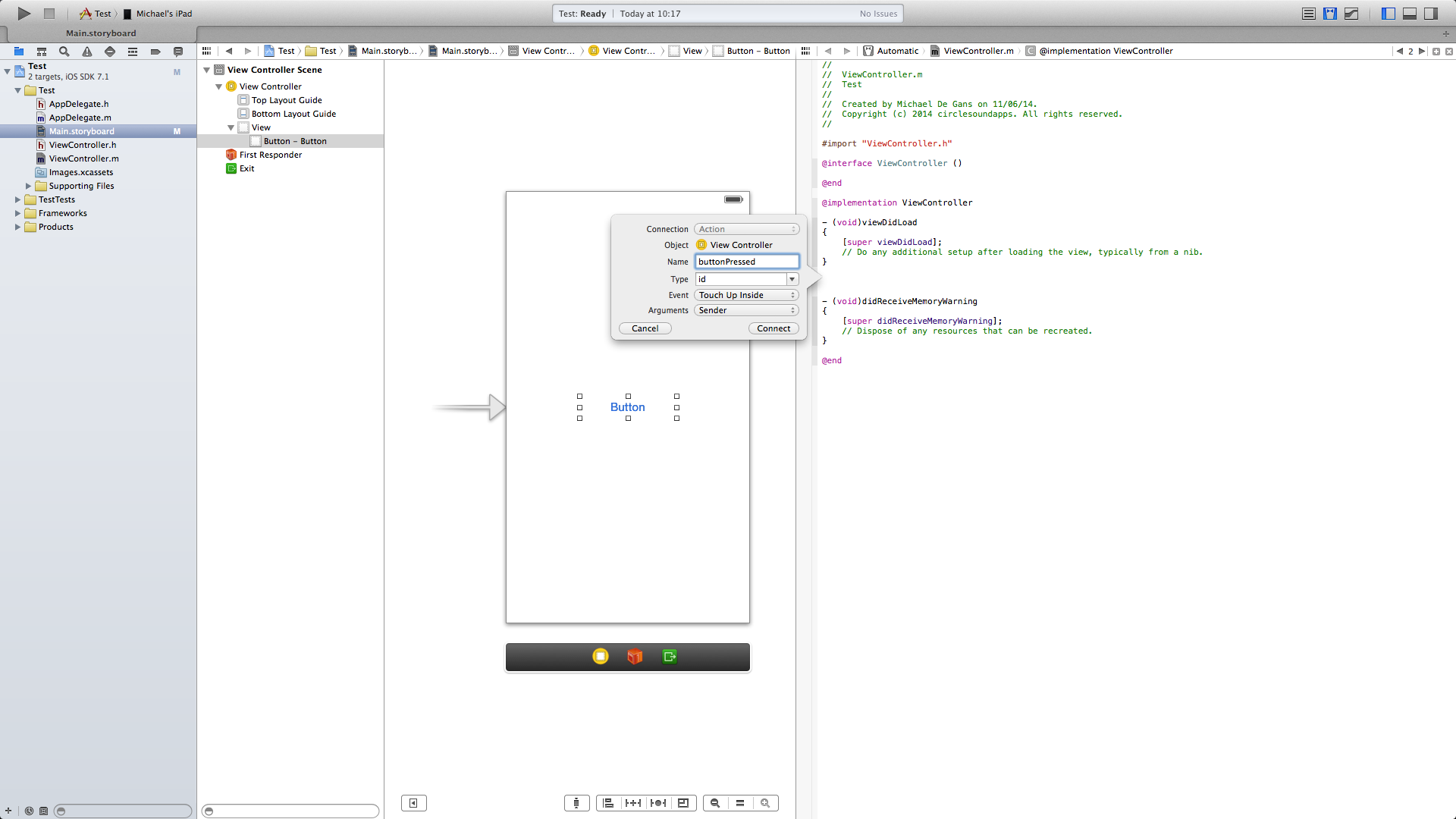
CNTRL + Click and drag从按钮到.m文件代码,以创建一个TouchUpInside事件,我的事件称为buttonPressed
- 将此代码放入方法体中,您就可以开始了!
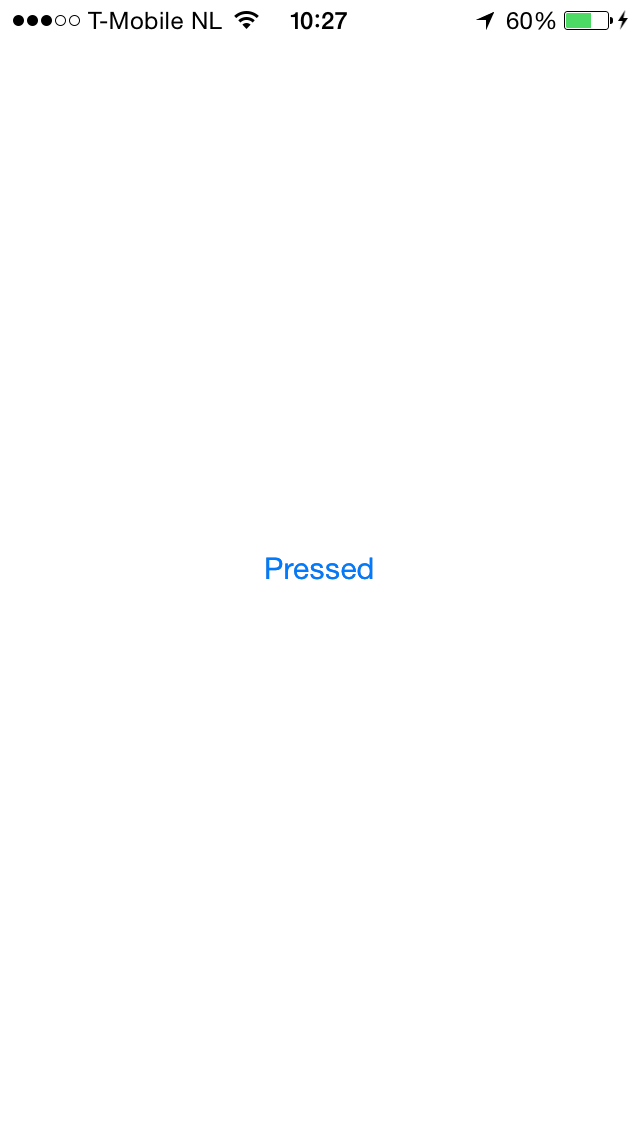
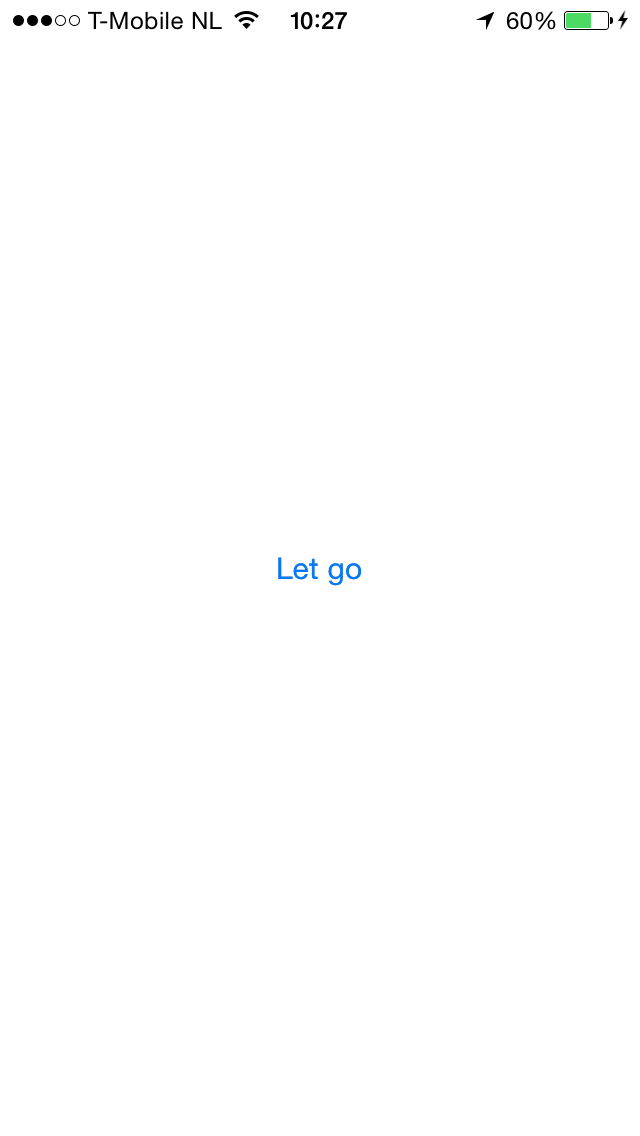
这就是它的样子,按下和释放:
页面原文内容由Stack Overflow提供。腾讯云小微IT领域专用引擎提供翻译支持
原文链接:
https://stackoverflow.com/questions/24258396
复制相关文章
相似问题
腾讯云开发者

Copyright © 2013 - 2026 Tencent Cloud. All Rights Reserved. 腾讯云 版权所有
深圳市腾讯计算机系统有限公司 ICP备案/许可证号:粤B2-20090059  粤公网安备44030502008569号
腾讯云计算(北京)有限责任公司 京ICP证150476号 | 京ICP备11018762号