
Android相对布局布局
Android相对布局布局
提问于 2014-06-17 04:48:29
我正在尝试创建一个具有图标列表的应用程序,比如android上的普通主页。问题是,我不能很好地处理它。这是我已经做过的图标的图片。

这是我创建的xml代码。
<?xml version="1.0" encoding="utf-8"?>
<LinearLayout xmlns:android="http://schemas.android.com/apk/res/android"
android:layout_width="match_parent"
android:layout_height="match_parent"
android:orientation="horizontal" >


<TableLayout
android:id="@+id/tableLayout1"
android:layout_width="fill_parent"
android:layout_height="fill_parent" >

    <TableRow
        android:id="@+id/tableRow1"
        android:layout_width="match_parent"
        android:layout_height="0dip"
        android:layout_weight="5"
        android:gravity="center"
        android:padding="5dip" >

        <RelativeLayout
            android:layout_width="wrap_content"
            android:layout_height="wrap_content"
            android:layout_weight="1" >

            <ImageView
                android:id="@+id/iconFoods"
                android:layout_width="wrap_content"
                android:layout_height="wrap_content"
                android:layout_alignParentLeft="true"
                android:layout_alignParentTop="true"
                android:layout_margin="0dp"
                android:contentDescription="@string/desc"
                android:layout_centerInParent="true"
                android:src="@drawable/food"
                android:clickable="true"
                android:onClick="onClick" />

            <TextView
                android:id="@+id/txtCount"
                android:layout_width="wrap_content"
                android:layout_height="wrap_content"
                android:layout_alignParentTop="true"
                android:layout_alignRight="@+id/iconFoods"
                android:layout_margin="0dp"
                android:background="@drawable/shapecount"
                android:paddingLeft="3dp"
                android:paddingRight="3dp"
                android:text="50"
                android:textColor="#FFFFFF"
                android:textSize="12sp"
                android:textStyle="bold" />

            <TextView
                android:id="@+id/textView1"
                android:textSize="12sp"
                android:layout_marginTop="20dip"
                android:layout_width="match_parent"
                android:layout_height="wrap_content"
                android:gravity="center"
                android:layout_centerHorizontal="true"
                android:layout_alignBottom="@+id/iconFoods"
                android:layout_alignParentLeft="false"
                android:text="Medium Text" />
        </RelativeLayout>
我的问题是,如何使图像在相对布局的中心,以及如何设置图像和文本视图之间的空间。我已经试着把填充顶部和布局边缘顶部,但它仍然不起作用。
回答 4
Stack Overflow用户
回答已采纳
发布于 2014-06-17 05:08:17
- 使用
android:layout_below而不是android:layout_alignBottom.For --这是保证金无效的原因。 - 删除android:layout_alignParentLeft="true“和android:layout_alignParentTop="true"这些属性
- 让
RelativeLayout's宽度match_parent,就像你给它weight一样。
P.S :嵌套权重不好
尝尝这个
<RelativeLayout
        android:layout_width="match_parent"
        android:layout_height="wrap_content"
        android:layout_weight="1" >

        <ImageView
            android:id="@+id/iconFoods"
            android:layout_width="wrap_content"
            android:layout_height="wrap_content"
            android:layout_margin="0dp"
            android:contentDescription="@string/desc"
            android:layout_centerInParent="true"
            android:src="@drawable/food"
            android:clickable="true"
            android:onClick="onClick" />

        <TextView
            android:id="@+id/txtCount"
            android:layout_width="wrap_content"
            android:layout_height="wrap_content"
            android:layout_alignParentTop="true"
            android:layout_alignRight="@+id/iconFoods"
            android:layout_margin="0dp"
            android:background="@drawable/shapecount"
            android:paddingLeft="3dp"
            android:paddingRight="3dp"
            android:text="50"
            android:textColor="#FFFFFF"
            android:textSize="12sp"
            android:textStyle="bold" />

        <TextView
            android:id="@+id/textView1"
            android:textSize="12sp"
            android:layout_marginTop="20dip"
            android:layout_width="match_parent"
            android:layout_height="wrap_content"
            android:gravity="center"
            android:layout_centerHorizontal="true"
            android:layout_below="@+id/iconFoods"
            android:text="Medium Text" />
</RelativeLayout>Stack Overflow用户
发布于 2014-06-17 05:07:58
您可以将图像放在其他所有事物的下面,方法是对齐它:HORIZONTAL VERTICAL。
文本视图可以放在图像下面,方法是将textView的顶部与图像http://developer.android.com/reference/android/widget/RelativeLayout.html#BELOW的底部对齐。
Stack Overflow用户
发布于 2014-06-17 05:10:42
<?xml version="1.0" encoding="utf-8"?>
    <RelativeLayout xmlns:android="http://schemas.android.com/apk/res/android"
    android:id="@+id/main_widget"
    android:layout_width="match_parent"
    android:layout_height="match_parent"
    android:background="#ffffff"
    android:focusable="true" >

    <ImageView
        android:id="@+id/icon"
        android:layout_width="60dip"
        android:layout_height="60dip"
        android:layout_centerHorizontal="true"
        android:background="@drawable/ic_launcher"
        android:scaleType="center" />


    <TextView
        android:id="@+id/tv1"
        android:layout_width="wrap_content"
        android:layout_height="wrap_content"
        android:layout_marginLeft="-10dip"
        android:layout_toRightOf="@+id/icon"
        android:gravity="center"
        android:textColor="#ff0000"
        android:text="@string/app_name" />


    <TextView
        android:layout_width="wrap_content"
        android:layout_height="wrap_content"
        android:textColor="#000000"
        android:layout_below="@+id/icon"
        android:layout_centerHorizontal="true"
        android:text="Meduim Text" />

    </RelativeLayout>
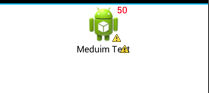
这是输出
利用GridView作为自定义布局。这对你会很有用的。
页面原文内容由Stack Overflow提供。腾讯云小微IT领域专用引擎提供翻译支持
原文链接:
https://stackoverflow.com/questions/24255915
复制相关文章
相似问题
腾讯云开发者

Copyright © 2013 - 2026 Tencent Cloud. All Rights Reserved. 腾讯云 版权所有
深圳市腾讯计算机系统有限公司 ICP备案/许可证号:粤B2-20090059  粤公网安备44030502008569号
腾讯云计算(北京)有限责任公司 京ICP证150476号 | 京ICP备11018762号