
MahApps.Metro图标未显示
我试图在窗口标题栏中添加一个“刷新”按钮,使用MahApps.Metro 0.13.1.0。
我的App.xaml是:
<Application x:Class="VersionSwitcher.App"
             xmlns="http://schemas.microsoft.com/winfx/2006/xaml/presentation"
             xmlns:x="http://schemas.microsoft.com/winfx/2006/xaml"
             StartupUri="Views/MainWindow.xaml"
             xmlns:d="http://schemas.microsoft.com/expression/blend/2008"
             d1p1:Ignorable="d"
             xmlns:d1p1="http://schemas.openxmlformats.org/markup-compatibility/2006">
    <Application.Resources>
        <ResourceDictionary>
            <ResourceDictionary.MergedDictionaries>
                <ResourceDictionary Source="pack://application:,,,/MahApps.Metro;component/Styles/Controls.xaml" />
                <ResourceDictionary Source="pack://application:,,,/MahApps.Metro;component/Styles/Fonts.xaml" />
                <ResourceDictionary Source="pack://application:,,,/MahApps.Metro;component/Styles/Colors.xaml" />
                <ResourceDictionary Source="pack://application:,,,/MahApps.Metro;component/Styles/Accents/Blue.xaml" />
                <ResourceDictionary Source="pack://application:,,,/MahApps.Metro;component/Styles/Accents/BaseLight.xaml" />
                <ResourceDictionary Source="/Resources/Icons.xaml" />
            </ResourceDictionary.MergedDictionaries>
            <vm:ViewModelLocator x:Key="Locator" d:IsDataSource="True" xmlns:vm="clr-namespace:VersionSwitcher.ViewModel" />
        </ResourceDictionary>
    </Application.Resources>
</Application>
然后在我的MainWindow.xaml里:
<Controls:MetroWindow.WindowCommands>
    <Controls:WindowCommands>
        <Button ToolTip="{x:Static p:Resources.Button_Refresh}"
                Style="{DynamicResource MetroCircleButtonStyle}" Width="30" Height="30">
                <Rectangle Fill="Black">
                    <Rectangle.OpacityMask>
                        <VisualBrush Stretch="Fill"
                                     Visual="{DynamicResource appbar_refresh}" />
                    </Rectangle.OpacityMask>
                </Rectangle>
        </Button>
    </Controls:WindowCommands>
</Controls:MetroWindow.WindowCommands>
我在标题栏内有一个灰色的圆圈,但没有图标!任何图标(来自Resources/Icons.xaml)都会做同样的事情。
如果图标被放置在窗口内容中,而不是标题栏中,它会做同样的事情。
我错过了什么?
谢谢!
更新
我发现设置一个宽度和一个矩形的高度显示图标。我该怎么做才能一直按下按钮?
回答 1
Stack Overflow用户
发布于 2014-06-16 13:50:53
您看不到它,因为Rectangle的大小为0,用于ActualWidth和ActualHeight,您可以通过斯诺普看到
如果您对WPF不太了解,正如您在评论中提到的那样,那么首先熟悉Snoop。这是一个很好的工具,它可以让你从很多令人头晕目眩的时刻中解脱出来:)
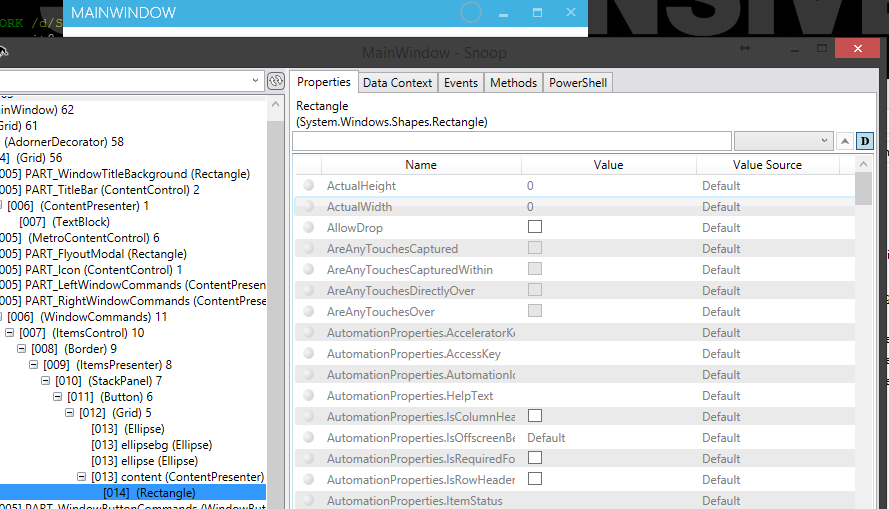
因此,在简单的英语中,我们添加一个Rectangle作为Button的Content。现在这个按钮有一些尺寸。但是,矩形没有,因此以0结尾。如果它是一些文本,它将得到一个隐含的大小。
因此,要排序它,给矩形一个适当的宽度/高度。
如果您希望矩形是按钮的大小,您可以使用RelativeSource绑定的宽度和高度,以获得它的按钮。然而,在您的情况下,它是一个样式的按钮,已经使用一个椭圆,所以它将需要一些填充。
MahApps.Metro来自github
显示他们建议的方法:(显式大小小于父按钮的内容)
<Button Width="50"
        Height="50"
        Margin="0, 10, 0, 0"
        Style="{DynamicResource MetroCircleButtonStyle}">
    <Rectangle Width="20"
                Height="20"
                Fill="{Binding Path=Foreground, RelativeSource={RelativeSource FindAncestor, AncestorType={x:Type Button}}}">
        <Rectangle.OpacityMask>
            <VisualBrush Stretch="Fill"
                          Visual="{DynamicResource appbar_city}" />
        </Rectangle.OpacityMask>
    </Rectangle>
</Button>https://stackoverflow.com/questions/24244461
复制相似问题
腾讯云开发者

Copyright © 2013 - 2026 Tencent Cloud. All Rights Reserved. 腾讯云 版权所有
深圳市腾讯计算机系统有限公司 ICP备案/许可证号:粤B2-20090059  粤公网安备44030502008569号
腾讯云计算(北京)有限责任公司 京ICP证150476号 | 京ICP备11018762号