
NSColorPanel到十六进制问题?
NSColorPanel到十六进制问题?
提问于 2014-06-13 14:06:32
我有一个输入RGV值的NSColorPanel:
NSColorPanel * sharedPanel = [NSColorPanel sharedColorPanel];
[sharedPanel setTarget: self];
[sharedPanel setAction: updateColor:];
[sharedPanel orderFront: self];
显示的彩色面板和我设置的值: r66、g114、b170
根据我的计算,这应该是#4272 be。我使用以下代码将其转换为十六进制:
- (void) updateColor: (NSColorPanel*) panel
{
    NSString * hexString = [panel.color hexadecimalValueOfAnNSColor];
    NSLog(@"%@", hexString);
}它注销了#345d9a (不是我所期望的)。
我使用直接从developer.apple.com获得的以下方法将颜色转换为十六进制:
#import <Cocoa/Cocoa.h>
@interface NSColor(NSColorHexadecimalValue)
-(NSString *)hexadecimalValueOfAnNSColor;
@end

@implementation NSColor(NSColorHexadecimalValue)

-(NSString *)hexadecimalValueOfAnNSColor
{
    float redFloatValue, greenFloatValue, blueFloatValue;
    int redIntValue, greenIntValue, blueIntValue;
    NSString *redHexValue, *greenHexValue, *blueHexValue;

  //Convert the NSColor to the RGB color space before we can access its components
    NSColor *convertedColor=[self colorUsingColorSpaceName:NSCalibratedRGBColorSpace];

    if(convertedColor)
    {
        // Get the red, green, and blue components of the color
        [convertedColor getRed:&redFloatValue green:&greenFloatValue blue:&blueFloatValue alpha:NULL];

        // Convert the components to numbers (unsigned decimal integer) between 0 and 255
        redIntValue=redFloatValue*255.99999f;
        greenIntValue=greenFloatValue*255.99999f;
        blueIntValue=blueFloatValue*255.99999f;

        // Convert the numbers to hex strings
        redHexValue=[NSString stringWithFormat:@"%02x", redIntValue];
        greenHexValue=[NSString stringWithFormat:@"%02x", greenIntValue];
        blueHexValue=[NSString stringWithFormat:@"%02x", blueIntValue];

        // Concatenate the red, green, and blue components' hex strings together with a "#"
        return [NSString stringWithFormat:@"#%@%@%@", redHexValue, greenHexValue, blueHexValue];
    }
    return nil;
}
@end
对我做错了什么有什么建议吗?
回答 1
Stack Overflow用户
回答已采纳
发布于 2014-09-13 12:30:35
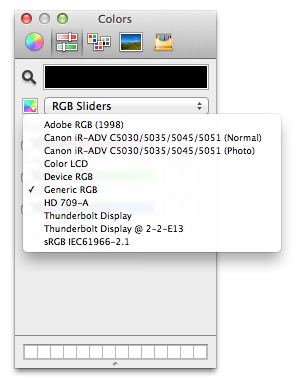
您必须在不同的颜色空间中输入坐标(可能是设备的,因为在我的Mac上,我的显示器的颜色空间中的#4272 in转换为校准的颜色空间时产生的结果几乎相同,#345C9A)。
若要更改NSColorPanel中的颜色空间,请单击“小彩虹”按钮。NSCalibratedRGBColorSpace对应于“泛型RGB”选择-由于您的get -十六进制方法使用校准,您需要使用相同的数字,如果您想要得到相同的数字。
一点警告:这段来自developer.apple.com的代码是有害的。
- 当人们互相说十六进制代码时,人们几乎普遍认为它意味着与HTML/CSS所产生的颜色相同。这意味着十六进制代码必须在sRGB颜色空间中,因为web标准要求在省略/丢失颜色空间信息时使用sRGB。
- 苹果的“通用RGB”(NSCalibratedRGBColorSpace)是,与sRGB和大多数现代显示器的原生颜色空间非常不同。你的问题证明了这种差别有多大。
- 世界上大多数的显示器都是为了尽可能地与sRGB相匹配而生产的,而现代苹果设备的高质量显示器在这方面尤其出色。
- 这就得出了一些令人惊讶的结论:如果需要那些十六进制代码来生成与HTML相同的颜色,那么使用
NSDeviceRGBColorSpace__,不管这是错误的,而不是NSCalibratedRGBColorSpace,都会得到更好的结果。通过在设备、泛型和sRGB颜色空间中输入相同的颜色坐标并与Safari中的HTML页面进行比较,您可以很容易地验证这一事实。 - 如果您需要与Web中使用的十六进制代码正确和有保证的匹配,则必须手动将颜色转换为sRGB,因为
NSColor不支持读取除设备RGB和校准的RGB之外的任何颜色配置文件的组件。
页面原文内容由Stack Overflow提供。腾讯云小微IT领域专用引擎提供翻译支持
原文链接:
https://stackoverflow.com/questions/24207313
复制相关文章
相似问题
腾讯云开发者

Copyright © 2013 - 2026 Tencent Cloud. All Rights Reserved. 腾讯云 版权所有
深圳市腾讯计算机系统有限公司 ICP备案/许可证号:粤B2-20090059  粤公网安备44030502008569号
腾讯云计算(北京)有限责任公司 京ICP证150476号 | 京ICP备11018762号