
切y轴成组桶形图
切y轴成组桶形图
提问于 2014-06-13 09:39:57
我试图用成组的条形图和切成的y轴来制作一个图。然而,我似乎不能两者兼得。使用这些数据:
d = t(matrix( c(7,3,2,3,2,2,852,268,128,150,
              127,74,5140,1681,860,963,866,
              470,26419,8795,4521,5375,4514,2487),
            nrow=6, ncol=4 ))
colnames(d)=c("A", "B", "C", "D", "E", "F")
我可以得到这样的分组酒吧间:
barplot( d, beside = TRUE)
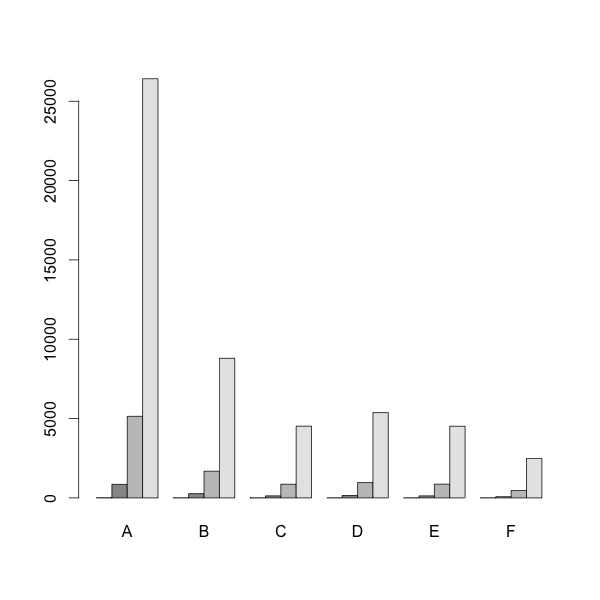
然后,我可以得到切割y轴使用:
# install.packages('plotrix', dependencies = TRUE)
require(plotrix)
gap.barplot( as.matrix(d),
             beside = TRUE,
             gap=c(9600,23400),
             ytics=c(0,3000,6000,9000,24000,25200,26400) )
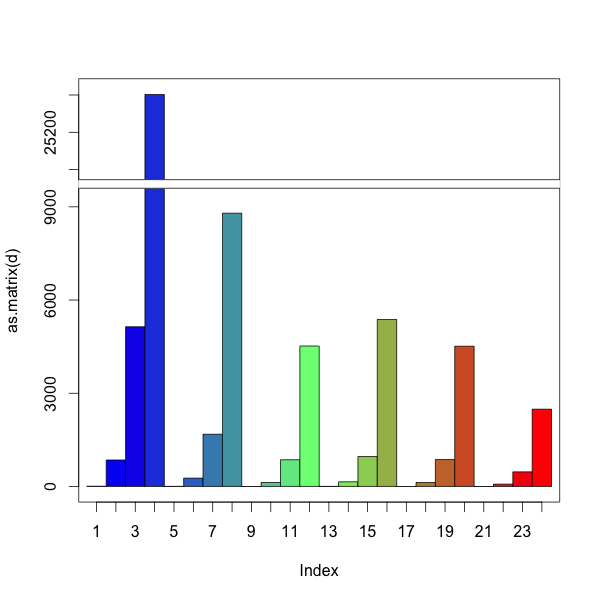
然后我就把A,B,C……贴标签。我怎么能两者兼得?
回答 2
Stack Overflow用户
回答已采纳
发布于 2014-06-13 09:55:45
你可以手动完成。与barplot一样,?gap.barplot返回条形图的中心位置。使用这些来添加标签。
使用space作为组之间的间隔(就像在常规barplot中那样)似乎不起作用。我们可以用一行NAs来黑一个空间。
d = t(matrix( c(7,3,2,3,2,2,852,268,128,150,
                                127,74,5140,1681,860,963,866,
                                470,26419,8795,4521,5375,4514,2487),
                            nrow=6, ncol=4 ))
colnames(d)=c("A", "B", "C", "D", "E", "F")

# add row of NAs for spacing
d=rbind(NA,d)

# install.packages('plotrix', dependencies = TRUE)
require(plotrix)

# create barplot and store returned value in 'a'
a = gap.barplot(as.matrix(d),
                gap=c(9600,23400),
                ytics=c(0,3000,6000,9000,24000,25200,26400),
                xaxt='n') # disable the default x-axis

# calculate mean x-position for each group, omitting the first row
# first row (NAs) is only there for spacing between groups
aa = matrix(a, nrow=nrow(d))
xticks = colMeans(aa[2:nrow(d),])

# add axis labels at mean position
axis(1, at=xticks, lab=LETTERS[1:6])Stack Overflow用户
发布于 2014-06-13 11:51:53
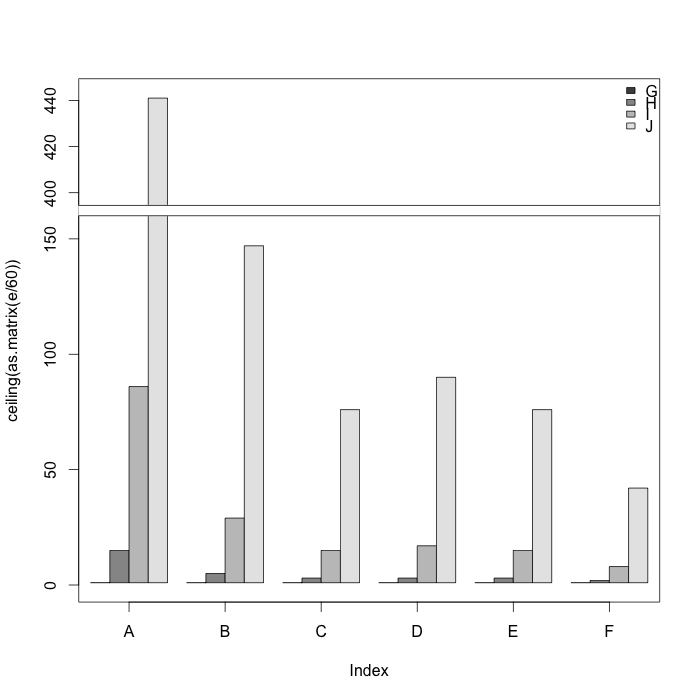
在考肯巴克尔的回答的帮助下,我终于想到了这一点:
# install.packages('plotrix', dependencies = TRUE)
require(plotrix)

d = t(matrix( c(7,3,2,3,2,2,852,268,128,150,
                127,74,5140,1681,860,963,866,
                470,26419,8795,4521,5375,4514,2487),
              nrow=6, ncol=4 ))

# Hack for grouping (leaves the extra space at the end)
e = as.vector(rbind(d, rep(NA, 6)))[1:29]

a = gap.barplot(ceiling(as.matrix(e/60)),
                gap=c(160,390),
                col=rep(c(grey.colors(4), 1), 6),
                #space=rep(c(rep(0,3), 1), 6),
                ytics=c(0,50,100,150,400,420,440),
                xaxt='n') # disable the default x-axis

xticks=c(2.5, 7.5, 12.5, 17.5, 22.5, 27.5)

# add axis labels at mean position
axis(1, at=xticks, LETTERS[1:6] )

legend("topright", LETTERS[7:10],
       bty="n",
       fill=grey.colors(4))
页面原文内容由Stack Overflow提供。腾讯云小微IT领域专用引擎提供翻译支持
原文链接:
https://stackoverflow.com/questions/24202245
复制相关文章
相似问题
腾讯云开发者

Copyright © 2013 - 2026 Tencent Cloud. All Rights Reserved. 腾讯云 版权所有
深圳市腾讯计算机系统有限公司 ICP备案/许可证号:粤B2-20090059  粤公网安备44030502008569号
腾讯云计算(北京)有限责任公司 京ICP证150476号 | 京ICP备11018762号