
从UIColor中获取色调值?
从UIColor中获取色调值?
提问于 2014-06-10 16:11:19
我正在使用以下代码来更改UIImage的色调
UIImage *image = [UIImage imageNamed:@"Image.png"];

// Create a Core Image version of the image.
CIImage *sourceCore = [CIImage imageWithCGImage:[image CGImage]];

// Apply a CIHueAdjust filter
CIFilter *hueAdjust = [CIFilter filterWithName:@"CIHueAdjust"];
[hueAdjust setDefaults];
[hueAdjust setValue: sourceCore forKey: @"inputImage"];
[hueAdjust setValue: [NSNumber numberWithFloat: 1.0f] forKey: @"inputAngle"];
CIImage *resultCore = [hueAdjust valueForKey: @"outputImage"];

// Convert the filter output back into a UIImage.
CIContext *context = [CIContext contextWithOptions:nil];
CGImageRef resultRef = [context createCGImage:resultCore fromRect:[resultCore extent]];

UIImage *result = [UIImage imageWithCGImage:resultRef];
CGImageRelease(resultRef);
代码工作得很好,我只是想找到一种方法来获得特定颜色的正确的NSNumber值inputAngle。
所以我也许可以:
- 通过转换
[UIColor colorWithRed:0.89 green:0.718 blue:0.102 alpha:1.0]获取值 - 或者只是以某种方式使用UIColor?
- 或者每种颜色都有特定数字的列表吗?
医生说:
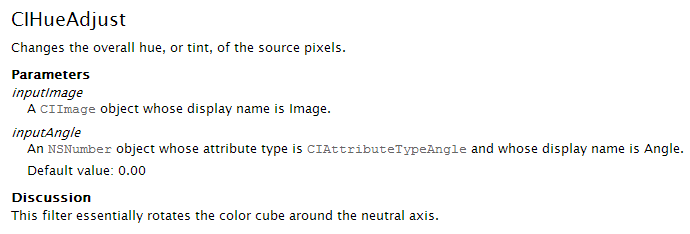
提前感谢
回答 1
Stack Overflow用户
回答已采纳
发布于 2014-06-10 16:33:58
这篇文章可能会回答你的问题:
Is there function to convert UIColor to Hue Saturation Brightness?
角度应该是你得到的色调值。
在这里,您可以找到一些关于如何理解角度的信息:
iOS: Values for CIFilter (Hue) from Photoshop
编辑
下面是一些基于您的示例代码:
首先,让我们定义要筛选的颜色(对于inputAngle)
UIColor *myColor = [UIColor redColor]; // The color you want to filter然后我们确定该颜色的色调值(这是实际的inputAngle)。
CGFloat hue;
CGFloat saturation;
CGFloat brightness;
CGFloat alpha;
[myColor getHue:&hue saturation:&saturation brightness:&brightness alpha:&alpha];
这是您的代码(未更改)
UIImage *image = [UIImage imageNamed:@"Image.png"];

// Create a Core Image version of the image.
CIImage *sourceCore = [CIImage imageWithCGImage:[image CGImage]];

// Apply a CIHueAdjust filter
CIFilter *hueAdjust = [CIFilter filterWithName:@"CIHueAdjust"];
[hueAdjust setDefaults];
[hueAdjust setValue: sourceCore forKey: @"inputImage"];
在这里,我们使用选定颜色的确定色调值来应用过滤器。
[hueAdjust setValue: [NSNumber numberWithFloat: hue] forKey: @"inputAngle"];这是您的代码(未更改)
CIImage *resultCore = [hueAdjust valueForKey: @"outputImage"];

// Convert the filter output back into a UIImage.
CIContext *context = [CIContext contextWithOptions:nil];
CGImageRef resultRef = [context createCGImage:resultCore fromRect:[resultCore extent]];

UIImage *result = [UIImage imageWithCGImage:resultRef];
CGImageRelease(resultRef);
希望这能满足你的需要。
页面原文内容由Stack Overflow提供。腾讯云小微IT领域专用引擎提供翻译支持
原文链接:
https://stackoverflow.com/questions/24145881
复制相关文章
相似问题
腾讯云开发者

Copyright © 2013 - 2026 Tencent Cloud. All Rights Reserved. 腾讯云 版权所有
深圳市腾讯计算机系统有限公司 ICP备案/许可证号:粤B2-20090059  粤公网安备44030502008569号
腾讯云计算(北京)有限责任公司 京ICP证150476号 | 京ICP备11018762号