
TableRow没有向右填充
TableRow没有向右填充
提问于 2014-06-10 15:44:25
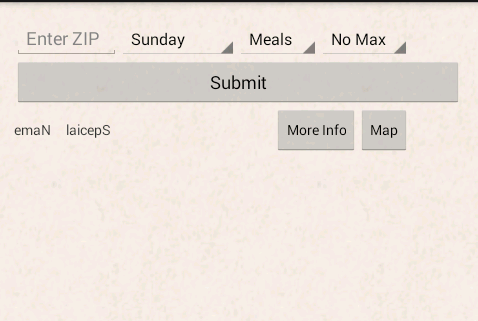
我试着让这个TableRow一直到右边,但是没有任何运气。我相信我已经尝试过android的每一个组合:宽度。所以我要给专家们。下面是屏幕截图和xml :提示: CTRL+F表示“/”可以跳转到有问题的TableRow。
<TableLayout xmlns:android="http://schemas.android.com/apk/res/android"
    xmlns:tools="http://schemas.android.com/tools"
    android:id="@+id/TableLayout1"
    android:layout_width="match_parent"
    android:layout_height="match_parent"
    android:paddingBottom="@dimen/activity_vertical_margin"
    android:paddingLeft="@dimen/activity_horizontal_margin"
    android:paddingRight="@dimen/activity_horizontal_margin"
    android:paddingTop="@dimen/activity_vertical_margin"
    tools:context="com.hogarth45.smartestdiner.MainActivity$PlaceholderFragment"
    android:background="@drawable/sdback" >
<!--
    <TableRow
        android:id="@+id/tableRow0"
        android:layout_width="match_parent"
        android:layout_height="wrap_content"
        android:gravity="center_horizontal">

        <TextView
            android:id="@+id/textView1"
            android:layout_width="0dip"
            android:layout_weight="1"
            android:layout_height="wrap_content"
            android:text="@string/SD"
            android:textColor="#CC4D22"
            android:textSize="30sp"
            android:textStyle="bold"
            />

    </TableRow>
 -->
    <TableRow
        android:id="@+id/tableRow1"
        android:layout_width="match_parent"
        android:layout_height="wrap_content" >

        <EditText
            android:id="@+id/ZIPeditText"
            android:layout_width="match_parent"
            android:layout_height="wrap_content"
            android:ems="5"
            android:hint="@string/ZIP_txtview"
            android:inputType="number" >

            <requestFocus />
        </EditText>

        <Spinner
            android:id="@+id/Day_spinner"
            android:layout_width="wrap_content"
            android:layout_height="wrap_content"
            android:entries="@array/days_array" />

        <Spinner
            android:id="@+id/Choice_spinner"
            android:layout_width="wrap_content"
            android:layout_height="wrap_content"
            android:entries="@array/choice_array" />

        <Spinner
            android:id="@+id/Price_spinner"
            android:layout_width="wrap_content"
            android:layout_height="wrap_content"
            android:entries="@array/price_array" />

    </TableRow>

    <TableRow
        android:id="@+id/tableRow2"
        android:layout_width="match_parent"
        android:layout_height="wrap_content" >

        <Button
            android:id="@+id/Submit_butt"
            android:layout_width="wrap_content"
            android:layout_height="wrap_content"
            android:layout_weight="1"
            android:text="@string/Submit_butt_txt" />

    </TableRow>

    <TableRow
        android:id="@+id/tableRow3"
        android:layout_width="match_parent"
        android:layout_height="wrap_content"
        android:layout_weight="1">

        <ScrollView
            android:id="@+id/scrollView1"
            android:layout_width="match_parent"
            android:layout_height="wrap_content"
            android:layout_span="4"
             >
            <!--   android:padding="5dp"-->


            <TableLayout
                android:id="@+id/scrollytable"
                android:layout_width="match_parent"
                android:layout_height="wrap_content"
                android:stretchColumns="yes"
                 >
                 <!--   android:padding="5dp"-->

                <!--   ///////////////Here is the row that is being clipped//////android:stretchColumns="1,2,1,1"/////////////////////////////////////////////    -->

                     <TableRow
                        android:id="@+id/StockTableScrollView"
                        android:layout_width="fill_parent"
                        android:layout_height="wrap_content"
                        android:stretchColumns ="*"
                        android:background="@android:color/transparent"
                         >

                        <TextView
                            android:id="@+id/Dinner_name_textView"

                            android:layout_height="wrap_content"
                            android:text="@string/eman"
                            android:layout_column="0"
                            android:textIsSelectable="true"
                            android:layout_width="0dip"
                            android:paddingRight="3dp"
                            android:layout_weight="1" />

                        <TextView
                            android:id="@+id/Special_txtview"

                            android:layout_height="wrap_content"
                            android:text="@string/ceps"
                            android:layout_column="1"
                            android:textIsSelectable="true"
                            android:layout_width="0dip"
                            android:layout_weight="3"/>

                        <Button
                            android:id="@+id/moreInfoButt"
                            style="?android:attr/buttonStyleSmall"
                            android:layout_width="wrap_content"
                            android:layout_height="wrap_content"
                            android:layout_column="2"
                            android:text="@string/Butt_txt_Info" />

                        <Button
                            android:id="@+id/WebButton"
                            style="?android:attr/buttonStyleSmall"
                            android:layout_width="wrap_content"
                            android:layout_height="wrap_content"
                            android:layout_column="3"
                            android:text="@string/Butt_txt_Map" />

                    </TableRow>
      <!--   //////////////////////////////////////////////////////////////////      -->

            </TableLayout>
        </ScrollView>

    </TableRow>

    <TableRow
        android:id="@+id/tableRow4"
        android:layout_width="wrap_content"
        android:layout_height="wrap_content" >

        <Button
            android:id="@+id/ClearButt"
            android:layout_width="wrap_content"
            android:layout_height="wrap_content"
            android:layout_weight="1"
            android:text="@string/Clear_butt_txt" />

    </TableRow>

</TableLayout>
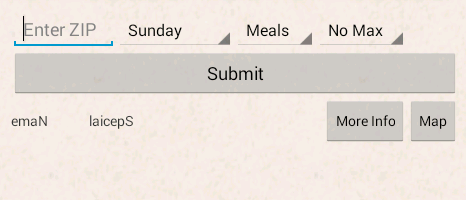
解决了
将ScrollView更改为
<ScrollView
    android:id="@+id/scrollView1"
    android:layout_width="0dp"
    android:layout_weight="1"
    android:layout_height="wrap_content"
     >
回答 1
Stack Overflow用户
发布于 2014-06-10 15:49:22
这是因为您的TableRow位于ScrollView中,它将与父级不匹配。
要实现这一点,您必须删除ScrollView
页面原文内容由Stack Overflow提供。腾讯云小微IT领域专用引擎提供翻译支持
原文链接:
https://stackoverflow.com/questions/24145310
复制相关文章
相似问题
腾讯云开发者

Copyright © 2013 - 2026 Tencent Cloud. All Rights Reserved. 腾讯云 版权所有
深圳市腾讯计算机系统有限公司 ICP备案/许可证号:粤B2-20090059  粤公网安备44030502008569号
腾讯云计算(北京)有限责任公司 京ICP证150476号 | 京ICP备11018762号