
使用UIActionSheetDelegate执行多个Segues
我希望通过一个UIBarButtonItem按钮拥有多个segue,根据通过UIActionSheetDelegate的响应,正确的UIViewController将通过push segue加载。这是我当前的UIActionSheetDelegate代码。
- (void)actionSheet:(UIActionSheet *)actionSheet clickedButtonAtIndex:(NSInteger)buttonIndex
{
    if (buttonIndex == 0)
    {
        // rate this app
    }

    else if (buttonIndex == 1)
    {
        [self performSegueWithIdentifier:@"bugReportSegue" sender:self];
    }

    else if (buttonIndex == 2)
    {
        [self performSegueWithIdentifier:@"featureRequestSegue" sender:self];
    }
}
这方面的问题是,我不能链接同一按钮到多个视图通过故事板塞格。我想知道是否有解决办法。
编辑
这就是我的代码现在的样子:(减去故事板)
- (void)actionSheet:(UIActionSheet *)actionSheet clickedButtonAtIndex:(NSInteger)buttonIndex
{
    if (buttonIndex == 0)
    {
        // rate this app
    }

    else if (buttonIndex == 1)
    {
        [self.storyboard instantiateViewControllerWithIdentifier:@"bugReportIdentifier"];
    }

    else if (buttonIndex == 2)
    {
        [self.storyboard instantiateViewControllerWithIdentifier:@"featureRequestIdentifier"];
    }
}回答 1
Stack Overflow用户
发布于 2014-06-09 20:21:39
而不是将segue与performSegueWithIdentifier结合使用
考虑将StoryboardID与instantiateViewControllerWithIdentifier:一起使用
要做到这一点,在Storyboard中,只需创建一个视图控制器就可以了,并且不要将任何分支连接到它。在属性检查器的第三个选项卡中,为它分配一个Storyboard ID
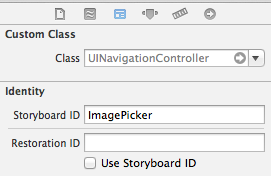
然后,在代码中,您可以创建如下所示的实例:
[self.storyboard instantiateViewControllerWithIdentifier:@"ImagePicker"]
这将在每次创建一个新实例,所以您仍然应该保存它,并在可能的情况下重用它。
编辑:在您获得视图控制器之后,您需要自己展示它。
如果您使用的是NavigationViewController调用:
UIViewController * newController = [self.storyboard instantiateViewControllerWithIdentifier:@"ImagePicker"];
[self.navigationController pushViewController:newController];
如果没有,您可以使用:
UIViewController * newController = [self.storyboard instantiateViewControllerWithIdentifier:@"ImagePicker"];
[self presentViewController:newController animated:YES completion:nil];编辑2:下面是您的最终代码应该是什么样子:
- (void)actionSheet:(UIActionSheet *)actionSheet clickedButtonAtIndex:(NSInteger)buttonIndex
{
    if (buttonIndex == 0)
    {
        // rate this app
    }

    else if (buttonIndex == 1)
    {
        UIViewController * controller = [self.storyboard instantiateViewControllerWithIdentifier:@"bugReportIdentifier"];
        [self presentViewController:controller animated:YES completion:nil];
    }

    else if (buttonIndex == 2)
    {
        UIViewController * controller = [self.storyboard instantiateViewControllerWithIdentifier:@"bugReportIdentifier"];
        [self presentViewController:controller animated:YES completion:nil];
    }
}https://stackoverflow.com/questions/24128201
复制相似问题
腾讯云开发者

Copyright © 2013 - 2026 Tencent Cloud. All Rights Reserved. 腾讯云 版权所有
深圳市腾讯计算机系统有限公司 ICP备案/许可证号:粤B2-20090059  粤公网安备44030502008569号
腾讯云计算(北京)有限责任公司 京ICP证150476号 | 京ICP备11018762号