
按钮填充TableLayout中的整行吗?
按钮填充TableLayout中的整行吗?
提问于 2014-06-08 15:05:14
我有一个垂直方向的LinearLayout,在第一行中我添加了一个按钮来填充父元素。
我想使用TableLayout实现同样的事情。
到目前为止,我尝试的是:

<TableLayout
    android:layout_width="fill_parent"
    android:layout_height="fill_parent"
    xmlns:android="http://schemas.android.com/apk/res/android"
    android:id="@+id/tableLayout">
<TableRow
     android:layout_width="match_parent"
     android:layout_height="wrap_content"
     android:id="@+id/firstRow">

<Button
     android:id="@+id/button1"
     android:layout_width="fill_parent"
     android:layout_height="wrap_content"
     android:text="Button" />
</TableRow >
</TableLayout>TableRow填充父程序,但是行内的按钮不会填充整个行。
如何使按钮像这样填充家长?

编辑:
以及如何使它垂直填充父母如下:
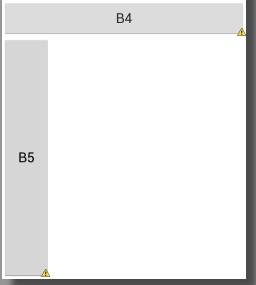
回答 2
Stack Overflow用户
回答已采纳
发布于 2014-06-08 15:11:12
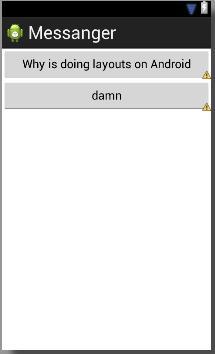
使用android:layout_weight="1"
   <?xml version="1.0" encoding="utf-8"?>
<TableLayout xmlns:android="http://schemas.android.com/apk/res/android"
    android:layout_width="match_parent"
    android:layout_height="match_parent" >

    <TableRow>

        <Button
            android:layout_width="0dip"
            android:layout_height="match_parent"
            android:layout_weight="1"
            android:text="Why is doing layouts on Android" />
    </TableRow>

    <TableRow>

        <Button
            android:layout_width="0dip"
            android:layout_height="match_parent"
            android:layout_weight="1"
            android:text="damn" />
    </TableRow>

</TableLayout>
看上去:
Stack Overflow用户
发布于 2020-07-30 12:16:36
<TableLayout
    android:layout_width="0dp"
    android:layout_height="0dp"
    app:layout_constraintBottom_toBottomOf="parent"
    app:layout_constraintEnd_toEndOf="parent"
    app:layout_constraintStart_toStartOf="parent"
    app:layout_constraintTop_toTopOf="parent">

    <TableRow
        android:layout_width="match_parent"
        android:layout_height="match_parent"
        android:layout_gravity="fill"
        android:layout_weight="1">

        <Button
            android:id="@+id/button"
            android:layout_width="match_parent"
            android:layout_height="match_parent"
            android:layout_weight="1"
            android:text="Button" />

        <Button
            android:id="@+id/button2"
            android:layout_width="wrap_content"
            android:layout_height="match_parent"
            android:layout_weight="1"
            android:text="Button" />
</TableRow>页面原文内容由Stack Overflow提供。腾讯云小微IT领域专用引擎提供翻译支持
原文链接:
https://stackoverflow.com/questions/24107467
复制相关文章
相似问题
腾讯云开发者

Copyright © 2013 - 2026 Tencent Cloud. All Rights Reserved. 腾讯云 版权所有
深圳市腾讯计算机系统有限公司 ICP备案/许可证号:粤B2-20090059  粤公网安备44030502008569号
腾讯云计算(北京)有限责任公司 京ICP证150476号 | 京ICP备11018762号