
如何利用matlab在视频帧上绘制填充圆
如何利用matlab在视频帧上绘制填充圆
提问于 2014-06-06 12:01:27
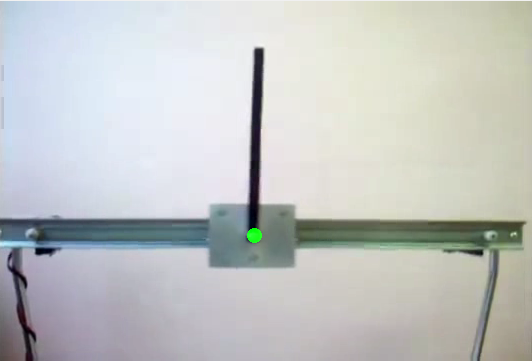
我有一个“倒立摆”的视频,我试图找到中间点的移动部分。我正在使用计算机视觉工具箱

我用检测到的坐标改变中点的颜色。假设X是检测到的中点的帧行号,Y是col号。
while ~isDone(hVideoFileReader)

    frame = step(hVideoFileReader);
    ...
    frame(X-3:X+3, Y-3:Y+3, 1) = 1; % # R=1 make the defined region red
    frame(X-3:X+3, Y-3:Y+3, 2) = 0; % # G=0
    frame(X-3:X+3, Y-3:Y+3, 3) = 0; % # B=0

    step(hVideoPlayer, frame);

end
那么我很容易就有了一个红色的广场。但是我想在检测到的点上加上一个红色的圆圈,而不是一个正方形。我怎么能这么做?
回答 3
Stack Overflow用户
回答已采纳
发布于 2014-06-16 08:14:52
谢谢@Dima,我已经创建了一个shapeInserter对象。
greenColor = uint8([0 255 0]);
hFilledCircle = vision.ShapeInserter('Shape','Circles',...
                              'BorderColor','Custom',...
                              'CustomBorderColor', greenColor ,...
                              'Fill', true, ...
                              'FillColor', 'Custom',...
                              'CustomFillColor', greenColor );
...

fc = int32([Y X 7;]);

frame = step(hFilledCircle, frame, fc);
然后我把它应用到检测点。
Stack Overflow用户
发布于 2014-06-06 12:07:49
您可以使用insertShape函数。示例:
img = imread('peppers.png');
img = insertShape(img, 'FilledCircle', [150 280 35], ...
    'LineWidth',5, 'Color','blue');
imshow(img)位置参数指定为[x y radius]。

编辑:
下面是我们手动绘制圆形形状的另一种方法(具有透明度):
% some RGB image
img = imread('peppers.png');
[imgH,imgW,~] = size(img);

% circle parameters
r = 35;                    % radius
c = [150 280];             % center
t = linspace(0, 2*pi, 50); % approximate circle with 50 points

% create a circular mask
BW = poly2mask(r*cos(t)+c(1), r*sin(t)+c(2), imgH, imgW);

% overlay filled circular shape by using the mask
% to fill the image with the desired color (for all three channels R,G,B)
clr = [0 0 255];            % blue color
a = 0.5;                    % blending factor
z = false(size(BW));
mask = cat(3,BW,z,z); img(mask) = a*clr(1) + (1-a)*img(mask);
mask = cat(3,z,BW,z); img(mask) = a*clr(2) + (1-a)*img(mask);
mask = cat(3,z,z,BW); img(mask) = a*clr(3) + (1-a)*img(mask);

% show result
imshow(img)我正在使用来自图像处理工具箱的poly2mask函数来创建圆圈掩码(idea从这个post)。如果您无法访问此函数,以下是另一种选择:
[X,Y] = ndgrid((1:imgH)-c(2), (1:imgW)-c(1));
BW = (X.^2 + Y.^2) < r^2;
这样,您就可以只使用核心MATLAB函数获得解决方案(没有工具箱!)
Stack Overflow用户
发布于 2014-06-15 01:35:38
如果您有安装了计算机视觉系统工具箱的旧版本的MATLAB,则可以使用vision.ShapeInserter系统对象。
页面原文内容由Stack Overflow提供。腾讯云小微IT领域专用引擎提供翻译支持
原文链接:
https://stackoverflow.com/questions/24081367
复制相关文章
相似问题
腾讯云开发者

Copyright © 2013 - 2026 Tencent Cloud. All Rights Reserved. 腾讯云 版权所有
深圳市腾讯计算机系统有限公司 ICP备案/许可证号:粤B2-20090059  粤公网安备44030502008569号
腾讯云计算(北京)有限责任公司 京ICP证150476号 | 京ICP备11018762号