
为什么PhoneGap (云)打包的iOS应用总是在iOS中显示默认的闪屏图像?
为什么PhoneGap (云)打包的iOS应用总是在iOS中显示默认的闪屏图像?
提问于 2014-06-04 14:02:14
我在Sencha Touch 2.3.1-gpl中创建了一个跨平台应用程序(用于、安卓和Windows ),并通过phonegap.com (phonegap.com)将其打包给iOS。该应用程序和应用程序图标在所有iOS设备上都能正常工作,但是当应用程序启动时,会显示默认的Phonegap 启动屏幕:

我在Phonegap (云) UI中找不到任何选项来为我的应用程序选择一个启动屏幕:
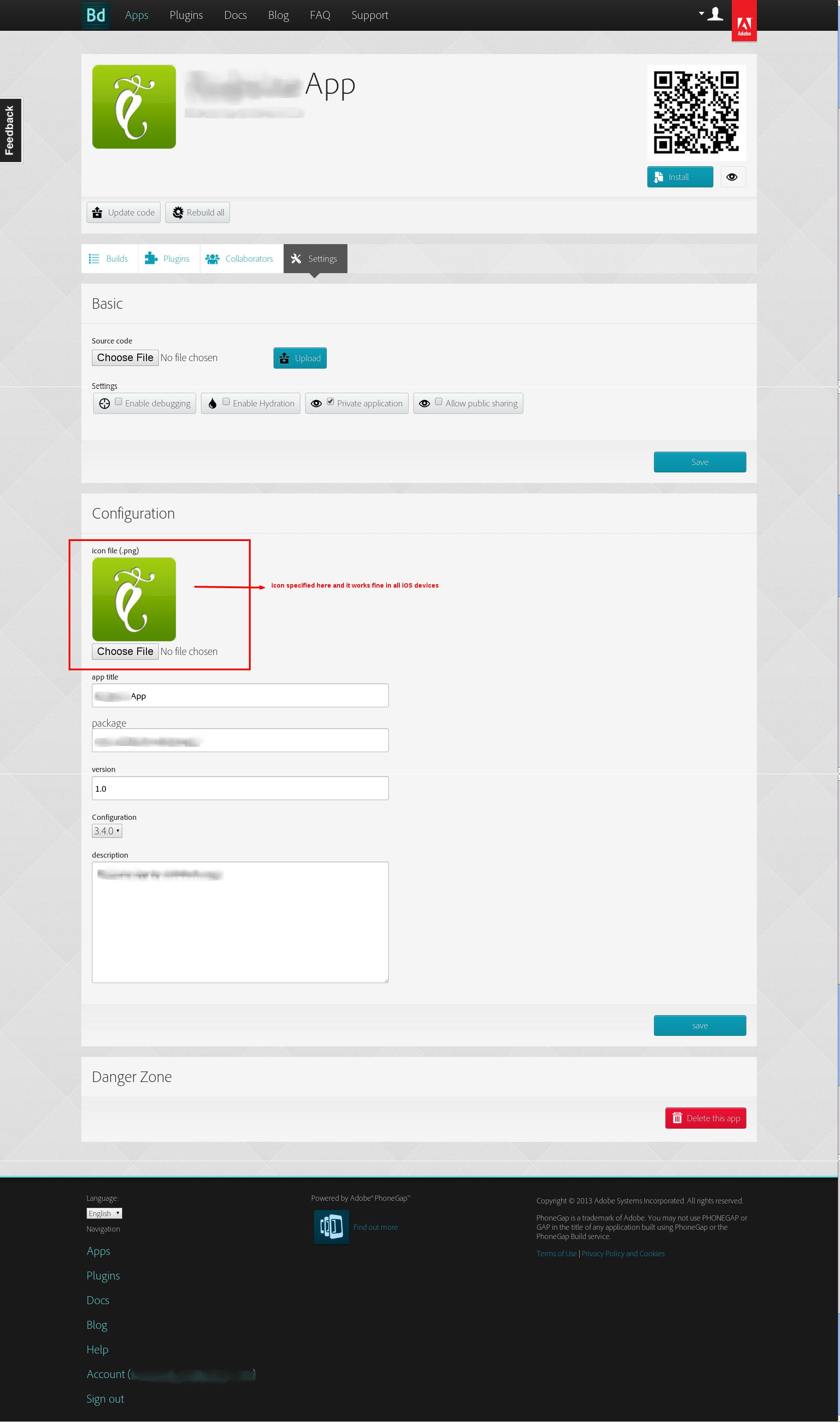
现在我的问题是:
- 我可以在哪里或者如何为我的应用程序定义一个自定义的启动屏幕?
- 启动屏幕是否必须在Sencha应用程序代码中指定?或是否必须添加到Phonegap (云) UI的某个位置?
这里是我的Sencha Touch app.js代码,我没有指定任何图标或启动屏幕,因为据我理解,必须在Phonegap (云)中添加图标和启动屏幕:
Ext.Loader.setConfig({disableCaching: false});
Ext.application({
    name: 'RedmineApp',
    views: ['Issue', 'ProjectIssues', 'RedmineIssuesNavigator', 'RedmineTabPanel', 'RedmineChart', 'RedmineChartsNavigator', 'UserInputView', 'RedmineIDChart', 'RedminePriorityChart', 'RedmineTrackerChart', 'RedmineStatusChart', 'IssueHistory'],
    models: ['RedmineConfig', 'Issue', 'IssueCategory', 'IssuePriority', 'Project', 'ProjectMembership', 'Tracker', 'User', 'IssueStatus'],
    stores: ['RedmineConfigs', 'Projects', 'IssuePriorities', 'IssueStatuses'],
    controllers: ['Projects', 'Issues', 'ChartsMenu', 'UserInputFields'],
    launch: function() {
        // Destroy the #appLoadingIndicator element
        Ext.fly('appLoadingIndicator').destroy();
        // Initialize the main view
        Ext.Viewport.add(Ext.create('RedmineApp.view.RedmineTabPanel'));
    },
    projectIdentifier: null,
    redmine_url: '',
    redmine_access_key: '',
    loadRedmineConfig: function() {
        var configStore = Ext.getStore('RedmineConfigs');
        configStore.load();
        var redmine_config = configStore.getAt(0);
        if (redmine_config !== undefined) {
            this.redmine_url = redmine_config.get('redmine_url');
            this.redmine_access_key = redmine_config.get('redmine_access_key');
        } else {
            this.redmine_url = 'http://redmine.arkhitech.com';
        }
    },
    saveRedmineConfig: function() {
        var newRecord = new RedmineApp.model.RedmineConfig({
            redmine_url: this.redmine_url,
            redmine_access_key: this.redmine_access_key
        });
        var configStore = Ext.getStore('RedmineConfigs');
        configStore.load();
        configStore.removeAll();
        configStore.add(newRecord);
        configStore.sync();
    },
    setRedmineUrl: function(redmine_url) {
        this.redmine_url = redmine_url.replace(/\/$/, '');
        this.saveRedmineConfig();
    },
    getRedmineUrl: function() {
        if (this.redmine_url === '') {
            this.loadRedmineConfig();
        }
        return this.redmine_url;
    },
    redmine_base_path: '',
    setRedmineBasePath: function(redmine_base_path) {
        this.redmine_base_path = redmine_base_path;
    },
    getRedmineBasePath: function() {
        return this.redmine_base_path;
    },
    setRedmineAccessKey: function(redmine_access_key) {
        this.redmine_access_key = redmine_access_key;
        this.saveRedmineConfig();
    },
    getRedmineAccessKey: function() {
        if (this.redmine_access_key === '') {
            this.loadRedmineConfig();
        }
        return this.redmine_access_key;
    },
    setCurrentProjectIdentifier: function(projectIdentifier) {
        this.projectIdentifier = projectIdentifier;
    },
    getCurrentProjectIdentifier: function() {
        return this.projectIdentifier;
    },
    getCurrentProjectTrackers: function() {
        return this.projectTrackersStore;
    },
    setCurrentProjectTrackers: function(projectTrackersStore) {
        this.projectTrackersStore = projectTrackersStore;
    },
    getCurrentIssuesStore: function() {
        return this.createIssuesStore(this.getCurrentProjectIdentifier());
    },
    getCurrentProjectIssueCategories: function() {
        return this.issueCategoriesStore;
    },
    setCurrentProjectIssueCategories: function(issueCategoriesStore) {
        this.issueCategoriesStore = issueCategoriesStore;
    },
    loadProjectSettings: function(project_id) {
        var Project = Ext.ModelManager.getModel('RedmineApp.model.Project');
        Project.load(project_id, {
            success: function(project) {
                RedmineApp.app.setCurrentProjectTrackers(project.trackersStore);
                RedmineApp.app.setCurrentProjectIssueCategories(project.issueCategoriesStore);
            }
        });
    },
    createIssuesStore: function(projectIdentifier) {
        var newStore = Ext.create('Ext.data.Store', {
            model: 'RedmineApp.model.Issue',
            autoLoad: true,
            proxy: {
                type: 'dynamicrest',
                resourcePath: '/projects/' + projectIdentifier + '/issues',
                format: 'json',
                reader: {
                    rootProperty: 'issues',
                    type: 'json'
                }
            },
            grouper: {
                groupFn: function(record) {
                    return record.get('updated_on');
                },
                sortProperty: 'updated_on',
                    direction: 'DESC'
                }
            });
            return newStore;
        }
});回答 1
Stack Overflow用户
回答已采纳
发布于 2014-06-05 12:33:05
通过在Sencha Touch应用程序代码的根目录中添加这个config.xml文件来解决这个问题:
 <?xml version="1.0" encoding="UTF-8" ?>
        <widget xmlns   = "http://www.w3.org/ns/widgets"
            xmlns:gap   = "http://phonegap.com/ns/1.0"
            id          = "com.phonegap.example"
            versionCode = "10"
            version     = "1.0.0" >

        <!-- versionCode is optional and Android only -->

        <name>Your app name</name>

        <description>
            Your app description
        </description>

        <author href="http://www.author.com" email="info@email.com">
            Author Name
        </author>
    <!-- iPhone and iPod touch -->
    <gap:splash src="splash/ios/Default.png" gap:platform="ios" width="320" height="480" />
    <gap:splash src="splash/ios/Default@2x.png" gap:platform="ios" width="640" height="960" />

    <!-- iPhone 5 / iPod Touch (5th Generation) -->
    <gap:splash src="splash/ios/Default-568h@2x.png" gap:platform="ios" width="640" height="1136" />

    <!-- iPad -->
    <gap:splash src="splash/ios/Default-Portrait.png" gap:platform="ios" width="768" height="1024" />
    <gap:splash src="splash/ios/Default-Landscape.png" gap:platform="ios" width="1024" height="768" />

    <!-- Retina iPad -->
    <gap:splash src="splash/ios/Default-Portrait@2x.png" gap:platform="ios" width="1536" height="2048" />
    <gap:splash src="splash/ios/Default-Landscape@2x.png" gap:platform="ios" width="2048" height="1536" />
    </widget>
添加此文件后,Phonegap (Cloud)开始从此config.xml文件中获取名称、描述和启动屏幕,而不是使用自己的默认值。
页面原文内容由Stack Overflow提供。腾讯云小微IT领域专用引擎提供翻译支持
原文链接:
https://stackoverflow.com/questions/24039571
复制相关文章
相似问题
腾讯云开发者

Copyright © 2013 - 2026 Tencent Cloud. All Rights Reserved. 腾讯云 版权所有
深圳市腾讯计算机系统有限公司 ICP备案/许可证号:粤B2-20090059  粤公网安备44030502008569号
腾讯云计算(北京)有限责任公司 京ICP证150476号 | 京ICP备11018762号