
带图像的HIghlight UITableViewCell
带图像的HIghlight UITableViewCell
提问于 2014-06-04 13:08:10
在我的应用程序中,我使用的是UITableView。我想用图像高亮显示细胞。我的代码是:
- (void)tableView:(UITableView *)tableView didSelectRowAtIndexPath:(NSIndexPath *)indexPath {
UITableViewCell *cell = [slideMenuTableView cellForRowAtIndexPath:indexPath];
UIImageView *image = [[UIImageView alloc]initWithImage:[UIImage imageNamed:@"selected_tab_bg.png"]];
cell.selectedBackgroundView = image;
}
它突出显示了单元格,但当我选择另一个单元格时,前面的单元格也被选中,如下所示。当我选择另一个单元格时,我想清除前一个单元格。
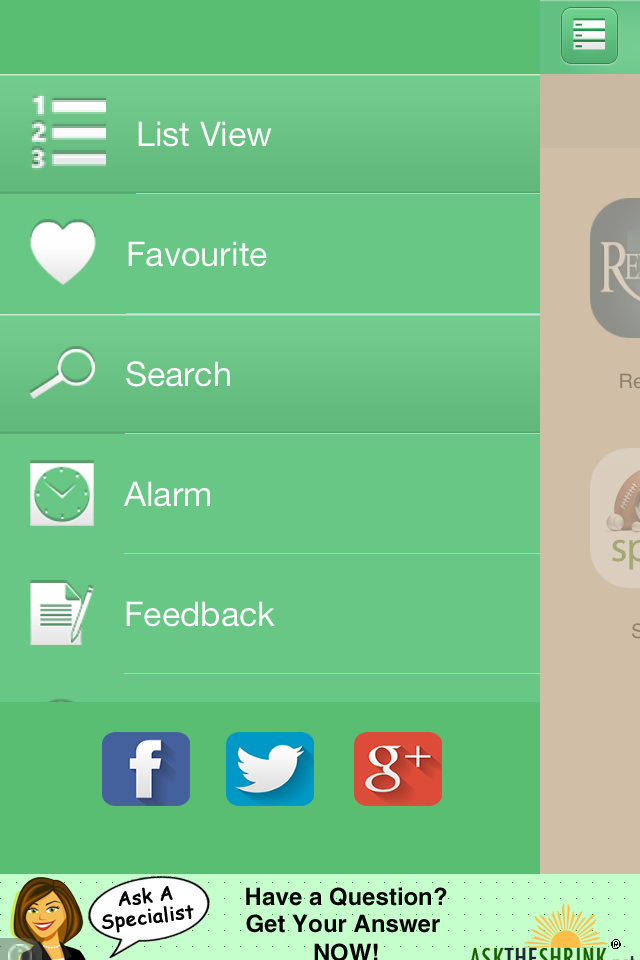
在屏幕截图列表中,视图和搜索被高亮显示。
回答 2
Stack Overflow用户
回答已采纳
发布于 2014-06-04 13:13:53
cellForRowAtImagePath可能会向您发送一个回收电池,这可能是或不可能是您以前突出显示的单元格。如果已将单元格设置为高亮显示,则需要记住该单元格,并将其取消。或者,您可以在cellForRowAtImagePath中有一个if条件,并确保它取消先前高亮显示的内容,并根据当前的indexPath设置当前高亮显示,然后在表视图上调用reloadData使其重新绘制所有内容。
Stack Overflow用户
发布于 2014-06-04 13:31:13
与didSelectRowAtIndexPath委托方法类似:
- (void)tableView:(UITableView *)tableView didSelectRowAtIndexPath:(NSIndexPath *)indexPath {
    UITableViewCell *cell = [slideMenuTableView cellForRowAtIndexPath:indexPath];
    UIImageView *image = [[UIImageView alloc]initWithImage:[UIImage imageNamed:@"selected_tab_bg.png"]];
    cell.selectedBackgroundView = image;
}还有一个名为didDeselectRowAtIndexPath的委托方法
在那里写这段代码:
- (void)tableView:(UITableView *)tableView didDeselectRowAtIndexPath:(NSIndexPath *)indexPath {
cell.selectedBackgroundView = nil; // or set anything else like normal cell
}
希望这就是你要找的。
页面原文内容由Stack Overflow提供。腾讯云小微IT领域专用引擎提供翻译支持
原文链接:
https://stackoverflow.com/questions/24038349
复制相关文章
相似问题
腾讯云开发者

Copyright © 2013 - 2026 Tencent Cloud. All Rights Reserved. 腾讯云 版权所有
深圳市腾讯计算机系统有限公司 ICP备案/许可证号:粤B2-20090059  粤公网安备44030502008569号
腾讯云计算(北京)有限责任公司 京ICP证150476号 | 京ICP备11018762号