
三星更新后的缺陷检测viewport.height作为设备宽度
更新
这个问题也在:https://github.com/mono/MonoGame/issues/2492中讨论过。
问题是,如果该应用程序只允许在景观导向运行,而不是当你使用肖像画或两者都运行。
我有一个用单曲编码的安卓游戏,其中我有一个GraphicsDeviceManager,它被设置为FullScreen=true。
我使用GraphicsDevice.Viewport.Height和GraphicsDevice.Viewport.Width来确定设备的分辨率。这是非常好的工作,直到我得到三星的更新,并不得不关闭FastDev。最大的神秘问题是:
当我用pc进行调试时,viewport的高度和宽度是正确的。但是当我在1到2次之后拔掉这个应用程序,viewport.Height就变成了设备宽度,而viewport.Width变成了设备高度,这使得游戏完全不可玩。
这是很难找到解决方案,因为这是从来没有发生的时候,我调试和电缆从pc到设备。
有人知道会是什么吗?
我现在可以确认这是因为三星更新了
我制作了世界上最简单的安卓应用程序来测试它,刚刚得到了一个带有背景图像的主机,名为"bg“,还有一个打印出viewport.Width和viewport.Height的spritefront。
下面是代码:
using Microsoft.Xna.Framework;
using Microsoft.Xna.Framework.Graphics;
using Microsoft.Xna.Framework.Input;

namespace TestRes
{
    /// <summary>
    /// This is the main type for your game
    /// </summary>
    public class Game1 : Microsoft.Xna.Framework.Game
    {
        GraphicsDeviceManager graphics;
        SpriteBatch spriteBatch;
        SpriteFont font;
        Rectangle _mainFrame;
        Texture2D _background;
        string text;

        public Game1()
        {
           graphics = new GraphicsDeviceManager(this);

            Content.RootDirectory = "Content";

            graphics.IsFullScreen = true;
            //graphics.PreferredBackBufferWidth = 800;
           // graphics.PreferredBackBufferHeight = 480;
            graphics.SupportedOrientations = DisplayOrientation.LandscapeLeft;
        }

        /// <summary>
        /// Allows the game to perform any initialization it needs to before starting
       /// This is where it can query for any required services and load any non-
    /// related content.  Calling base.Initialize will enumerate through any components
    /// and initialize them as well.
    /// </summary>
        protected override void Initialize()
        {
            // TODO: Add your initialization logic here

            base.Initialize();
           text = "";
       }

    /// <summary>
    /// LoadContent will be called once per game and is the place to load
    /// all of your content.
    /// </summary>
        protected override void LoadContent()
        {
        // Create a new SpriteBatch, which can be used to draw textures.
            spriteBatch = new SpriteBatch(GraphicsDevice);
            _background = Content.Load<Texture2D>("Bilder/bg");
           _mainFrame = new Rectangle(0, 0, this.GraphicsDevice.Viewport.Width,     this.GraphicsDevice.Viewport.Height);
        // TODO: use this.Content to load your game content here
        font = Content.Load<SpriteFont>("spriteFont1");
    }

    /// <summary>
    /// Allows the game to run logic such as updating the world,
    /// checking for collisions, gathering input, and playing audio.
    /// </summary>
    /// <param name="gameTime">Provides a snapshot of timing values.</param>
        protected override void Update(GameTime gameTime)
        {
            if (GamePad.GetState(PlayerIndex.One).Buttons.Back == ButtonState.Pressed)
             {
                 Exit();
             }
           text = "ScreenWidth: " + this.GraphicsDevice.Viewport.Width + ", screenheight: " + this.GraphicsDevice.Viewport.Height;
        // TODO: Add your update logic here

            base.Update(gameTime);
    }

    /// <summary>
    /// This is called when the game should draw itself.
    /// </summary>
    /// <param name="gameTime">Provides a snapshot of timing values.</param>
        protected override void Draw(GameTime gameTime)
        {
           graphics.GraphicsDevice.Clear(Color.CornflowerBlue);

           spriteBatch.Begin();
           spriteBatch.Draw(_background, _mainFrame, Color.White);
           spriteBatch.DrawString(font, text, new Vector2(16, 1000), Color.White);
           spriteBatch.End();

           base.Draw(gameTime);
       }
    }
}
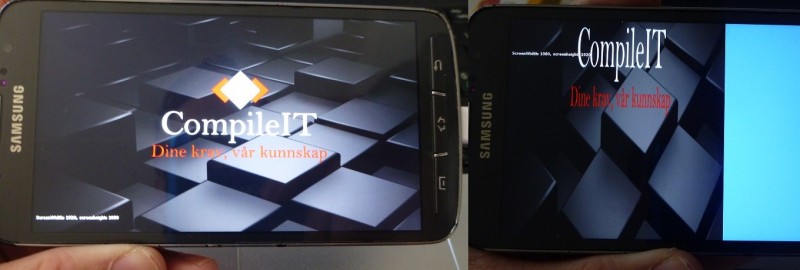
当部署from时,一切都很好,viewport.width是实际的设备宽度,viewport.height是实际的设备高度。但是,当试图从三星Galaxy S4 active (有时你需要尝试2-3次)部署它时,突然之间,Viewport.Height是设备的宽度,相反的,这使得背景图片只覆盖了一点屏幕。
已经拍了照片来展示:
回答 1
Stack Overflow用户
发布于 2017-11-10 13:20:48
签入3.6版,bug就修复了。
https://stackoverflow.com/questions/23978054
复制相似问题
腾讯云开发者

Copyright © 2013 - 2026 Tencent Cloud. All Rights Reserved. 腾讯云 版权所有
深圳市腾讯计算机系统有限公司 ICP备案/许可证号:粤B2-20090059  粤公网安备44030502008569号
腾讯云计算(北京)有限责任公司 京ICP证150476号 | 京ICP备11018762号