
FontMetrics.getStringBounds for AttributedString给出了错误的结果吗?
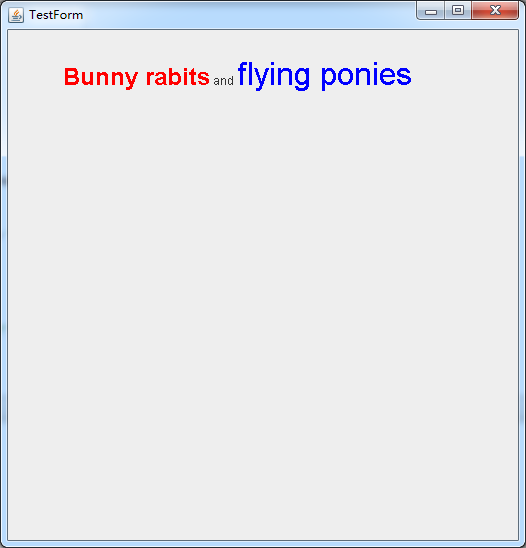
如下图所示,AttributedString是在JPanel (500X500)上绘制的。
如跟踪输出所示,该FontMetrics.getStringBounds()的AttributedString提供的宽度为164.0。
java.awt.geom.Rectangle2D$Float[x=0.0,y=-12.064453,w=164.0,h=15.09375]然而,图片建议宽度应该是300-400 (因为面板的宽度是500)。
你能帮我评论一下原因和解决办法吗?
MyJFrame.java
import javax.swing.*;
import java.awt.*;
import java.awt.font.TextAttribute;
import java.text.AttributedString;

class MyJPanel extends JPanel {
    MyJPanel() {
        setPreferredSize(new Dimension(500,500));
    }

    @Override
    public void paintComponent(Graphics gold) {
        super.paintComponent(gold);
        Graphics2D g = (Graphics2D)gold;
        //
        AttributedString text = new AttributedString("Bunny rabits and flying ponies");
        text.addAttribute(TextAttribute.FONT, new Font("Arial", Font.BOLD, 24), 0, "Bunny rabits".length());
        text.addAttribute(TextAttribute.FOREGROUND, Color.RED, 0, "Bunny rabits".length());

        text.addAttribute(TextAttribute.FONT, new Font("Arial", Font.BOLD & Font.ITALIC, 32), 17, 17 + "flying ponies".length());
        text.addAttribute(TextAttribute.FOREGROUND, Color.BLUE, 17, 17 + "flying ponies".length());

        FontMetrics fm = g.getFontMetrics();

        System.out.println(fm.getStringBounds(text.getIterator(), 0, text.getIterator().getEndIndex(), g));
        g.drawString(text.getIterator(), 50, 50);
        //
        g.dispose();
    }
}

public class MyJFrame extends JFrame {

    public static void main(String[] args) {
        MyJFrame frame = new MyJFrame();
        frame.setContentPane(new MyJPanel());
        frame.setDefaultCloseOperation(JFrame.EXIT_ON_CLOSE);
        frame.pack();
        frame.setVisible(true);
    }
}回答 2
Stack Overflow用户
发布于 2014-06-03 15:42:27
FontMetrics fontMetrics = graphics.getFontMetrics()根据当前设置在graphics对象上的单一字体返回一个FontMetrics对象。您没有显式地更改graphics使用的字体,因此它使用当前L&F为JPanel指定的默认字体。
与边界计算相关的FontMetrics方法接受“简单”CharacterIterator (它不提供字体信息),而不是AttributedCharacterIterator (AttributedCharacterIterator)。因此,fontMetrics.getStringBounds()只需根据相同大小的单一字体计算文本边界。
在使用具有不同字体和字体大小的java.awt.font.TextLayout时,需要使用AttributedCharacterIterator来确定适当的界限:
TextLayout textLayout = new TextLayout(
        text.getIterator(),
        g.getFontRenderContext()
);
Rectangle2D.Float textBounds = ( Rectangle2D.Float ) textLayout.getBounds();

g.drawString( text.getIterator(), 50, 50 );
// lets draw a bounding rect exactly around our text
// to be sure we calculated it properly
g.draw( new Rectangle2D.Float(
        50 + textBounds.x, 50 + textBounds.y,
        textBounds.width, textBounds.height
) );Stack Overflow用户
发布于 2014-06-03 15:48:34
FontMetrics只接收一个CharacterIterator,而不考虑它实际上是一个AttributedCharacterIterator。您可以使用TextMeasurer来计算字符串的实际界限。为了进行比较,在调用drawString方法之后添加以下内容:
    // Compensate for the 50,50 of the drawString position
    g.translate(50, 50);

    g.setColor(Color.RED);
    Rectangle2D wrongBounds = fm.getStringBounds(
            text.getIterator(), 0, text.getIterator().getEndIndex(), g);
    g.draw(wrongBounds);
    System.out.println("wrong: "+wrongBounds);

    g.setColor(Color.BLUE);
    AttributedCharacterIterator iterator = text.getIterator();
    TextMeasurer tm = new TextMeasurer(iterator, g.getFontRenderContext());
    Rectangle2D rightBounds = tm.getLayout(0, iterator.getEndIndex()).getBounds();
    g.draw(rightBounds);
System.out.println("right: "+rightBounds);(和BTW:不要在g.dispose()方法中传递给您的Graphics上调用paintComponent )
https://stackoverflow.com/questions/23975076
复制相似问题
腾讯云开发者

Copyright © 2013 - 2026 Tencent Cloud. All Rights Reserved. 腾讯云 版权所有
深圳市腾讯计算机系统有限公司 ICP备案/许可证号:粤B2-20090059  粤公网安备44030502008569号
腾讯云计算(北京)有限责任公司 京ICP证150476号 | 京ICP备11018762号