
如何创建具有列和行标题的UICollectionView?
我想创建一个如下所示的UICollectionView:
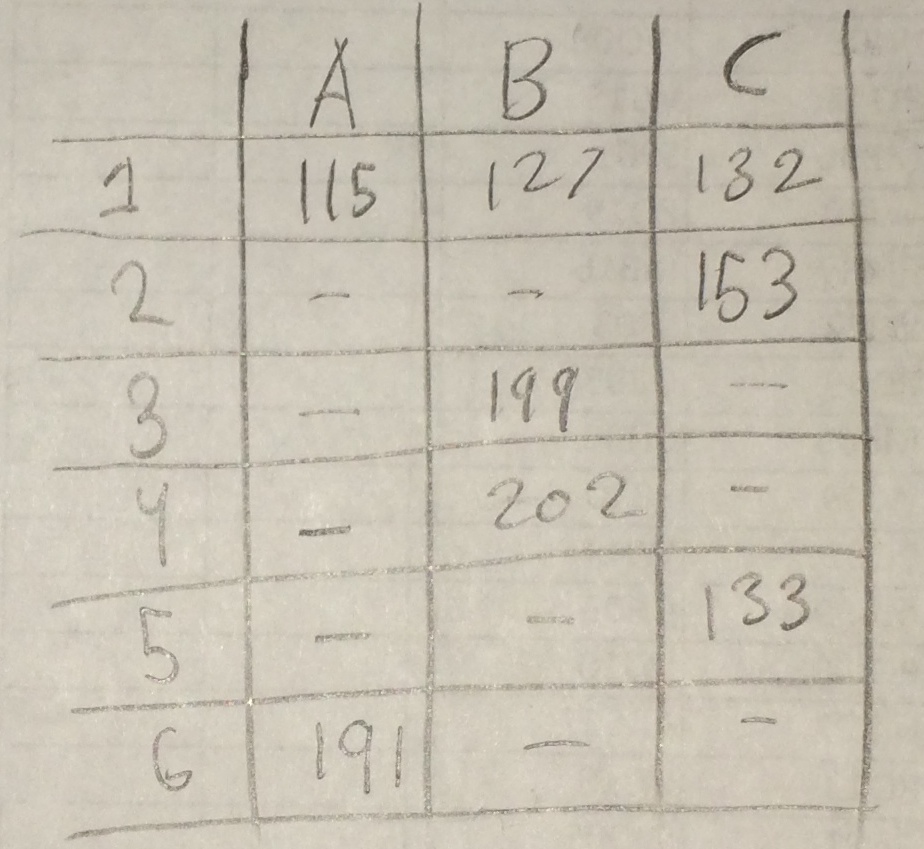
它不会是可滚动或可编辑的。目前,我想知道如何编写这个布局。我猜它不会是UICollectionViewFlowLayout的子类。我能想到很多种方法,但我很好奇是否有什么“正确”的方法。细胞是有活力的。
每一行或每一列都应该是它自己的部分吗?
回答 2
Stack Overflow用户
发布于 2014-05-29 04:39:17
我已经对UICollectionViewFlowLayout的子类做了类似您想要的事情。看上去像这样,
 @implementation MultpleLineLayout {
    NSInteger itemWidth;
    NSInteger itemHeight;
}

-(id)init {
    if (self = [super init]) {
        itemWidth = 80;
        itemHeight = 80;
    }
    return self;
}

-(CGSize)collectionViewContentSize {
    NSInteger xSize = [self.collectionView numberOfItemsInSection:0] * (itemWidth + 2); // the 2 is for spacing between cells.
    NSInteger ySize = [self.collectionView numberOfSections] * (itemHeight + 2);
    return CGSizeMake(xSize, ySize);
}

- (UICollectionViewLayoutAttributes *)layoutAttributesForItemAtIndexPath:(NSIndexPath *)path {
    UICollectionViewLayoutAttributes* attributes = [UICollectionViewLayoutAttributes layoutAttributesForCellWithIndexPath:path];
    NSInteger xValue;
    attributes.size = CGSizeMake(itemWidth,itemHeight);
    xValue = itemWidth/2 + path.row * (itemWidth +2);
    NSInteger yValue = itemHeight + path.section * (itemHeight +2);
    attributes.center = CGPointMake(xValue, yValue);
    return attributes;
}


-(NSArray*)layoutAttributesForElementsInRect:(CGRect)rect {
    NSInteger minRow =  (rect.origin.x > 0)?  rect.origin.x/(itemWidth +2) : 0; // need to check because bounce gives negative values  for x.
    NSInteger maxRow = rect.size.width/(itemWidth +2) + minRow;
    NSMutableArray* attributes = [NSMutableArray array];
    for(NSInteger i=0 ; i < self.collectionView.numberOfSections; i++) {
        for (NSInteger j=minRow ; j < maxRow; j++) {
            NSIndexPath* indexPath = [NSIndexPath indexPathForItem:j inSection:i];
            [attributes addObject:[self layoutAttributesForItemAtIndexPath:indexPath]];
        }
    }
    return attributes;
}
所述数据被安排为数组的数组,其中每个内部数组为一个水平行提供数据。有了我现在的值,并以您的数据为例,视图如下所示,
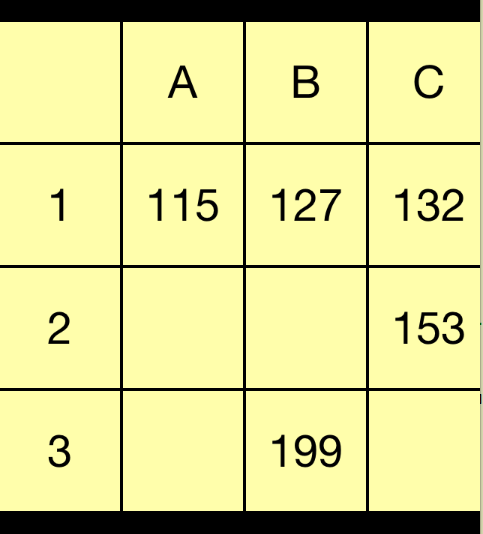
这是代码我有视图控制器,
@interface ViewController ()
@property (strong,nonatomic) UICollectionView *collectionView;
@property (strong,nonatomic) NSArray *theData;
@end

@implementation ViewController

- (void)viewDidLoad {
    self.theData = @[@[@"",@"A",@"B",@"C"],@[@"1",@"115",@"127",@"132"],@[@"2",@"",@"",@"153"],@[@"3",@"",@"199",@""]];

    MultpleLineLayout *layout = [[MultpleLineLayout alloc] init];
    self.collectionView = [[UICollectionView alloc] initWithFrame:self.view.bounds collectionViewLayout:layout];
    self.collectionView.dataSource = self;
    self.collectionView.delegate = self;
    layout.scrollDirection = UICollectionViewScrollDirectionHorizontal;
    self.view.backgroundColor = [UIColor blackColor];
    [self.view addSubview:self.collectionView];
    [self.collectionView registerNib:[UINib nibWithNibName:@"CustomDataCell" bundle:nil] forCellWithReuseIdentifier:@"DataCell"];
}


- (NSInteger)collectionView:(UICollectionView *)view numberOfItemsInSection:(NSInteger)section {
    return [self.theData[section] count];
}

- (NSInteger)numberOfSectionsInCollectionView: (UICollectionView *)collectionView {
    return [self.theData count];
}

- (UICollectionViewCell *)collectionView:(UICollectionView *)collectionView  cellForItemAtIndexPath:(NSIndexPath *)indexPath {
    DataCell *cell = [collectionView  dequeueReusableCellWithReuseIdentifier:@"DataCell" forIndexPath:indexPath];
    cell.label.text = self.theData[indexPath.section][indexPath.row];
    return cell;
}Stack Overflow用户
发布于 2014-05-29 04:38:24
您可以使用UICollectionViewFlowLayout来完成它,但是如果您这样做,您需要仔细地计数,并将填充(即左上角和其他“空的”单元格)正确。如果你算错了,这很明显,因为流很快就破坏了一切,你会在列的一半处找到你的标题单元格。(我也做过类似的事情)
我这样做只是因为害怕定制布局,但实际上它和UITableView一样容易。如果您的布局根本没有滚动,那么您的布局将特别简单,因为您唯一真正的工作将是计算单元格的帧值,并在layoutAttributesForItemAtIndexPath中返回。由于整个视图都位于可见区域,因此layoutAttributesForElementsInRect将意味着您只需遍历视图中的所有单元格。collectionViewContentSize将是您视图的大小。
查看您的示例图片,您可能会发现将数据组织为数组字典(每列一个)是很方便的。您可以按名称("A“、"B”等)获得列数组。数组中的位置对应于最左边列中的值,您可以将其命名为"index“。
您可以使用更多的方法,但这些都是基本方法,将使您的基本显示启动并运行。
https://stackoverflow.com/questions/23925647
复制相似问题
腾讯云开发者

Copyright © 2013 - 2026 Tencent Cloud. All Rights Reserved. 腾讯云 版权所有
深圳市腾讯计算机系统有限公司 ICP备案/许可证号:粤B2-20090059  粤公网安备44030502008569号
腾讯云计算(北京)有限责任公司 京ICP证150476号 | 京ICP备11018762号