
Excel VBA多重Application.OnTime
我试图在我的潜艇中使用多个Application.OnTime,我得到了意想不到的结果。
这就是我想要做的:
- 使用“递归”调用每1分钟运行一个sub (testOnTime) 内部子(testOnTime):
1. run "firstSection" 10 seconds after entering the sub (testOnTime)在“firstSection”中:将调试消息写入Excel工作表"MySheet“
2.进入潜艇后40秒运行"lastSection“(testOnTime)
在“lastSection”内部:将调试消息写入Excel表"MySheet“
3.将调试消息写入Excel工作表"Mysheet“
4.子"testOnTime“运行了5次吗?:没有->继续,有->出口
代码:
Option Explicit

Public rowCnt As Integer
Public Cnt As Integer
Public Const sheetName = "MySheet"
Public Const inc1 = "00:00:40"
Public Const inc2 = "00:00:10"
Public timeStr1 As Date
Public timeStr2 As Date
Public timeStr3 As Date

Public Sub MyMain()

     rowCnt = 1
     Cnt = 0

     Call testOnTime

     Worksheets(sheetName).Range("A" & CStr(rowCnt)).Value = "Done"

End Sub

Public Sub testOnTime()


     ' wait-time for last section
     timeStr1 = Format(Now + TimeValue(inc1), "hh:mm:ss")
     ' wait time for first section
     timeStr2 = Format(Now + TimeValue(inc2), "hh:mm:ss")
     ' wait for 1 minute
     timeStr3 = Format(Now + TimeValue("00:01:00"), "hh:mm:ss")


     ' wait utill 10 seconds
     Application.OnTime TimeValue(timeStr2), "firstSection"

     ' wait utill 40 seconds
     Application.OnTime TimeValue(timeStr1), "lastSection"

     ' debug msgs
     Worksheets(sheetName).Range("A" & CStr(rowCnt)).Value = "Outside @ " & CStr(timeStr3)
     Worksheets(sheetName).Range("B" & CStr(rowCnt)).Value = CStr(rowCnt)
     Worksheets(sheetName).Range("C" & CStr(rowCnt)).Value = CStr(Cnt)
     rowCnt = rowCnt + 1

     Cnt = Cnt + 1

    If Cnt < 5 Then
         ' wait until Now + 1 min
         Application.OnTime TimeValue(timeStr3), "testOnTime"
    End If

End Sub

Public Sub firstSection()
    ' debug msgs for first section
    Worksheets(sheetName).Range("A" & CStr(rowCnt)).Value = "In first section @ " & CStr(timeStr2)
    Worksheets(sheetName).Range("B" & CStr(rowCnt)).Value = CStr(rowCnt)
    Worksheets(sheetName).Range("C" & CStr(rowCnt)).Value = CStr(Cnt)
    rowCnt = rowCnt + 1
End Sub

Public Sub lastSection()
    ' debug msgs for first section
    Worksheets(sheetName).Range("A" & CStr(rowCnt)).Value = "In last section @ " & CStr(timeStr1)
    Worksheets(sheetName).Range("B" & CStr(rowCnt)).Value = CStr(rowCnt)
    Worksheets(sheetName).Range("C" & CStr(rowCnt)).Value = CStr(Cnt)
    rowCnt = rowCnt + 1
End Sub
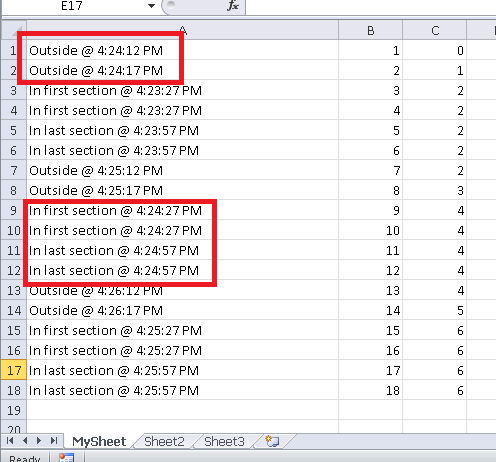
- 为什么“外面.”先写到excel表,当它应该是宏内的最后指令时?
- 当宏只输出一次时,为什么宏输出相同事物的“两个”消息?
- 有没有更好的方法来实现我想要的目标而不用"OnTime“呢?
回答 2
Stack Overflow用户
发布于 2014-05-27 12:50:12
我运行了代码,我认为它运行正确-我必须承认,我有点困惑它的目标是什么。我没有看到任何加倍的信息。
我可以通过两次运行宏来实现消息的加倍-- excel很乐意让它运行两次,然后你就可以得到两倍的消息。这就是问题的原因吗?
我认为您误解了Application.OnTime是如何运行的--它是一个非阻塞调用,因此它创建了对指定子例程的未来调用,然后继续--这就是为什么首先显示“外部”消息的原因。我认为这也是为什么“完成”消息会立即显示,直到它被改写。
希望这能有所帮助
Stack Overflow用户
发布于 2014-05-28 13:57:19
我想我找到了实现我想要达到的目标的方法,下面是代码
更新代码:
Option Explicit

Public rowCnt As Integer
Public Cnt As Integer
Public Const sheetName = "MySheet"
Public Const inc1 = "00:00:40"
Public Const inc2 = "00:00:10"
Public timeStr1 As Date
Public timeStr2 As Date
Public timeStr3 As Date
Public firstFlag As Boolean
Public lastFlag As Boolean


Public Sub MyMain()

    rowCnt = 1
    Cnt = 0

    Call testOnTime

    Worksheets(sheetName).Range("A" & CStr(rowCnt)).Value = "Done"

End Sub

Public Sub testOnTime()

    ' wait-time for last section
    timeStr1 = Format(Now + TimeValue(inc1), "hh:mm:ss")
    ' wait time for first section
    timeStr2 = Format(Now + TimeValue(inc2), "hh:mm:ss")
    ' wait for 1 minute
    timeStr3 = Format(Now + TimeValue("00:01:00"), "hh:mm:ss")


    ' wait utill 10 seconds
    firstFlag = False
    Application.OnTime TimeValue(timeStr2), "firstSection"
    While Not firstFlag
        DoEvents
    Wend


    ' wait utill 40 seconds
    lastFlag = False
    Application.OnTime TimeValue(timeStr1), "lastSection"
    While Not lastFlag
        DoEvents
    Wend

    ' debug msgs
    Worksheets(sheetName).Range("A" & CStr(rowCnt)).Value = "Outside @ " & CStr(timeStr3)
    Worksheets(sheetName).Range("B" & CStr(rowCnt)).Value = CStr(rowCnt)
    Worksheets(sheetName).Range("C" & CStr(rowCnt)).Value = CStr(Cnt)
    rowCnt = rowCnt + 1

    Cnt = Cnt + 1

    If Cnt < 5 Then
        ' wait until Now + 30 seconds
        Application.OnTime TimeValue(timeStr3), "testOnTime"
    End If


End Sub

Public Sub firstSection()
    ' debug msgs for first section
    Worksheets(sheetName).Range("A" & CStr(rowCnt)).Value = "In first section @ " & CStr(timeStr2)
    Worksheets(sheetName).Range("B" & CStr(rowCnt)).Value = CStr(rowCnt)
    Worksheets(sheetName).Range("C" & CStr(rowCnt)).Value = CStr(Cnt)
    rowCnt = rowCnt + 1
    firstFlag = True
End Sub

Public Sub lastSection()
    ' debug msgs for first section
    Worksheets(sheetName).Range("A" & CStr(rowCnt)).Value = "In last section @ " & CStr(timeStr1)
    Worksheets(sheetName).Range("B" & CStr(rowCnt)).Value = CStr(rowCnt)
    Worksheets(sheetName).Range("C" & CStr(rowCnt)).Value = CStr(Cnt)
    rowCnt = rowCnt + 1
    lastFlag = True
End Sub
因此,我为每个部分实例化一个标志,标志被设置为FALSE,在宏中,标志将被设置为TRUE。在Application.OnTime之后,我检查是否有真正的标志,如果没有,我会等待(使用DoEvents)。这确保在执行非阻塞OnTime之后,程序“等待”直到该特定宏被执行后才继续运行。这应该是我的目的。
https://stackoverflow.com/questions/23883461
复制相似问题
腾讯云开发者

Copyright © 2013 - 2026 Tencent Cloud. All Rights Reserved. 腾讯云 版权所有
深圳市腾讯计算机系统有限公司 ICP备案/许可证号:粤B2-20090059  粤公网安备44030502008569号
腾讯云计算(北京)有限责任公司 京ICP证150476号 | 京ICP备11018762号