
为表创建新可创建行的内联创建
我创建了以下简单的MVC 5应用程序
- 使用4个属性创建模型(首先使用代码)
- 我去控制器,通过脚手架生成视图。
一切都很好!当我运行该页面并单击create按钮时,我已经导航到了具有我需要创建的字段的新建页面(这是默认行为),我的问题是,如果有一种方法,当我单击create时,我将停留在相同的页面上,在开始的中添加到表中的新空行,即内联create,我只有一个页面,它只是在表中打开带有文本框和复选框的新行,并在右边保存按钮。
这是我的简单模型和由脚手架生成的UI。
namespace Emp01.Models
{
    public class Emp
    {
        public string name { get; set; }
        public Boolean checkBox1 { get; set; }
        public Boolean checkBox2 { get; set; }
        public Boolean checkBox3 { get; set; }
    }

    public class EmpDbContext : DbContext
    {
        public EmpDbContext()
            : base("DefaultConnection")
        {

        }
        public DbSet<Emp> Emps { get; set; }
    }
}
这是视图
@{
    ViewBag.Title = "Index";
}

<h2>Index</h2>

<p>
    @Html.ActionLink("Create New", "Create")
</p>
<table class="table">
    <tr>
        <th>
            @Html.DisplayNameFor(model => model.name)
        </th>
        <th>
            @Html.DisplayNameFor(model => model.checkBox1)
        </th>
        <th>
            @Html.DisplayNameFor(model => model.checkBox2)
        </th>
        <th>
            @Html.DisplayNameFor(model => model.checkBox3)
        </th>
        <th></th>
    </tr>

@foreach (var item in Model) {
    <tr>
        <td>
            @Html.DisplayFor(modelItem => item.name)
        </td>
        <td>
            @Html.DisplayFor(modelItem => item.checkBox1)
        </td>
        <td>
            @Html.DisplayFor(modelItem => item.checkBox2)
        </td>
        <td>
            @Html.DisplayFor(modelItem => item.checkBox3)
        </td>
        <td>
            @Html.ActionLink("Edit", "Edit", new { id=item.id }) |
            @Html.ActionLink("Delete", "Delete", new { id=item.id })
        </td>
    </tr>
}

</table>
更新
此外,就像帕蒂尔建议的那样,我尝试以下方法,我需要你的帮助
- 我将在create操作中生成的代码添加到索引页,并将类表单从垂直更改为内联。
2.添加带有应该切换的上下文ID的新div。
目前我想念两件事
- 当我点击这个按钮时,我应该如何使它工作?
2.当我运行页面时,我在链接代码中得到了erorr (model=>model.name是因为它的当前空值,但也是当您调用创建页空时,所以我不明白为什么.)
我需要你帮忙!
<script>
    jQuery(document).ready(function () {
        jQuery(".content").hide();
    });
    $("#addmoret").click(function () {
        $(".content").toggle();
    });
</script>

@* ----------------------------------------------------------- *@


          <div class="content">
              <div class="form-inline">
                  <h4>Role</h4>
                  <hr />
                  @Html.ValidationSummary(true, "", new { @class = "text-danger" })
                  <div class="form-group">

                      @Html.LabelFor(model => model.name, htmlAttributes: new { @class = "control-label col-md-2" })
                      <div class="col-md-10">

                          @*@Html.EditorFor(model => model.name, new { htmlAttributes = new { @class = "form-control" } })*@

                          @Html.ValidationMessageFor(model => model.name, "", new { @class = "text-danger" })
                      </div>
                  </div>

                  <div class="form-group">
                      @Html.LabelFor(model => model.checkBox1, htmlAttributes: new { @class = "control-label col-md-2" })
                      <div class="col-md-10">
                          <div class="checkbox">
                              @*@Html.EditorFor(model => model.checkBox1)*@
                              @Html.ValidationMessageFor(model => model.checkBox1, "", new { @class = "text-danger" })
                          </div>
                      </div>
                  </div>

                  <div class="form-group">
                      @Html.LabelFor(model => model.checkBox2, htmlAttributes: new { @class = "control-label col-md-2" })
                      <div class="col-md-10">
                          <div class="checkbox">
                              @*@Html.EditorFor(model => model.checkBox2)*@
                              @Html.ValidationMessageFor(model => model.checkBox2, "", new { @class = "text-danger" })
                          </div>
                      </div>
                  </div>

                  <div class="form-group">
                      @Html.LabelFor(model => model.checkBox3, htmlAttributes: new { @class = "control-label col-md-2" })
                      <div class="col-md-10">
                          <div class="checkbox">
                              @*@Html.EditorFor(model => model.checkBox3)*@
                              @Html.ValidationMessageFor(model => model.checkBox3, "", new { @class = "text-danger" })
                          </div>
                      </div>
                  </div>
更新2
@Html.LabelFor(model => model.name,htmlAttributes: new { @class = "control-label -md-2“})
1:“System.Collections.Generic.IEnumerable”不包含“名称”的定义,也找不到接受“System.Collections.Generic.IEnumerable emp01.Models.emp>”类型的第一个参数的扩展方法“name”(您是缺少使用指令还是程序集引用?)
为我添加的按钮
<button type='button' id='addmore' class="btn ui-state-default medium" value='Add More Credit ?' style="width: 200px;">Create </button>回答 1
Stack Overflow用户
发布于 2014-05-26 08:09:06
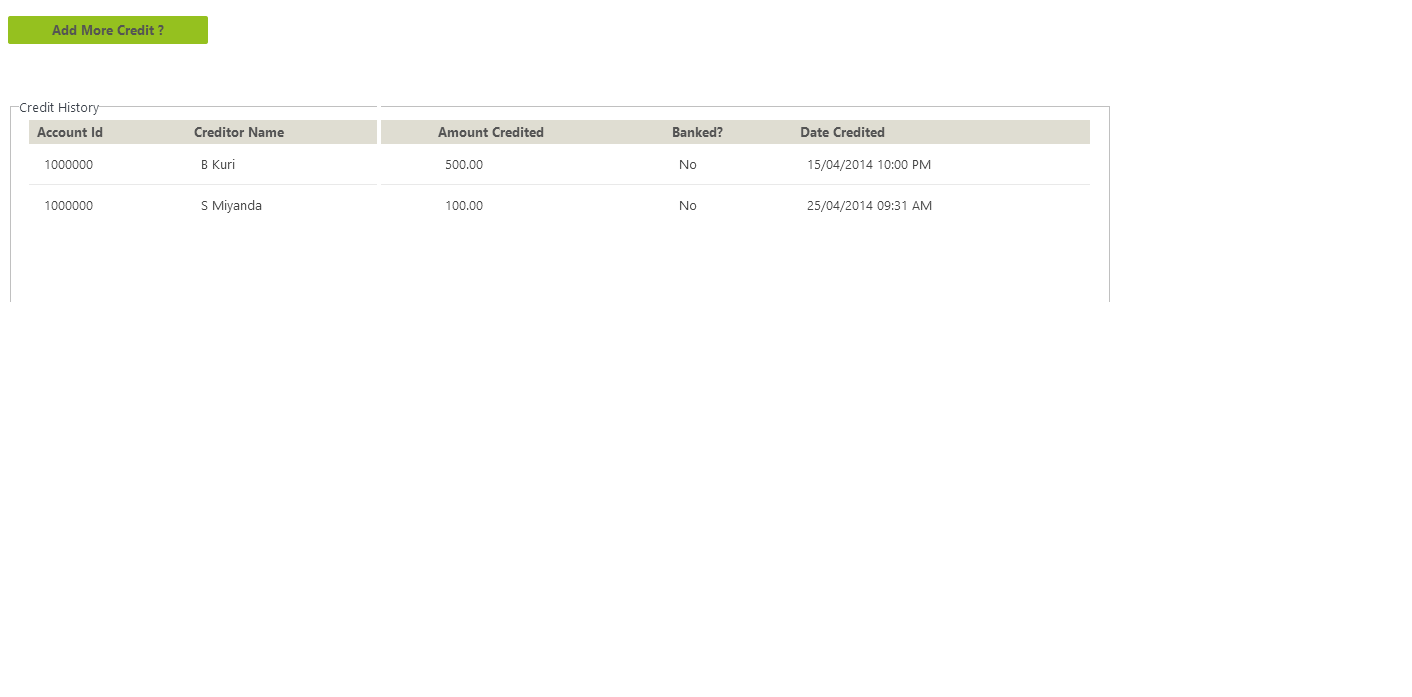
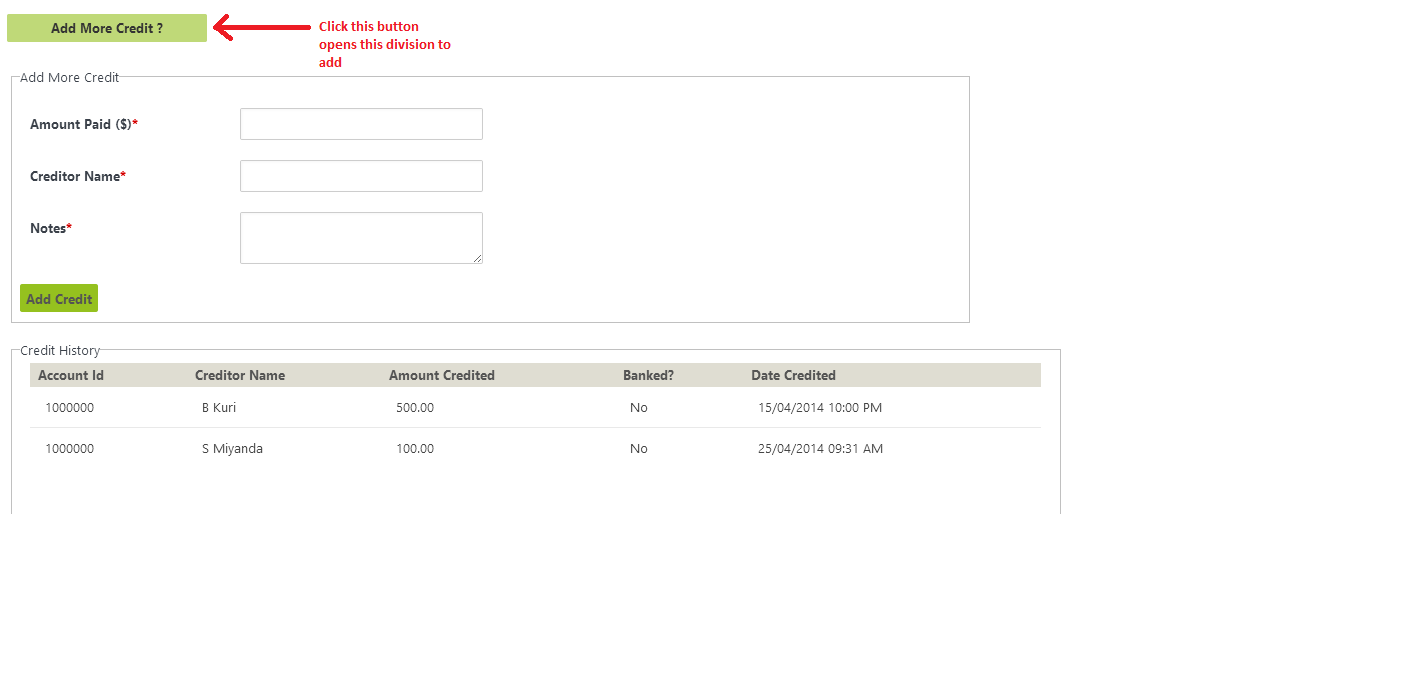
我试着做同样的事情:唯一的事情是,我使用的是一个除法,当你点击按钮时,这个除法会打开。就像你看到的图像。
您可以通过以下代码来实现这一点:
    <script>
        jQuery(document).ready(function () {
            jQuery(".content").hide();
        });
        $("#addmorecredit").click(function () {
            $(".content").toggle();
        });
    </script>

<button type='button' id='addmorecredit' class="btn ui-state-default medium" value='Add More Credit ?' style="width: 200px;">Add More Credit ?</button>
<br />
<br />
<div id="add-credit-form" class="content">
    <fieldset>
        <legend>Add More Credit</legend>
        <br />
        <div class="form-row form-input">
            <div class="form-label col-md-2">
                <label for="">Amount Paid (@Html.DisplayFor(m => m.SelectedCurrency))<span class="required">*</span></label>
            </div>
            <div class="form-input col-md-10">
                <div class="row">
                    <div class="col-md-3">
                        @Html.TextBoxFor(m => m.AmountPaid)
                        @Html.ValidationMessageFor(m => m.AmountPaid)
                    </div>
                </div>
            </div>
        </div>
        <div class="form-row form-input">
            <div class="form-label col-md-2">
                <label for="">Creditor Name<span class="required">*</span></label>
            </div>
            <div class="form-input col-md-10">
                <div class="row">
                    <div class="col-md-3">
                        @Html.TextBoxFor(m => m.CreditorName)
                        @Html.ValidationMessageFor(m => m.CreditorName)
                    </div>
                </div>
            </div>
        </div>
        <div class="form-row">
            <div class="form-label col-md-2">
                <label for="">Notes<span class="required">*</span></label>
            </div>
            <div class="form-input col-md-10">
                <div class="row">
                    <div class="col-md-3">
                        @Html.TextAreaFor(m => m.Notes)
                        @Html.ValidationMessageFor(m => m.Notes)
                    </div>
                </div>
            </div>
        </div>
        <button id='addcredit' class="btn ui-state-default medium">Add Credit</button>
    </fieldset>
</div>
<br />
<br />
<fieldset>
    <legend>Credit History</legend>
    <div>
        <table>
            <thead>
                <tr>
                    <th>Account Id</th>
                    <th>Creditor Name</th>
                    <th>Amount Credited</th>
                    <th>Banked?</th>
                    <th>Date Credited</th>
                </tr>
            </thead>
            <tbody>
                @foreach (var item in Model.PurchaseHistory)
                {
                    <tr>
                        <td>@Html.Raw(Convert.ToString(item.AccountId))</td>
                        <td>@Html.Raw(item.CreditorName)</td>
                        <td>@Html.Raw(Convert.ToString(item.Balance))</td>
                        <td>No</td>
                        <td>@Html.Raw(item.Datetime.ToString("dd/MM/yyyy hh:mm tt"))</td>
                    </tr>
                        }
            </tbody>
        </table>
    </div>
</fieldset>
图像:
https://stackoverflow.com/questions/23864839
复制相似问题
腾讯云开发者

Copyright © 2013 - 2026 Tencent Cloud. All Rights Reserved. 腾讯云 版权所有
深圳市腾讯计算机系统有限公司 ICP备案/许可证号:粤B2-20090059  粤公网安备44030502008569号
腾讯云计算(北京)有限责任公司 京ICP证150476号 | 京ICP备11018762号