
如何真正将两个项目的中心与css对齐?
如何真正将两个项目的中心与css对齐?
提问于 2014-05-23 10:48:33
我有一个帆布,里面有一个圆形的图像,放在一个包装器里,如下所示:
<div id="kaleidowrapper"><canvas class="kaleidoscope" height="1448" width="1448"></canvas></div>.kaleidoscope是圆形图像。圆形图像半径是根据浏览器的大小来设置的,这样图像就可以覆盖整个背景。高度和宽度是这样的2*radius

包装器具有以下css:
#kaleidowrapper{
  position: fixed;
  width: 100%;
  height: 100%;
  overflow: hidden;
}
默认情况下,我的图像定位如下:
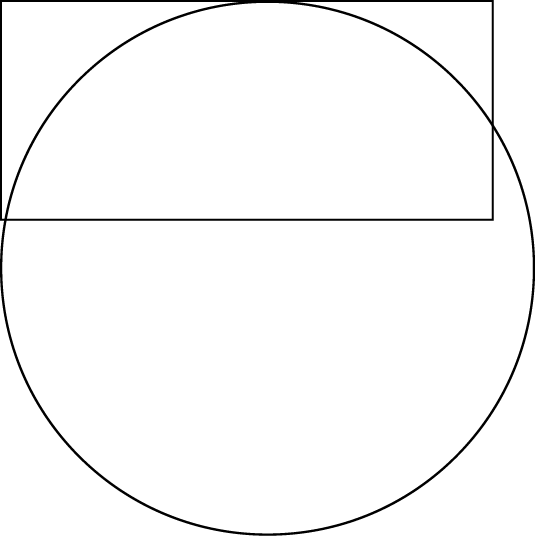
如何定位图像,使其在屏幕上居中?
回答 2
Stack Overflow用户
回答已采纳
发布于 2014-05-23 11:10:11
为此,您需要使用jquery。试试这个小提琴
联合来文:
var imgWidth = Math.sqrt(($("div").width()*$("div").width())*2);
$("img").css({
    "width": imgWidth,
    "position":"relative",
    "left":-((imgWidth-$("div").width())/2),
    "top":-((imgWidth-$("div").height())/2),
});Stack Overflow用户
发布于 2014-05-23 10:57:19
类似的东西是将图片的左上角放置在页面的中间:
.centered {
  position: fixed;
  top: 50%;
  left: 50%;
}
为了使图像准确地居中,您需要附加一半图像高度的负上缘和一半图像宽度的左负边距。
.centered {
  position: fixed;
  top: 50%;
  left: 50%;
  margin-top: -???px;
  margin-left: -???px;
}页面原文内容由Stack Overflow提供。腾讯云小微IT领域专用引擎提供翻译支持
原文链接:
https://stackoverflow.com/questions/23827233
复制相关文章
相似问题
腾讯云开发者

Copyright © 2013 - 2026 Tencent Cloud. All Rights Reserved. 腾讯云 版权所有
深圳市腾讯计算机系统有限公司 ICP备案/许可证号:粤B2-20090059  粤公网安备44030502008569号
腾讯云计算(北京)有限责任公司 京ICP证150476号 | 京ICP备11018762号