
如何强迫人像定向?
如何强迫人像定向?
提问于 2014-05-22 10:24:36
如果我的应用程序最初支持这两个方向,那么如何在iOS 7中强制进行纵向定向?
回答 4
Stack Overflow用户
回答已采纳
发布于 2014-05-22 10:26:49
UIViewController *c = [[UIViewController alloc]init];
[self presentViewController:c animated:NO completion:nil];
[self dismissViewControllerAnimated:NO completion:nil];Stack Overflow用户
发布于 2014-05-22 10:38:42
对于整个应用程序,打开项目文件,转到General选项卡,更改设置:
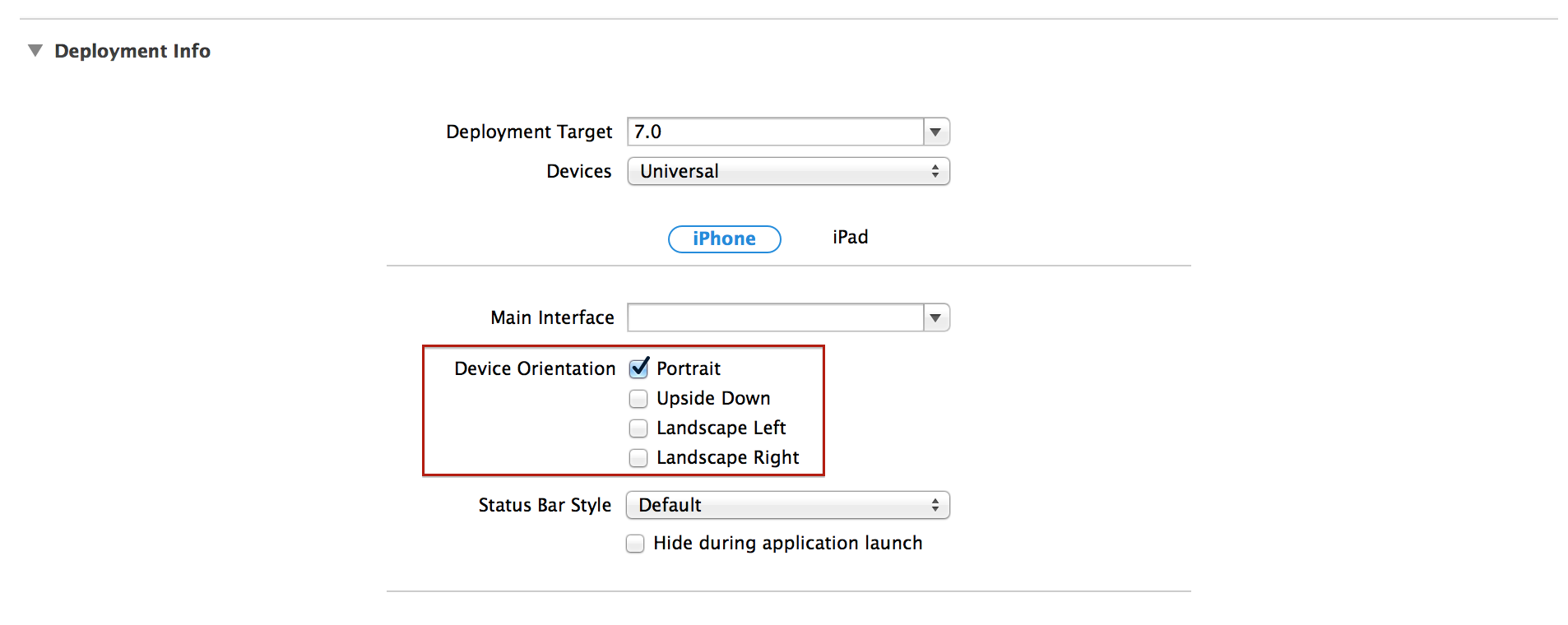
或者直接在Info.plist文件上:

如果只希望在特定的视图控制器上使用,请重写supportedInterfaceOrientations。
- (NSUInteger)supportedInterfaceOrientations
{
    return UIInterfaceOrientationMaskPortrait;
}您可以在官方UIViewController文档上阅读更多关于第二种方法的信息。也许,你会找到一个更适合你的具体问题的方法。
Stack Overflow用户
发布于 2014-05-22 10:36:51
使用以下方法:在应用程序委托.h中
@interface PlayWithWSWithLibAppDelegate : NSObject <UIApplicationDelegate, UITabBarControllerDelegate> {

       BOOL flagOrientationAll;
}

@property (assign) BOOL flagOrientationAll;
在应用程序委托.m文件中添加以下方法
- (NSUInteger)application:(UIApplication *)application supportedInterfaceOrientationsForWindow:(UIWindow *)window{
    //NSLog(@"PlayWithWSWithLibAppDelegate -- supportedInterfaceOrientationsForWindow");
    if(flagOrientationAll == YES){
        return UIInterfaceOrientationMaskPortrait;
    } else {
        return UIInterfaceOrientationMaskAll;
    }
}
在您的视图中实现以下方式,您希望在iPhone设备的纵向和横向中都旋转
-(void)viewWillAppear:(BOOL)animated
{
    self.tabBarController.delegate = self;

    PlayWithWSWithLibAppDelegate *delegate = (PlayWithWSWithLibAppDelegate *) [[UIApplication sharedApplication] delegate];
    delegate.flagOrientationAll = YES;
 }
}

-(void)viewWillDisappear:(BOOL)animated
{
    //NSLog(@"viewWillDisappear -- Start");
     PlayWithWSWithLibAppDelegate *delegate = (PlayWithWSWithLibAppDelegate *)[[UIApplication sharedApplication] delegate];
        delegate.flagOrientationAll = NO;
}下面是我的一些与您的问题类似的内容:iOS 7接口定向
页面原文内容由Stack Overflow提供。腾讯云小微IT领域专用引擎提供翻译支持
原文链接:
https://stackoverflow.com/questions/23804143
复制相关文章
相似问题
腾讯云开发者

Copyright © 2013 - 2026 Tencent Cloud. All Rights Reserved. 腾讯云 版权所有
深圳市腾讯计算机系统有限公司 ICP备案/许可证号:粤B2-20090059  粤公网安备44030502008569号
腾讯云计算(北京)有限责任公司 京ICP证150476号 | 京ICP备11018762号