
2013年Web要点中的Coffeelint缩进
2013年Web要点中的Coffeelint缩进
提问于 2014-05-22 10:09:07
我的咖啡文件中有4个空格缩进,当我编译这些文件时,我得到了错误:
CoffeeLint: YourFile.coffee编译失败: CoffeeLint: Line包含不一致的缩进;上下文:预期2 got 4
我发现http://www.coffeelint.org/实际上提供了配置缩进的选项,并且在WebEss纲菜单中有编辑全局CofeeLint设置的选项。所以我把这个选项改为:
"indentation": {
    "name": "indentation",
    "value": 4,
    "level": "error"
}
(将数值从2改为4)
但这并没有什么区别,我甚至试图将level从error改为ignore,但仍然没有成功。我甚至尝试重新启动VS和Windows,我做错了什么?
更新1.
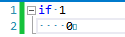
正如注释中所要求的,下面是我的代码:
if 1
    0
还有它的截图和视图的空白:
回答 1
Stack Overflow用户
发布于 2015-02-12 22:16:26
如果您正在使用coffeelint,并且希望将缩进值更改为2个空格,则必须编辑coffeelint/lib/coffeelint.js文件,并将" value“的值更改为2,如下所示:
module.exports = Indentation = (function() {
  Indentation.prototype.rule = {
    name: 'indentation',
    value: 2,
    level: 'error',
    message: 'Line contains inconsistent indentation',
    description: "This rule imposes a standard number of spaces to be used for\nindentation. Since whitespace is significant in CoffeeScript, it's\ncritical that a project chooses a standard indentation format and\nstays consistent. Other roads lead to darkness. <pre> <code>#\nEnabling this option will prevent this ugly\n# but otherwise valid CoffeeScript.\ntwoSpaces = () ->\n  fourSpaces = () ->\n      eightSpaces = () ->\n            'this is valid CoffeeScript'\n\n</code>\n</pre>\nTwo space indentation is enabled by default."
  };
您编辑的文件可能是一个没有意义的生成文件。
页面原文内容由Stack Overflow提供。腾讯云小微IT领域专用引擎提供翻译支持
原文链接:
https://stackoverflow.com/questions/23803790
复制相关文章
相似问题
腾讯云开发者

Copyright © 2013 - 2026 Tencent Cloud. All Rights Reserved. 腾讯云 版权所有
深圳市腾讯计算机系统有限公司 ICP备案/许可证号:粤B2-20090059  粤公网安备44030502008569号
腾讯云计算(北京)有限责任公司 京ICP证150476号 | 京ICP备11018762号