
旋转矢量传感器反向“水平”旋转
旋转矢量传感器反向“水平”旋转
提问于 2014-05-15 15:51:51
我做了一个小型测试应用程序,它模拟对象周围的移动。我在移动设备上使用了JPCT-AE库和旋转矢量传感器。
我的问题是,旋转的当前状态不能正确地模拟物体周围的运动。旋转是相反的。
这是一个问题的图片,需要更清楚:
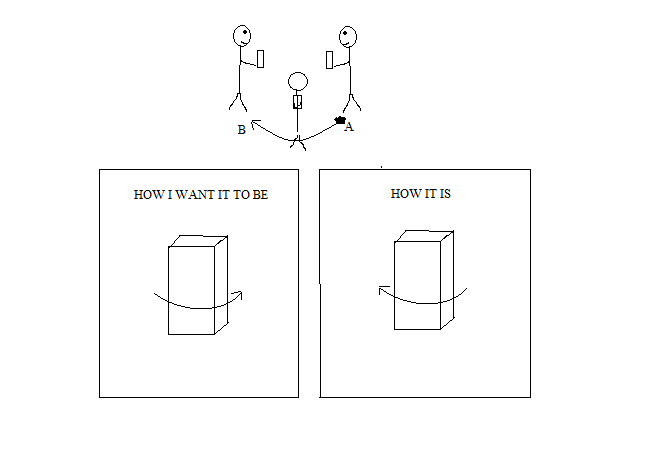
在图片中,上面部分显示了用户从A点到B点的移动。下面的部分显示了应用程序是如何模拟对象周围移动的。“IT是怎样的”屏幕显示了它当前是如何旋转对象的。
代码如下所示:
public class HelloWorld extends Activity {

private GLSurfaceView mGLSurfaceView;
private SensorManager mSensorManager;
private MyRenderer mRenderer;
Object3D object = null;
private World world = null;
private Light sun = null;
Context context = this;
private FrameBuffer fb = null;
private RGBColor back = new RGBColor(175, 175, 175);

@Override
protected void onCreate(Bundle savedInstanceState) {
    super.onCreate(savedInstanceState);

    // Get an instance of the SensorManager
    mSensorManager = (SensorManager) getSystemService(SENSOR_SERVICE);

    mRenderer = new MyRenderer(context);
    mGLSurfaceView = new GLSurfaceView(this);
    mGLSurfaceView.setRenderer(mRenderer);
    setContentView(mGLSurfaceView);
}

@Override
protected void onResume() {
    super.onResume();
    mRenderer.start();
    mGLSurfaceView.onResume();
}

@Override
protected void onPause() {
    super.onPause();
    mRenderer.stop();
    mGLSurfaceView.onPause();
}

class MyRenderer implements GLSurfaceView.Renderer, SensorEventListener {
    private Sensor mRotationVectorSensor;
    private final float[] mRotationMatrix = new float[16];
    Context context;

    public MyRenderer(Context context) {
        // find the rotation-vector sensor
        this.context = context;
        mRotationVectorSensor = mSensorManager
                .getDefaultSensor(Sensor.TYPE_ROTATION_VECTOR);

        // initialize the rotation matrix to identity
        mRotationMatrix[0] = 1;
        mRotationMatrix[4] = 1;
        mRotationMatrix[8] = 1;
        mRotationMatrix[12] = 1;
    }

    public void start() {
        mSensorManager.registerListener(this, mRotationVectorSensor, 10000);
    }

    public void stop() {
        // make sure to turn our sensor off when the activity is paused
        mSensorManager.unregisterListener(this);
    }

    public void onSensorChanged(SensorEvent event) {
        if (event.sensor.getType() == Sensor.TYPE_ROTATION_VECTOR) {
            SensorManager.getRotationMatrixFromVector(mRotationMatrix,
                    event.values);
            SensorManager.remapCoordinateSystem(mRotationMatrix, SensorManager.AXIS_X,  SensorManager.AXIS_MINUS_Y, mRotationMatrix);


        }
    }

    public void onDrawFrame(GL10 gl) {

        Matrix m = new Matrix();
        m.setDump(mRotationMatrix);

        object.setRotationMatrix(m);

        fb.clear(back);
        world.renderScene(fb);
        world.draw(fb);
        fb.display();
    }

    public void onSurfaceChanged(GL10 gl, int width, int height) {
        if (fb != null) {
            fb.dispose();
        }
        fb = new FrameBuffer(gl, width, height);
        world = new World();
        world.setAmbientLight(250, 250, 250);

        // set view-port
        gl.glViewport(0, 0, width, height);
        // set projection matrix
        float ratio = (float) width / height;
        gl.glMatrixMode(GL10.GL_PROJECTION);
        gl.glLoadIdentity();
        gl.glFrustumf(-ratio, ratio, -1, 1, 1, 10);
        try {
            object = loadModel("untitled.obj", "untitled.mtl", 0.1F);
        } catch (UnsupportedEncodingException e) {
            // TODO Auto-generated catch block
            e.printStackTrace();
        }

        object.build();
        world.addObject(object);

        Camera cam = world.getCamera();
        cam.moveCamera(Camera.CAMERA_MOVEOUT, 50);
        cam.lookAt(object.getTransformedCenter());
    }

    public void onSurfaceCreated(GL10 gl, EGLConfig config) {
        // dither is enabled by default, we don't need it
        gl.glDisable(GL10.GL_DITHER);
        // clear screen in white
        gl.glClearColor(1, 1, 1, 1);
    }

    public void onAccuracyChanged(Sensor sensor, int accuracy) {
    }

    private Object3D loadModel(String filename, String mtlFileName,
            float scale) throws UnsupportedEncodingException {

        InputStream stream = null;
        InputStream mtlStream = null;
        try {

            stream = context.getAssets().open(filename);
            mtlStream = context.getAssets().open(mtlFileName);
        } catch (IOException e) {
            // TODO Auto-generated catch block
            e.printStackTrace();
        }


        Object3D[] model = Loader.loadOBJ(stream, mtlStream, scale);

        return Object3D.mergeAll(model);

    }
}}
这里有人有这样的经验吗?我想知道是否有一个简单的解决方案,然后我开始全面的数学这一点。
谢谢您抽时间见我!我真的很感激!
回答 1
Stack Overflow用户
回答已采纳
发布于 2014-05-16 12:59:15
好的,我自己找到了一个解决方案。我必须旋转所提供的旋转矩阵,所以它表示为一个坐标系统,适合我的问题。
我在我的问题中编辑了代码。那个密码现在适用于我了。
基本上,我在onSensorChanged方法中添加了这一行代码:
SensorManager.remapCoordinateSystem(mRotationMatrix, SensorManager.AXIS_X, SensorManager.AXIS_MINUS_Y, mRotationMatrix);我知道这不是最好的性能解决方案,因为我使用mRotationMatrix作为上述方法中的第一个和最后一个参数。但就目前而言,我并不为性能问题而烦恼。
我希望这对将来的人有帮助。
页面原文内容由Stack Overflow提供。腾讯云小微IT领域专用引擎提供翻译支持
原文链接:
https://stackoverflow.com/questions/23683150
复制相关文章
相似问题
腾讯云开发者

Copyright © 2013 - 2026 Tencent Cloud. All Rights Reserved. 腾讯云 版权所有
深圳市腾讯计算机系统有限公司 ICP备案/许可证号:粤B2-20090059  粤公网安备44030502008569号
腾讯云计算(北京)有限责任公司 京ICP证150476号 | 京ICP备11018762号