
TreeTable by HTML+CSS
偶然发现了TreeTable的问题.帮助理解,如何使第二层和进一步下降时,将不会出现在上面的td输入检查。不幸的是,我只能使用HTML+CSS。现在是什么样子?
<table class="table-tree" cellspacing="0">
        <tr>
            <td>
                <label for="folder2">Folder 1</label>
                <input type="checkbox" id="folder2" />
                <table class="table-wrapper">
                    <tr>
                        <td class="file"><a href="">Subfile 1</a></td>
                        <td class="file"><a href="">Subfile 2</a></td>
                        <td>
                            <label for="folder3">Subfolder 1</label>
                            <input type="checkbox" id="folder3" />
                            <table class="table-wrapper">
                                <tr>
                                    <td class="file"><a href="">Subsubfile 1</a></td>
                                    <td class="file"><a href="">Subsubfile 2</a></td>
                                </tr>
                            </table>
                        </td>
                    </tr>
                </table>
            </td>
        </tr>
    </table>
如果布局是这样,那就太好了
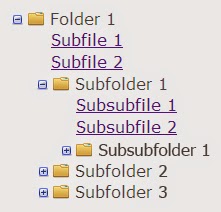
有人能帮我吗?
回答 3
Stack Overflow用户
发布于 2014-05-13 10:16:30
您的CSS有两个错误。
首先,您应该选择以下未选中的复选框:
input:not(:checked)而不依赖于规则应用中的退步。
第二,也是更重要的是,td input:checked + table > tbody td规则是错误的。
实际上,如果选中了外部复选框,但嵌套的复选框未选中,则该规则仍将与嵌套表td匹配,因为第一部分td input:checked + table > tbody与外层表体匹配,然后第二部分td查找以该主体为祖先的td。
你应该检查一下直接的孩子。
总之,您可以将css更改为如下所示:
*, html {
    font-family: Verdana, Arial, Helvetica, sans-serif;
}

body, form, ul, li, p, h1, h2, h3, h4, h5 {
    margin: 0;
    padding: 0;
}

body {
    background-color: #fafafa;
    color: rgba(0, 0, 0, 0.7);
    margin: 0;
    position: absolute;
    top: 0;
    right: 0;
    bottom: 0;
    left: 0;
}

/**
 * Tree Table CSS
**/

.table-tree {
    display: block;
    padding: 30px 0 0 30px;
}

td {
    display: block;
    position: relative;
}

td label {
    background: url(http://www.webmasters.by/images/articles/css-tree/folder-horizontal.png) 15px 1px no-repeat;
    cursor: pointer;
    display: block;
    padding-left: 37px;
    width: 100%;
}

td input {
    position: absolute;
    left: 0;
    margin-left: 0;
    opacity: 0;
    z-index: 2;
    cursor: pointer;
    height: 1em;
    width: 1em;
    top: 0;
}
// CHANGED HERE
td input:not(:checked) + table {
    background: url(http://www.webmasters.by/images/articles/css-tree/toggle-small-expand.png) -3px -1px no-repeat;
    margin: -0.938em 0 0 0;
    height: 1em;
    width: 1em;
}

td input:checked + table {
    background: url(http://www.webmasters.by/images/articles/css-tree/toggle-small.png) 41px 4px no-repeat;
    display: block;
    margin: -1.25em 0 0 -44px;
    padding: 1.25em 0 0 80px;
    height: auto;
    width: 100%;
}

td.file {
    margin-left: -1px !important;
}
// CHANGED HERE
td input:not(:checked) + table > tbody > tr > td {
    display: none;
    margin-left: -14px !important;
    padding-left: 1px;
}
// CHANGED HERE
td input:checked + table > tbody > tr > td {
    display: block;
    margin: 0 0 0.125em;
}
// CHANGED HERE
td input:checked + table > tbody > tr > td:last-child {
    margin: 0 0 0.063em; /* 1px */
}
始终使用最具体的CSS规则,因为当HTML变得巨大时,您可能会有一些惊喜。
Stack Overflow用户
发布于 2014-05-13 10:01:14
在HTML和CSS中,您需要用ul (或ol)替换td (或ol),用li代替td(移除tr),它看起来就像图像上的分隔布局。
这样做的另一个原因是,所显示的内容不是表格数据,而是文件列表,因此不应该使用表,而应该使用列表类型布局。
小提琴
HTML:
<ul class="table-tree" cellspacing="0">
    <li>
        <label for="folder2">Folder 1</label>
        <input type="checkbox" id="folder2" />
        <ul class="table-wrapper">
            <li class="file"><a href="">Subfile 1</a>

            </li>
            <li class="file"><a href="">Subfile 2</a>

            </li>
            <li>
                <label for="folder3">Subfolder 1</label>
                <input type="checkbox" id="folder3" />
                <ul class="table-wrapper">
                    <li class="file"><a href="">Subsubfile 1</a>

                    </li>
                    <li class="file"><a href="">Subsubfile 2</a>

                    </li>
                </ul>
            </li>
        </ul>
    </li>
</ul>
CSS:
*, html {
    font-family: Verdana, Arial, Helvetica, sans-serif;
}
body, form, ul, li, p, h1, h2, h3, h4, h5 {
    margin: 0;
    padding: 0;
}
body {
    background-color: #fafafa;
    color: rgba(0, 0, 0, 0.7);
    margin: 0;
    position: absolute;
    top: 0;
    right: 0;
    bottom: 0;
    left: 0;
}
/**
 * Tree Table CSS
**/
 .table-tree {
    display: block;
    padding: 30px 0 0 30px;
}
li {
    display: block;
    position: relative;
}
li label {
    background: url(http://www.webmasters.by/images/articles/css-tree/folder-horizontal.png) 15px 1px no-repeat;
    cursor: pointer;
    display: block;
    padding-left: 37px;
    width: 100%;
}
li input {
    position: absolute;
    left: 0;
    margin-left: 0;
    opacity: 0;
    z-index: 2;
    cursor: pointer;
    height: 1em;
    width: 1em;
    top: 0;
}
li input + ul {
    background: url(http://www.webmasters.by/images/articles/css-tree/toggle-small-expand.png) -3px -1px no-repeat;
    margin: -0.938em 0 0 0;
    height: 1em;
    width: 1em;
}
li input:checked + ul {
    background: url(http://www.webmasters.by/images/articles/css-tree/toggle-small.png) 41px 4px no-repeat;
    display: block;
    margin: -1.25em 0 0 -44px;
    padding: 1.25em 0 0 80px;
    height: auto;
    width: 100%;
}
li.file {
    margin-left: -1px !important;
}
li input + ul > li {
    display: none;
    margin-left: -14px !important;
    padding-left: 1px;
}
li input:checked + ul > li {
    display: block;
    margin: 0 0 0.125em;
}
li input:checked + ul > li:last-child {
    margin: 0 0 0.063em;
    /* 1px */
}Stack Overflow用户
发布于 2014-05-13 10:09:41
我希望我的榜样能帮助你演示
<ol class="tree">
        <li>
            <label for="folder1">Folder 1</label> <input type="checkbox" checked disabled id="folder1" />
            <ol>
                <li class="file"><a href="document.html.pdf">File 1</a></li>
                <li>
                    <label for="subfolder1">Subfolder 1</label> <input type="checkbox" id="subfolder1" />
                    <ol>
                        <li class="file"><a href="">Filey 1</a></li>
                        <li>
                            <label for="subsubfolder1">Subfolder 1</label> <input type="checkbox" id="subsubfolder1" />
                            <ol>
                                <li class="file"><a href="">File 1</a></li>
                                <li>
                                    <label for="subsubfolder2">Subfolder 1</label> <input type="checkbox" id="subsubfolder2" />
                                    <ol>
                                        <li class="file"><a href="">Subfile 1</a></li>
                                        <li class="file"><a href="">Subfile 2</a></li>
                                        <li class="file"><a href="">Subfile 3</a></li>
                                        <li class="file"><a href="">Subfile 4</a></li>
                                        <li class="file"><a href="">Subfile 5</a></li>
                                        <li class="file"><a href="">Subfile 6</a></li>
                                    </ol>
                                </li>
                            </ol>
                        </li>
                        <li class="file"><a href="">File 3</a></li>
                        <li class="file"><a href="">File 4</a></li>
                        <li class="file"><a href="">File 5</a></li>
                        <li class="file"><a href="">File 6</a></li>
                    </ol>
                </li>
            </ol>
        </li>
        <li>
            <label for="folder2">Folder 2</label> <input type="checkbox" id="folder2" />
            <ol>
                <li class="file"><a href="">File 1</a></li>
                <li>
                    <label for="subfolder2">Subfolder 1</label> <input type="checkbox" id="subfolder2" />
                    <ol>
                        <li class="file"><a href="">Subfile 1</a></li>
                        <li class="file"><a href="">Subfile 2</a></li>
                        <li class="file"><a href="">Subfile 3</a></li>
                        <li class="file"><a href="">Subfile 4</a></li>
                        <li class="file"><a href="">Subfile 5</a></li>
                        <li class="file"><a href="">Subfile 6</a></li>
                    </ol>
                </li>
            </ol>
        </li>
        <li>
            <label for="folder3">Folder 3</label> <input type="checkbox" id="folder3" />
            <ol>
                <li class="file"><a href="">File 1</a></li>
                <li>
                    <label for="subfolder3">Subfolder 1</label> <input type="checkbox" id="subfolder3" />
                    <ol>
                        <li class="file"><a href="">Subfile 1</a></li>
                        <li class="file"><a href="">Subfile 2</a></li>
                        <li class="file"><a href="">Subfile 3</a></li>
                        <li class="file"><a href="">Subfile 4</a></li>
                        <li class="file"><a href="">Subfile 5</a></li>
                        <li class="file"><a href="">Subfile 6</a></li>
                    </ol>
                </li>
            </ol>
        </li>
        <li>
            <label for="folder4">Folder 4</label> <input type="checkbox" id="folder4" />
            <ol>
                <li class="file"><a href="">File 1</a></li>
                <li>
                    <label for="subfolder4">Subfolder 1</label> <input type="checkbox" id="subfolder4" />
                    <ol>
                        <li class="file"><a href="">Subfile 1</a></li>
                        <li class="file"><a href="">Subfile 2</a></li>
                        <li class="file"><a href="">Subfile 3</a></li>
                        <li class="file"><a href="">Subfile 4</a></li>
                        <li class="file"><a href="">Subfile 5</a></li>
                        <li class="file"><a href="">Subfile 6</a></li>
                    </ol>
                </li>
            </ol>
        </li>
        <li>
            <label for="folder5">Folder 5</label> <input type="checkbox" id="folder5" />
            <ol>
                <li class="file"><a href="">File 1</a></li>
                <li>
                    <label for="subfolder5">Subfolder 1</label> <input type="checkbox" id="subfolder5" />
                    <ol>
                        <li class="file"><a href="">Subfile 1</a></li>
                        <li class="file"><a href="">Subfile 2</a></li>
                        <li class="file"><a href="">Subfile 3</a></li>
                        <li class="file"><a href="">Subfile 4</a></li>
                        <li class="file"><a href="">Subfile 5</a></li>
                        <li class="file"><a href="">Subfile 6</a></li>
                    </ol>
                </li>
            </ol>
        </li>
</ol>https://stackoverflow.com/questions/23627762
复制相似问题
腾讯云开发者

Copyright © 2013 - 2026 Tencent Cloud. All Rights Reserved. 腾讯云 版权所有
深圳市腾讯计算机系统有限公司 ICP备案/许可证号:粤B2-20090059  粤公网安备44030502008569号
腾讯云计算(北京)有限责任公司 京ICP证150476号 | 京ICP备11018762号