
JEditorPane垂直叠加
JEditorPane垂直叠加
提问于 2014-05-12 15:25:28
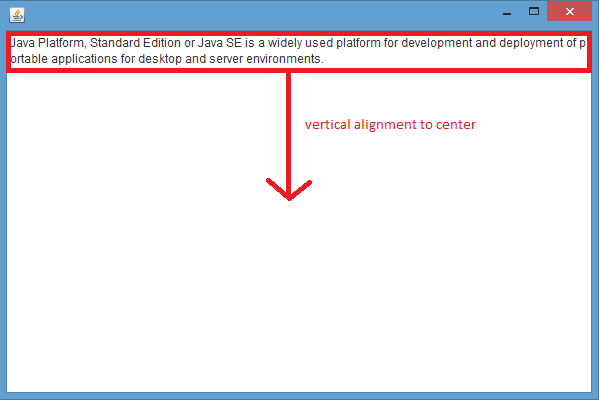
我试着在JEditorPane中将中间垂直连接应用到文本中。但是文本仍然与顶部对齐。我哪里弄错了?
    JEditorPane editor = new JEditorPane();
    editor.setText("..large text block..");
    editor.setAlignmentY(JEditorPane.CENTER_ALIGNMENT); // DOESN'T WORK

    JFrame frame = new JFrame();
    frame.setSize(600, 400);
    frame.setVisible(true);
    frame.add(editor);
回答 1
Stack Overflow用户
回答已采纳
发布于 2014-05-12 17:03:23
我发现最好的方法是将组件放在JPanel中,然后明智地为面板选择正确的布局管理器。
JEditorPane editor = new JEditorPane();
editor.setBorder(BorderFactory.createLineBorder(Color.RED, 1));
editor.setText("..large text block..");
JScrollPane scrollPane = new JScrollPane(editor);

JPanel panel = new JPanel();
BoxLayout layout = new BoxLayout(panel, BoxLayout.Y_AXIS);
panel.setLayout(layout);
panel.add(Box.createVerticalGlue());
panel.add(scrollPane);
panel.add(Box.createVerticalGlue());


JFrame frame = new JFrame();
frame.setSize(600, 400);
frame.add(panel);

frame.setVisible(true);这实际上只是编辑的垂直中心,而不是编辑器中的文本,我认为这正是您所要尝试的。有关BoxLayout的更多信息,请参见http://docs.oracle.com/javase/tutorial/uiswing/layout/box.html
页面原文内容由Stack Overflow提供。腾讯云小微IT领域专用引擎提供翻译支持
原文链接:
https://stackoverflow.com/questions/23613016
复制相关文章
相似问题
腾讯云开发者

Copyright © 2013 - 2026 Tencent Cloud. All Rights Reserved. 腾讯云 版权所有
深圳市腾讯计算机系统有限公司 ICP备案/许可证号:粤B2-20090059  粤公网安备44030502008569号
腾讯云计算(北京)有限责任公司 京ICP证150476号 | 京ICP备11018762号