
MVC 5 DropDownList客户端验证
MVC 5 DropDownList客户端验证
提问于 2014-05-11 04:42:32
启用客户端验证之后,为什么DropDownList或String属性没有被验证客户端?使用EF6.1,MVC 5 VS2012。
这是我的EF课
//------------------------------------------------------------------------------
// <auto-generated>
//     This code was generated from a template.
//
//     Manual changes to this file may cause unexpected behavior in your application.
//     Manual changes to this file will be overwritten if the code is regenerated.
// </auto-generated>
//------------------------------------------------------------------------------

namespace SampleApp.Models
{
    using System;
    using System.Collections.Generic;

    public partial class Business
    {
        public int BusinessKeyId { get; set; }
        public string BusinessName { get; set; }
        public string BusinessType { get; set; }
        public int ContactId { get; set; }

        public virtual Contact Contact { get; set; }
    }
}
我的主计长动作
// GET: /Business/
public ActionResult Index()
{
    var businesses = _db.Businesses.Include(b => b.Contact);
    return View(businesses.ToList());
}

// GET: /Business/Create
public ActionResult Create()
{
    ViewBag.ContactId = new SelectList(_db.Contacts, "ContactId", "Name");
    return View();
}

// POST: /Business/Create
[HttpPost]
[ValidateAntiForgeryToken]
public ActionResult Create([Bind(Include="BusinessKeyId,BusinessName,BusinessType,ContactId")] Business business)
{
    if (ModelState.IsValid)
    {
        _db.Businesses.Add(business);
        _db.SaveChanges();
        return RedirectToAction("Index");
    }

    ViewBag.ContactId = new SelectList(_db.Contacts, "ContactId", "Name", business.ContactId);
    return View(business);
}
和我的观点
@model SampleApp.Models.Business

@{
    ViewBag.Title = "Create";
    Layout = "~/Views/Shared/_Layout.cshtml";
}
<script src="~/Scripts/jquery-2.1.0.min.js"></script>
<script src="~/Scripts/jquery.validate.min.js"></script>
<script src="~/Scripts/jquery.validate.unobtrusive.min.js"></script>


<h2>Create</h2>


@using (Html.BeginForm())
{
    @Html.AntiForgeryToken()

    <div class="form-horizontal">
        <h4>Business</h4>
        <hr />
        @Html.ValidationSummary(true)

        <div class="form-group">
            @Html.LabelFor(model => model.BusinessKeyId, new { @class = "control-label col-md-2" })
            <div class="col-md-10">
                @Html.EditorFor(model => model.BusinessKeyId)
                @Html.ValidationMessageFor(model => model.BusinessKeyId)
            </div>
        </div>

        <div class="form-group">
            @Html.LabelFor(model => model.BusinessName, new { @class = "control-label col-md-2" })
            <div class="col-md-10">
                @Html.EditorFor(model => model.BusinessName)
                @Html.ValidationMessageFor(model => model.BusinessName)
            </div>
        </div>

        <div class="form-group">
            @Html.LabelFor(model => model.BusinessType, new { @class = "control-label col-md-2" })
            <div class="col-md-10">
                @Html.EditorFor(model => model.BusinessType)
                @Html.ValidationMessageFor(model => model.BusinessType)
            </div>
        </div>

        <div class="form-group">
            @Html.LabelFor(model => model.ContactId, "ContactId", new { @class = "control-label col-md-2" })
            <div class="col-md-10">
                @Html.DropDownList("ContactId", String.Empty)
                @Html.ValidationMessageFor(model => model.ContactId)
            </div>
        </div>

        <div class="form-group">
            <div class="col-md-offset-2 col-md-10">
                <input type="submit" value="Create" class="btn btn-default" />
            </div>
        </div>
    </div>
}

<div>
    @Html.ActionLink("Back to List", "Index")
</div>

@section Scripts {
    @Scripts.Render("~/bundles/jqueryval")
}
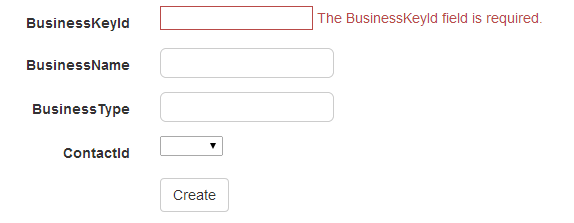
下面是仅验证id的验证片段
回答 1
Stack Overflow用户
回答已采纳
发布于 2014-05-11 05:49:20
在类中,需要添加属性Required的模型。因为EF认为第一个是关键,这就是为什么只有第一个:尝试如下:
   public partial class Business
   {
     [Key] //And this one should be the key
     public int BusinessKeyId { get; set; }
     [Required]
     public string BusinessName { get; set; }
     [Required]
     public string BusinessType { get; set; }
     [Required]
     public int ContactId { get; set; }

    public virtual Contact Contact { get; set; }
}注意,对于您的BusinessKeyId的第一个属性,您还可以让数据库生成该属性以避免重复。如果你想要的话,就问吧,这样我就可以编辑我的答案了。但就目前而言,我认为它应该有效。
页面原文内容由Stack Overflow提供。腾讯云小微IT领域专用引擎提供翻译支持
原文链接:
https://stackoverflow.com/questions/23588980
复制相关文章
相似问题
腾讯云开发者

Copyright © 2013 - 2026 Tencent Cloud. All Rights Reserved. 腾讯云 版权所有
深圳市腾讯计算机系统有限公司 ICP备案/许可证号:粤B2-20090059  粤公网安备44030502008569号
腾讯云计算(北京)有限责任公司 京ICP证150476号 | 京ICP备11018762号